mirror of
https://github.com/coder/code-server.git
synced 2026-02-19 18:01:15 +08:00

83 lines
2.7 KiB
Markdown
83 lines
2.7 KiB
Markdown
# Claude Code Server
|
||
|
||

|
||
|
||
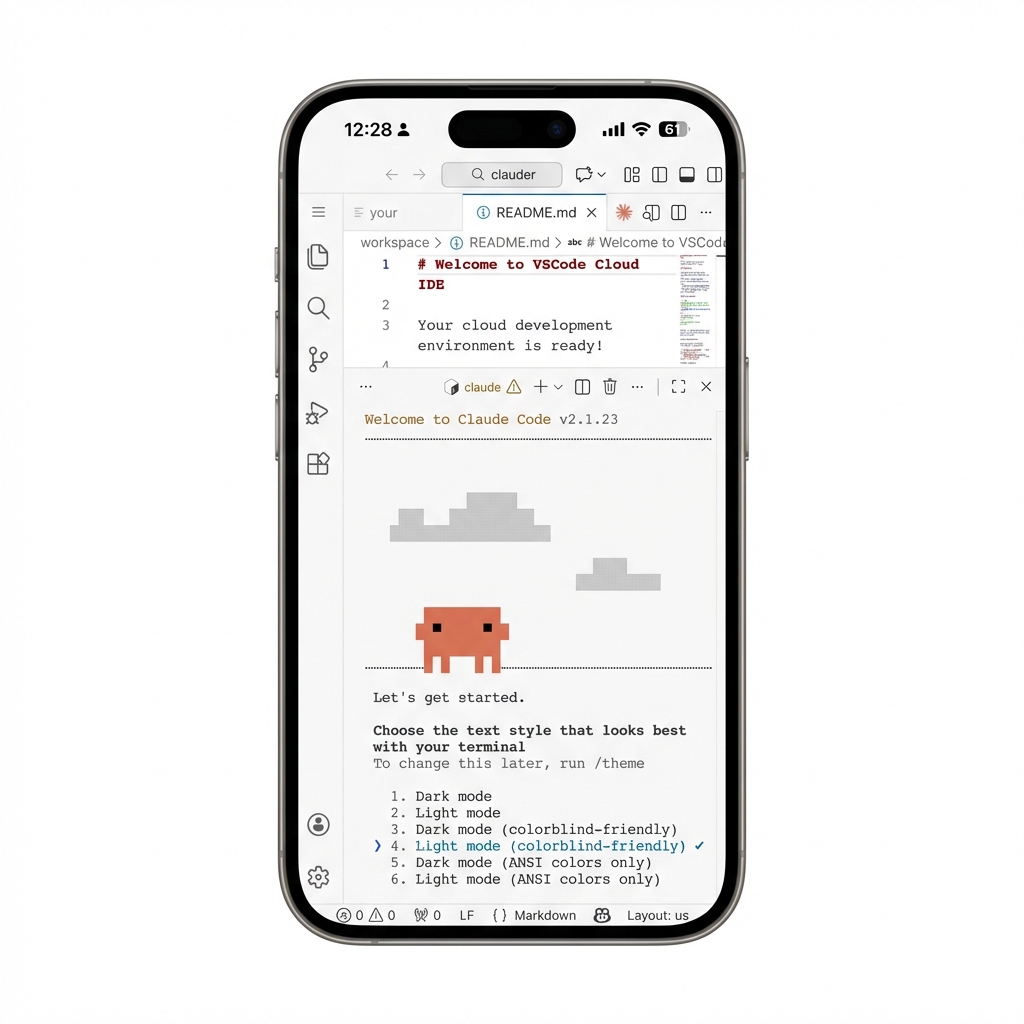
**Browser-based VS Code with Claude Code CLI pre-installed**
|
||
|
||
[](https://railway.com/template/claude-code-server)
|
||
|
||
|
||
|
||
Deploy a full VS Code development environment in the cloud with Claude Code CLI ready to go. Access it from any browser, on any device. Code with AI assistance anywhere.
|
||
|
||
---
|
||
|
||
## Features
|
||
|
||
- **Claude Code CLI Pre-installed** – Start AI-assisted coding immediately with `claude` or `claude-auto` (YOLO mode)
|
||
- **Browser-Based VS Code** – Full IDE experience accessible from any device
|
||
- **Persistent Storage** – Your extensions, settings, and projects survive redeploys
|
||
- **Non-Root Security** – Runs as the `clauder` user with optional sudo access
|
||
- **One-Click Deploy** – Deploy to Railway in 60 seconds
|
||
|
||
---
|
||
|
||
## Quick Start
|
||
|
||
### Deploy to Railway
|
||
|
||
Click the button above, or:
|
||
|
||
1. Go to [Railway Templates](https://railway.com/templates)
|
||
2. Search for "Claude Code Server"
|
||
3. Click **Deploy** and set your `PASSWORD`
|
||
4. Attach a volume to `/home/clauder`
|
||
5. Open the generated domain in your browser
|
||
|
||
### First Login
|
||
|
||
1. Enter the password you set
|
||
2. Open the terminal in VS Code
|
||
3. Run `claude` to start coding with AI
|
||
|
||
---
|
||
|
||
## Configuration
|
||
|
||
### Required Variables
|
||
|
||
| Variable | Description |
|
||
|------------|------------------------------------|
|
||
| `PASSWORD` | Login password for the web IDE |
|
||
|
||
### Optional Variables
|
||
|
||
| Variable | Default | Description |
|
||
|----------------|--------------------------------|------------------------------------------|
|
||
| `CLAUDER_HOME` | `/home/clauder` | Volume mount path |
|
||
| `RUN_AS_USER` | `clauder` | Set to `root` if you need root access |
|
||
| `APP_NAME` | `Claude Code Server` | Login page title |
|
||
| `WELCOME_TEXT` | `Welcome to Claude Code Server`| Login page message |
|
||
|
||
### Volume Configuration
|
||
|
||
> ⚠️ **CRITICAL**: Without a volume, ALL data is lost on every redeploy!
|
||
|
||
| Setting | Value |
|
||
|----------------|------------------|
|
||
| **Mount Path** | `/home/clauder` |
|
||
| **Size** | 5GB+ recommended |
|
||
|
||
---
|
||
|
||
## Built With
|
||
|
||
- [code-server](https://github.com/coder/code-server) – VS Code in the browser
|
||
- [Claude Code CLI](https://claude.ai/code) – AI coding assistant by Anthropic
|
||
|
||
---
|
||
|
||
## License
|
||
|
||
MIT
|