# 📚 BookLore
### *Your Personal Library, Beautifully Organized*
**🌐 Official Website: [https://booklore.org](https://booklore.org/)**
[](https://github.com/booklore-app/booklore/releases)
[](LICENSE)
[](https://github.com/booklore-app/booklore/stargazers)
[](https://hub.docker.com/r/booklore/booklore)
[](https://discord.gg/Ee5hd458Uz)
[](https://opencollective.com/booklore)
---
**BookLore** is a powerful, self-hosted web application designed to organize and manage your personal book collection with elegance and ease. Build your dream library with an intuitive interface, robust metadata management, and seamless multi-user support.
[🚀 Get Started](#-getting-started-with-booklore) • [📖 Documentation](https://booklore.org/docs/getting-started) • [🎮 Try Demo](#-live-demo-explore-booklore-in-action) • [💬 Community](https://discord.gg/Ee5hd458Uz)
---
## ✨ **Features That Make BookLore Shine**
### 📖 **Library Management**
- **Smart Organization**: Custom shelves with powerful filters
- **Magic Shelves**: Dynamic, auto-updating collections
- **Auto Metadata**: Rich details from multiple sources
- **Advanced Search**: Find any book instantly
### 👥 **User Experience**
- **Multi-User Support**: Granular permissions
- **Flexible Auth**: Local or OIDC providers
- **Mobile Ready**: Responsive on all devices
- **Built-in Reader**: PDFs, EPUBs, comics
### 🚀 **Smart Features**
- **BookDrop Import**: Auto-detect bulk files
- **Private Notes**: Personal reading annotations
- **Community Reviews**: Enriched book data
- **Progress Tracking**: Reading statistics
---
## 💖 **Support the Project**
Your support helps BookLore grow and improve! 🌱
### ⭐ **Star Us**
Give us a star to show your support and help others discover BookLore!
[](https://github.com/booklore-app/booklore)
### 💰 **Sponsor**
Support development, hosting, and testing costs
[](https://opencollective.com/booklore)
### 📢 **Spread the Word**
Share BookLore with fellow book lovers and developers!
> 🎯 **Current Goal:** Raising funds for a **Kobo device** to implement native Kobo sync support
> [💡 Support the Kobo Sync Bounty →](https://opencollective.com/booklore/projects/kobo-device-for-testing)
---
## 🎮 **Live Demo: Explore BookLore in Action**
Experience BookLore's features in a live environment before deploying your own instance!
| 🌐 Demo URL | 👤 Username | 🔑 Password |
|----------------------------------------------------|-------------|--------------------|
| **[demo.booklore.org](https://demo.booklore.org)** | `booklore` | `9HC20PGGfitvWaZ1` |
> ⚠️ **Note:** Demo account has standard user permissions only.
> Admin features (user management, library setup) require a self-hosted instance.
---
## 🚀 **Getting Started with BookLore**
### Choose Your Path
### 📘 **Documentation**
Guides for installation, setup, features, and more
[](https://booklore.org/docs/getting-started)
*Contribute to the docs at: [booklore-docs](https://github.com/booklore-app/booklore-docs)*
### 🐳 **Quick Deploy**
Get up and running in minutes with Docker
[](#-deploy-with-docker)
*Easiest way to self-host BookLore*
BookLore's **BookDrop** feature automatically detects and processes book files dropped into a designated folder.
### **How It Works**
```mermaid
graph LR
A[📁 Drop Files] --> B[🔍 Auto-Detect]
B --> C[📊 Extract Metadata]
C --> D[✅ Review & Import]
```
1. **File Watcher**: Monitors the BookDrop folder continuously
2. **Auto-Detection**: Processes new files and extracts metadata
3. **Metadata Enrichment**: Fetches details from Google Books, Open Library
4. **Review & Finalize**: Review, edit, and import to your library
### **Docker Configuration**
Add the BookDrop volume to your `docker-compose.yml`:
```yaml
services:
booklore:
volumes:
- ./data:/app/data
- ./books:/books
- ./bookdrop:/bookdrop # 👈 BookDrop magic happens here
```
---
## 🤝 **Community & Support**
### 🐞 **Bug Reports**
Found an issue?
[](https://github.com/booklore-app/booklore/issues/new?template=bug_report.yml)
### 💡 **Feature Req**
Have an idea?
[](https://github.com/booklore-app/booklore/issues/new?template=feature_request.yml)
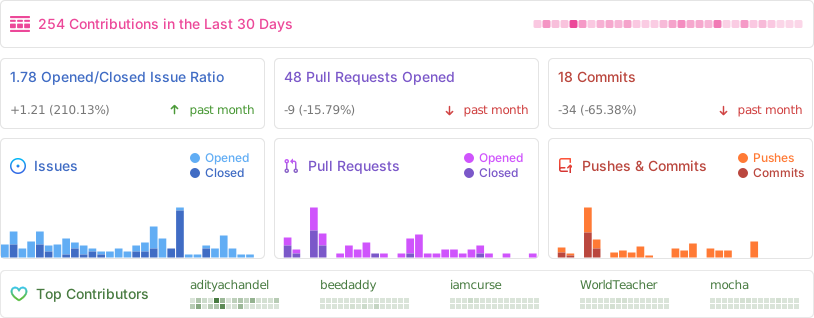
## 📊 **Project Analytics**
### Repository Activity
### ⭐ Star History
---
## 👨💻 **Contributors**
### Thanks to all our amazing contributors! 🙏
[](https://github.com/booklore-app/booklore/graphs/contributors)
**Want to see your face here?** [Start contributing today!](CONTRIBUTING.md)
---
## 🌟 **Sponsors**
### Thank you to our amazing sponsors!
*Become a sponsor and get your logo here! [Support us on Open Collective](https://opencollective.com/booklore)*

 *Become a sponsor and get your logo here! [Support us on Open Collective](https://opencollective.com/booklore)*