mirror of
https://github.com/material-components/material-components-ios.git
synced 2026-01-22 13:17:16 +08:00
 027f240063
This example demonstrates the recommended way to create a custom-themed button in the AppBar. 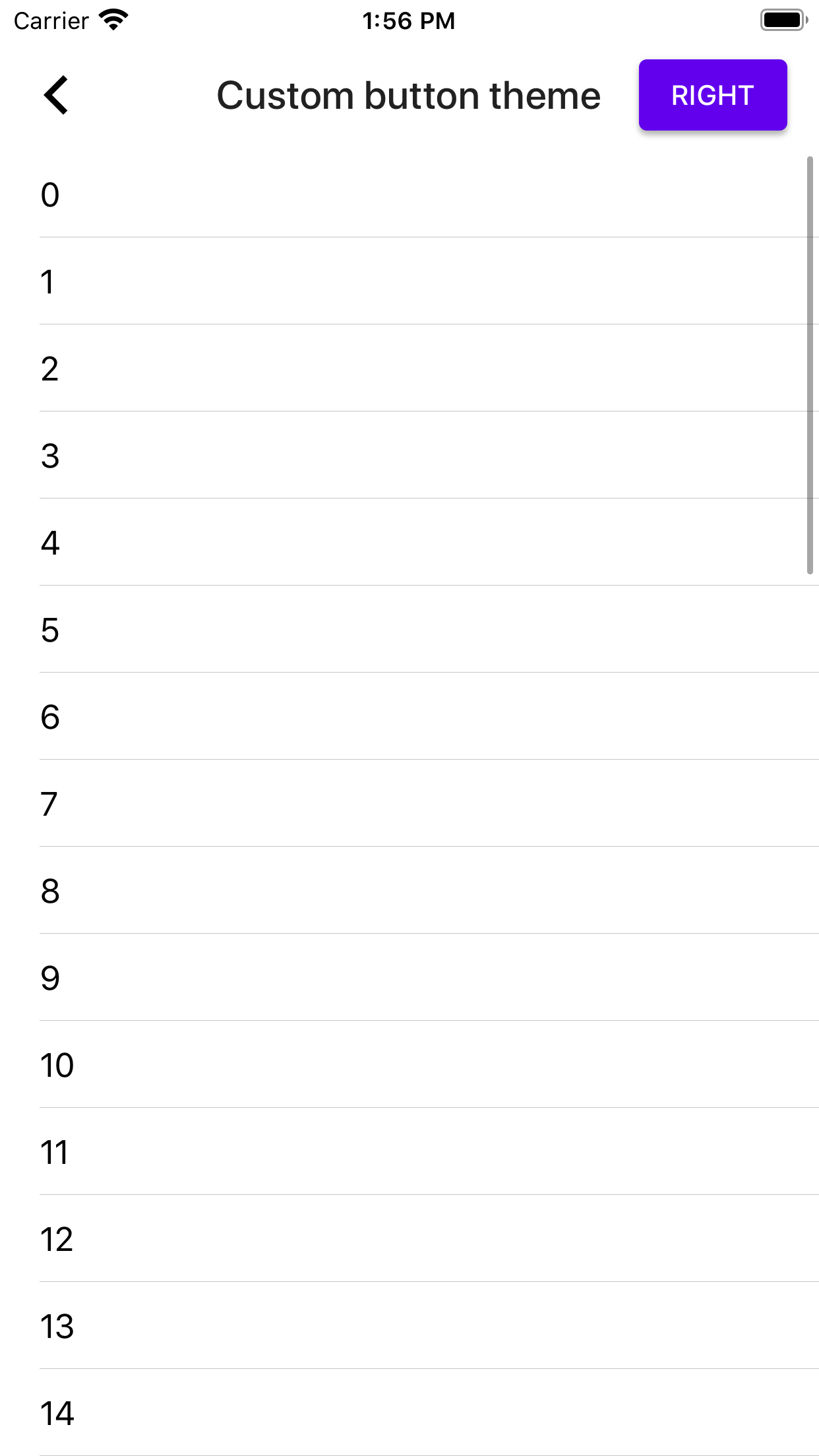 Closes https://github.com/material-components/material-components-ios/issues/9007

133 lines
4.5 KiB
Swift
133 lines
4.5 KiB
Swift
// Copyright 2020-present the Material Components for iOS authors. All Rights Reserved.
|
|
//
|
|
// Licensed under the Apache License, Version 2.0 (the "License");
|
|
// you may not use this file except in compliance with the License.
|
|
// You may obtain a copy of the License at
|
|
//
|
|
// http://www.apache.org/licenses/LICENSE-2.0
|
|
//
|
|
// Unless required by applicable law or agreed to in writing, software
|
|
// distributed under the License is distributed on an "AS IS" BASIS,
|
|
// WITHOUT WARRANTIES OR CONDITIONS OF ANY KIND, either express or implied.
|
|
// See the License for the specific language governing permissions and
|
|
// limitations under the License.
|
|
|
|
import Foundation
|
|
import MaterialComponents.MaterialButtons_Theming
|
|
import MaterialComponents.MaterialAppBar
|
|
import MaterialComponents.MaterialAppBar_Theming
|
|
import MaterialComponents.MaterialContainerScheme
|
|
|
|
class AppBarCustomButtonThemeExample: UITableViewController {
|
|
|
|
let appBarViewController = MDCAppBarViewController()
|
|
@objc var containerScheme: MDCContainerScheming = MDCContainerScheme()
|
|
|
|
deinit {
|
|
// Required for pre-iOS 11 devices because we've enabled observesTrackingScrollViewScrollEvents.
|
|
appBarViewController.headerView.trackingScrollView = nil
|
|
}
|
|
|
|
init() {
|
|
super.init(nibName: nil, bundle: nil)
|
|
|
|
self.title = "Custom button theme"
|
|
|
|
// Behavioral flags.
|
|
appBarViewController.inferTopSafeAreaInsetFromViewController = true
|
|
appBarViewController.headerView.minMaxHeightIncludesSafeArea = false
|
|
|
|
// Step 2: Add the headerViewController as a child.
|
|
self.addChild(appBarViewController)
|
|
}
|
|
|
|
required init?(coder aDecoder: NSCoder) {
|
|
super.init(coder: aDecoder)
|
|
}
|
|
|
|
override func viewDidLoad() {
|
|
super.viewDidLoad()
|
|
|
|
appBarViewController.headerView.observesTrackingScrollViewScrollEvents = true
|
|
appBarViewController.headerView.trackingScrollView = self.tableView
|
|
|
|
view.addSubview(appBarViewController.view)
|
|
appBarViewController.didMove(toParent: self)
|
|
|
|
appBarViewController.applySurfaceTheme(withScheme: containerScheme)
|
|
|
|
// To create a custom-themed button we create a custom button placed inside a container which
|
|
// will be set as a custom view on the navigationItem.
|
|
let containerView = UIView()
|
|
let button = MDCButton()
|
|
button.applyContainedTheme(withScheme: containerScheme)
|
|
button.setTitle("Right", for: .normal)
|
|
button.sizeToFit()
|
|
// Give the button horizontal insets so that it's not flush with the device's edge.
|
|
containerView.frame = CGRect(x: 0,
|
|
y: 8,
|
|
width: button.bounds.width + 16,
|
|
height: button.bounds.height)
|
|
// Vertically center the button:
|
|
button.autoresizingMask = [.flexibleTopMargin, .flexibleBottomMargin]
|
|
containerView.addSubview(button)
|
|
self.navigationItem.rightBarButtonItem = UIBarButtonItem(customView: containerView)
|
|
}
|
|
|
|
// Optional step: If you allow the header view to hide the status bar you must implement this
|
|
// method and return the headerViewController.
|
|
override var childForStatusBarHidden: UIViewController? {
|
|
return appBarViewController
|
|
}
|
|
|
|
// Optional step: The Header View Controller does basic inspection of the header view's background
|
|
// color to identify whether the status bar should be light or dark-themed.
|
|
override var childForStatusBarStyle: UIViewController? {
|
|
return appBarViewController
|
|
}
|
|
|
|
override func viewWillAppear(_ animated: Bool) {
|
|
super.viewWillAppear(animated)
|
|
|
|
self.navigationController?.setNavigationBarHidden(true, animated: animated)
|
|
}
|
|
}
|
|
|
|
// MARK: Catalog by convention
|
|
extension AppBarCustomButtonThemeExample {
|
|
|
|
@objc class func catalogMetadata() -> [String: Any] {
|
|
return [
|
|
"breadcrumbs": ["App Bar", "Custom button theme"],
|
|
"primaryDemo": false,
|
|
"presentable": false,
|
|
]
|
|
}
|
|
|
|
@objc func catalogShouldHideNavigation() -> Bool {
|
|
return true
|
|
}
|
|
}
|
|
|
|
// MARK: - Typical application code (not Material-specific)
|
|
|
|
// MARK: UITableViewDataSource
|
|
extension AppBarCustomButtonThemeExample {
|
|
|
|
override func tableView(_ tableView: UITableView, numberOfRowsInSection section: Int) -> Int {
|
|
return 50
|
|
}
|
|
|
|
override func tableView(
|
|
_ tableView: UITableView,
|
|
cellForRowAt indexPath: IndexPath) -> UITableViewCell {
|
|
|
|
let cell = self.tableView.dequeueReusableCell(withIdentifier: "cell") ??
|
|
UITableViewCell(style: .default, reuseIdentifier: "cell")
|
|
cell.layoutMargins = .zero
|
|
cell.textLabel?.text = "\(indexPath.row)"
|
|
cell.selectionStyle = .none
|
|
return cell
|
|
}
|
|
}
|