As part of our readme generator, components can now opt in to displaying badges in their readme.

The badges are generated from https://shields.io/ and are focused on an individual component. We're currently generating the following badges:

- Open bug count.
This command will generate an API diff for the current pull request. In a follow-up PR it will also post the results of the API diff to the PR as a comment.

This is the first of two changes to the `apidiff` branch that will add support for API diff reporting to our PRs. The second PR will add the github comment reporting tool.

This was previously reviewed in https://github.com/material-components/material-components-ios/pull/4181.
This PR adds a new script, `scripts/generate_readme`, which will generate a root README.md file for a component from the component's docs/ content.

The advantages of this script over our current process of writing readmes:

- Documentation articles can be broken out into separate files, making it easier to generate and apply templates.
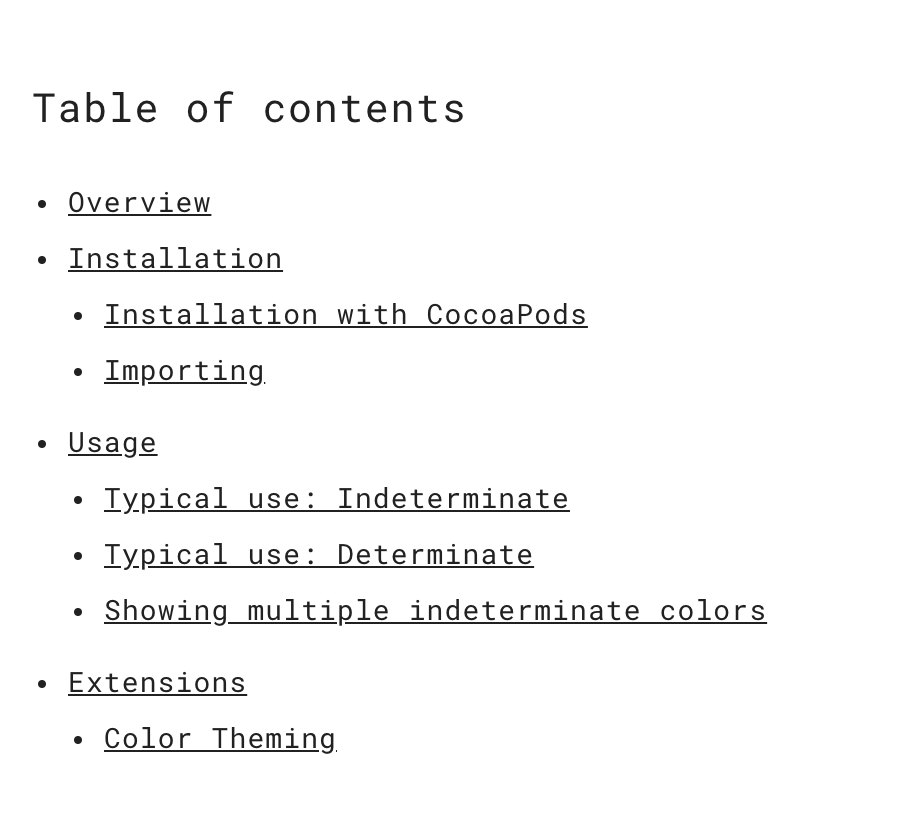
- Our component readmes now have auto-generated table of contents.
- Our documentation can be written in plain markdown with minimal material.io html magic.
- Having docs in separate files doesn't result in multiple "component pages" on material.io - everything ends up in a single component document on the site. E.g. the "Color Theming" article no longer shows up as its own link on material.io.

Example usage:

```bash
./scripts/generate_readme ActivityIndicator
```

---

The script makes the following assumptions:

A component has the following directory structure:

```
components/
  Component/
    README.md <- The component's main readme.
                 This is the readme that will show up on material.io.
    docs/
      README.md       <- A skeletal readme with links to other docs files.
      some-article.md <- An article that may be linked to.
```

`components/Component/docs/README.md` is treated as a standard markdown file, with the additional interpretations:

```
* [Text](url)
Treated as an icon list for the material.io website.
If the url links to any go/design- url, the link will use the spec icon

- [Text](some-article.md)
Indicates that the linked article should be added verbatim to the main README.md

<!-- toc -->
A table of contents should be generated here.
```

The script then does the following:

1. Generates a template README from the component's .vars file.
2. Appends the component's docs/README.md to the readme.
3. Rewrites any asset and relative url paths.
4. Transforms all `* [text](link)`-formatted link lists into icon-list lists.
4b. If an icon list url points to a design site, the spec icon will be used for the list item.
5. Replaces every `- [text](link)`-formatted link list item with the contents of the file.
6. Generates a table of contents if `<!-- toc -->` is found. The table of contents will include all level 2 and 3 headers found after the toc tag.
7. Copies the output to the component's root README.md.

The implication of this script is that we can now write documentation as small files which are easier to templatize. These smaller files can be aggregated together into a single larger README.md that is consumable by the material.io website.

Example of table of contents on material.io:

<img width="460" alt="screen shot 2018-05-01 at 9 07 31 am" src="https://user-images.githubusercontent.com/45670/39473887-1fa6c85c-4d1f-11e8-8620-d6b151a315c6.png">
The added script allows a component to apply the template in an automated fashion.

```
Usage: ./scripts/apply_template <ComponentName> <path_to_.template_file>

Copies the template into the component directory and replaces all of the symbols defined
in the component's .vars file.

.vars files should be placed in the root of the component's directory.
Example: components/ActivityIndicator/.vars

Each line of the .vars file should be of the form symbol=replacement.
Example:
component=ActivityIndicator
component_name=Activity Indicator

This script will replace all instances of <#symbol#> in the .template with the given
replacement.

Example usage: ./scripts/apply_template ActivityIndicator scripts/templates/component/docs/ColorTheming.md.template
```
This will allow our PRs to generate the documentation website as part of our presubmits. This will let us catch any errors that might otherwise affect the ability for the website to be deployed.

This PR also updates the site generator's git url to an https one so that the kokoro instance can clone the repo.
The following changes were made:

- The global grep is now a non-regular expression search. This will avoid treating the version '.' as a wildcard.
- We ignore any of the bazel output directories.
- We pipe stderr to null so that invalid directories don't appear in the output.
* Switched to hard-coded version string.

* Updating to current version and clarifying comments.

* Updated bump script to update LibraryInfo source version.

* Added actual replacement to bump script.

* Documented constants, changed version file name to a path.

* Fixed single-value tuple issue.

* Added note about string copy.
CocoaPods updated their default install behavior some time ago to not update the pods repo, but our pods management script still appeared to be assuming that it did update the repo. This change inverts our pod install logic so that it updates the spec repo by default.

This resolves some Travis CI failures we've seen when downstream pod releases get published but not picked up by the Travis CI instance's pre-imaged pods repo.
* Added script to list the directories of our components.

* Add check for metadata to the readme check.

* Improved the output format for `list_components` on the terminal.

* Switched `check_components` script to use `list_components`.

* Update list_components
The lint_all script should stick to the MDC-iOS code and not the docs,
scripts, etc. that are included in the repository. Specifically, we are
only linting the Components, Catalog, and Demos that we ship.
Closes#1578
* [Icons] Add icon method for use with imageNamed
Icon images are currently loaded manually from a path in a bundle and therefore bypass the internal UIImage caching mechanism. This change will add new methods that provide the icon images via the -imageNamed family of methods.
Closes#1637, #1606