mirror of
https://github.com/flutter/flutter.git
synced 2026-02-20 02:29:02 +08:00

3575 lines
132 KiB
Dart
3575 lines
132 KiB
Dart
// Copyright 2013 The Flutter Authors. All rights reserved.
|
||
// Use of this source code is governed by a BSD-style license that can be
|
||
// found in the LICENSE file.
|
||
|
||
// @dart = 2.12
|
||
part of dart.ui;
|
||
|
||
/// Whether to slant the glyphs in the font
|
||
enum FontStyle {
|
||
/// Use the upright glyphs
|
||
normal,
|
||
|
||
/// Use glyphs designed for slanting
|
||
italic,
|
||
}
|
||
|
||
/// The thickness of the glyphs used to draw the text
|
||
class FontWeight {
|
||
const FontWeight._(this.index);
|
||
|
||
/// The encoded integer value of this font weight.
|
||
final int index;
|
||
|
||
/// Thin, the least thick
|
||
static const FontWeight w100 = FontWeight._(0);
|
||
|
||
/// Extra-light
|
||
static const FontWeight w200 = FontWeight._(1);
|
||
|
||
/// Light
|
||
static const FontWeight w300 = FontWeight._(2);
|
||
|
||
/// Normal / regular / plain
|
||
static const FontWeight w400 = FontWeight._(3);
|
||
|
||
/// Medium
|
||
static const FontWeight w500 = FontWeight._(4);
|
||
|
||
/// Semi-bold
|
||
static const FontWeight w600 = FontWeight._(5);
|
||
|
||
/// Bold
|
||
static const FontWeight w700 = FontWeight._(6);
|
||
|
||
/// Extra-bold
|
||
static const FontWeight w800 = FontWeight._(7);
|
||
|
||
/// Black, the most thick
|
||
static const FontWeight w900 = FontWeight._(8);
|
||
|
||
/// The default font weight.
|
||
static const FontWeight normal = w400;
|
||
|
||
/// A commonly used font weight that is heavier than normal.
|
||
static const FontWeight bold = w700;
|
||
|
||
/// A list of all the font weights.
|
||
static const List<FontWeight> values = <FontWeight>[
|
||
w100, w200, w300, w400, w500, w600, w700, w800, w900
|
||
];
|
||
|
||
/// Linearly interpolates between two font weights.
|
||
///
|
||
/// Rather than using fractional weights, the interpolation rounds to the
|
||
/// nearest weight.
|
||
///
|
||
/// If both `a` and `b` are null, then this method will return null. Otherwise,
|
||
/// any null values for `a` or `b` are interpreted as equivalent to [normal]
|
||
/// (also known as [w400]).
|
||
///
|
||
/// The `t` argument represents position on the timeline, with 0.0 meaning
|
||
/// that the interpolation has not started, returning `a` (or something
|
||
/// equivalent to `a`), 1.0 meaning that the interpolation has finished,
|
||
/// returning `b` (or something equivalent to `b`), and values in between
|
||
/// meaning that the interpolation is at the relevant point on the timeline
|
||
/// between `a` and `b`. The interpolation can be extrapolated beyond 0.0 and
|
||
/// 1.0, so negative values and values greater than 1.0 are valid (and can
|
||
/// easily be generated by curves such as [Curves.elasticInOut]). The result
|
||
/// is clamped to the range [w100]–[w900].
|
||
///
|
||
/// Values for `t` are usually obtained from an [Animation<double>], such as
|
||
/// an [AnimationController].
|
||
static FontWeight? lerp(FontWeight? a, FontWeight? b, double t) {
|
||
assert(t != null);
|
||
if (a == null && b == null)
|
||
return null;
|
||
return values[_lerpInt((a ?? normal).index, (b ?? normal).index, t).round().clamp(0, 8)];
|
||
}
|
||
|
||
@override
|
||
String toString() {
|
||
return const <int, String>{
|
||
0: 'FontWeight.w100',
|
||
1: 'FontWeight.w200',
|
||
2: 'FontWeight.w300',
|
||
3: 'FontWeight.w400',
|
||
4: 'FontWeight.w500',
|
||
5: 'FontWeight.w600',
|
||
6: 'FontWeight.w700',
|
||
7: 'FontWeight.w800',
|
||
8: 'FontWeight.w900',
|
||
}[index]!;
|
||
}
|
||
}
|
||
|
||
/// A feature tag and value that affect the selection of glyphs in a font.
|
||
///
|
||
/// Different fonts support different features. Consider using a tool
|
||
/// such as <https://wakamaifondue.com/> to examine your fonts to
|
||
/// determine what features are available.
|
||
///
|
||
/// {@tool sample --template=stateless_widget_material}
|
||
///
|
||
/// This example shows usage of several OpenType font features,
|
||
/// including Small Caps (selected manually using the "smcp" code),
|
||
/// old-style figures, fractional ligatures, and stylistic sets.
|
||
///
|
||
/// ```dart dartImports
|
||
/// import 'dart:ui';
|
||
/// ```
|
||
///
|
||
/// ```dart preamble
|
||
/// final TextStyle titleStyle = TextStyle(
|
||
/// fontSize: 18,
|
||
/// fontFeatures: const <FontFeature>[FontFeature.enable('smcp')],
|
||
/// color: Colors.blueGrey[600],
|
||
/// );
|
||
/// ```
|
||
///
|
||
/// ```dart
|
||
/// Widget build(BuildContext context) {
|
||
/// // The Cardo, Milonga and Raleway Dots fonts can be downloaded from
|
||
/// // Google Fonts (https://www.google.com/fonts).
|
||
/// return Scaffold(
|
||
/// body: Center(
|
||
/// child: Column(
|
||
/// mainAxisAlignment: MainAxisAlignment.center,
|
||
/// children: <Widget>[
|
||
/// const Spacer(flex: 5),
|
||
/// Text('regular numbers have their place:', style: titleStyle),
|
||
/// const Text('The 1972 cup final was a 1-1 draw.',
|
||
/// style: TextStyle(
|
||
/// fontFamily: 'Cardo',
|
||
/// fontSize: 24,
|
||
/// )),
|
||
/// const Spacer(),
|
||
/// Text('but old-style figures blend well with lower case:',
|
||
/// style: titleStyle),
|
||
/// const Text('The 1972 cup final was a 1-1 draw.',
|
||
/// style: TextStyle(
|
||
/// fontFamily: 'Cardo',
|
||
/// fontSize: 24,
|
||
/// fontFeatures: const <FontFeature>[FontFeature.oldstyleFigures()])),
|
||
/// const Spacer(),
|
||
/// const Divider(),
|
||
/// const Spacer(),
|
||
/// Text('fractions look better with a custom ligature:',
|
||
/// style: titleStyle),
|
||
/// const Text('Add 1/2 tsp of flour and stir.',
|
||
/// style: TextStyle(
|
||
/// fontFamily: 'Milonga',
|
||
/// fontSize: 24,
|
||
/// fontFeatures: <FontFeature>[FontFeature.alternativeFractions()])),
|
||
/// const Spacer(),
|
||
/// const Divider(),
|
||
/// const Spacer(),
|
||
/// Text('multiple stylistic sets in one font:', style: titleStyle),
|
||
/// const Text('Raleway Dots',
|
||
/// style: TextStyle(fontFamily: 'Raleway Dots', fontSize: 48)),
|
||
/// Text('Raleway Dots',
|
||
/// style: TextStyle(
|
||
/// fontFeatures: <FontFeature>[FontFeature.stylisticSet(1)],
|
||
/// fontFamily: 'Raleway Dots',
|
||
/// fontSize: 48,
|
||
/// )),
|
||
/// const Spacer(flex: 5),
|
||
/// ],
|
||
/// ),
|
||
/// ),
|
||
/// );
|
||
/// }
|
||
/// ```
|
||
/// {@end-tool}
|
||
///
|
||
/// See also:
|
||
///
|
||
/// * <https://en.wikipedia.org/wiki/List_of_typographic_features>,
|
||
/// Wikipedia's description of these typographic features.
|
||
///
|
||
/// * <https://docs.microsoft.com/en-us/typography/opentype/spec/featuretags>,
|
||
/// Microsoft's registry of these features.
|
||
class FontFeature {
|
||
/// Creates a [FontFeature] object, which can be added to a [TextStyle] to
|
||
/// change how the engine selects glyphs when rendering text.
|
||
///
|
||
/// `feature` is the four-character tag that identifies the feature.
|
||
/// These tags are specified by font formats such as OpenType.
|
||
///
|
||
/// `value` is the value that the feature will be set to. The behavior
|
||
/// of the value depends on the specific feature. Many features are
|
||
/// flags whose value can be 1 (when enabled) or 0 (when disabled).
|
||
///
|
||
/// See <https://docs.microsoft.com/en-us/typography/opentype/spec/featuretags>
|
||
const FontFeature(
|
||
this.feature,
|
||
[ this.value = 1 ]
|
||
) : assert(feature != null),
|
||
assert(feature.length == 4, 'Feature tag must be exactly four characters long.'),
|
||
assert(value != null),
|
||
assert(value >= 0, 'Feature value must be zero or a positive integer.');
|
||
|
||
/// Create a [FontFeature] object that enables the feature with the given tag.
|
||
const FontFeature.enable(String feature) : this(feature, 1);
|
||
|
||
/// Create a [FontFeature] object that disables the feature with the given tag.
|
||
const FontFeature.disable(String feature) : this(feature, 0);
|
||
|
||
// Features below should be alphabetic by feature tag. This makes it
|
||
// easier to determine when a feature is missing so that we avoid
|
||
// adding duplicates.
|
||
//
|
||
// The full list is extremely long, and many of the features are
|
||
// language-specific, or indeed force-enabled for particular locales
|
||
// by HarfBuzz, so we don't even attempt to be comprehensive here.
|
||
// Features listed below are those we deemed "interesting enough" to
|
||
// have their own constructor, mostly on the basis of whether we
|
||
// could find a font where the feature had a useful effect that
|
||
// could be demonstrated.
|
||
|
||
// Start of feature tag list.
|
||
// ------------------------------------------------------------------------
|
||
|
||
// aalt
|
||
/// Access alternative glyphs. (`aalt`)
|
||
///
|
||
/// This feature selects the given glyph variant for glyphs in the span.
|
||
///
|
||
/// {@tool sample --template=stateless_widget}
|
||
///
|
||
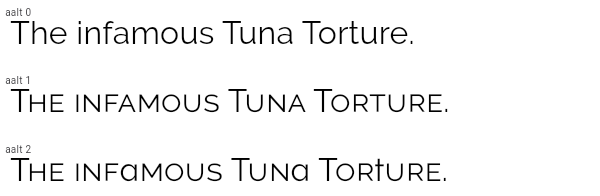
/// The Raleway font supports several alternate glyphs. The code
|
||
/// below shows how specific glyphs can be selected. With `aalt` set
|
||
/// to zero, the default, the normal glyphs are used. With a
|
||
/// non-zero value, Raleway substitutes small caps for lower case
|
||
/// letters. With value 2, the lowercase "a" changes to a stemless
|
||
/// "a", whereas the lowercase "t" changes to a vertical bar instead
|
||
/// of having a curve. By targeting specific letters in the text
|
||
/// (using [Text.rich]), the desired rendering for each glyph can be
|
||
/// achieved.
|
||
///
|
||
/// ```dart dartImports
|
||
/// import 'dart:ui';
|
||
/// ```
|
||
///
|
||
/// ```dart
|
||
/// Widget build(BuildContext context) {
|
||
/// // The Raleway font can be downloaded from Google Fonts (https://www.google.com/fonts).
|
||
/// return const Text(
|
||
/// 'The infamous Tuna Torture.',
|
||
/// style: TextStyle(
|
||
/// fontFamily: 'Raleway',
|
||
/// fontFeatures: <FontFeature>[
|
||
/// FontFeature.alternative(1), // or 2, or 3, or...
|
||
/// ],
|
||
/// ),
|
||
/// );
|
||
/// }
|
||
/// ```
|
||
///
|
||
/// 
|
||
/// {@end-tool}
|
||
///
|
||
/// See also:
|
||
///
|
||
/// * <https://docs.microsoft.com/en-us/typography/opentype/spec/features_ae#aalt>
|
||
const FontFeature.alternative(this.value) : feature = 'aalt';
|
||
|
||
// afrc
|
||
/// Use alternative ligatures to represent fractions. (`afrc`)
|
||
///
|
||
/// When this feature is enabled (and the font supports it),
|
||
/// sequences of digits separated by U+002F SOLIDUS character (/) or
|
||
/// U+2044 FRACTION SLASH (⁄) are replaced by ligatures that
|
||
/// represent the corresponding fraction. These ligatures may differ
|
||
/// from those used by the [FontFeature.fractions] feature.
|
||
///
|
||
/// This feature overrides all other features.
|
||
///
|
||
/// {@tool sample --template=stateless_widget}
|
||
///
|
||
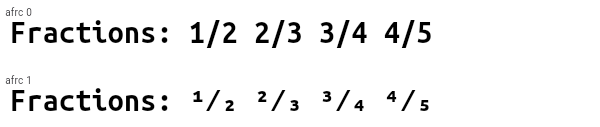
/// The Ubuntu Mono font supports the `afrc` feature. It causes digits
|
||
/// before slashes to become superscripted and digits after slashes to become
|
||
/// subscripted. This contrasts to the effect seen with [FontFeature.fractions].
|
||
///
|
||
/// ```dart dartImports
|
||
/// import 'dart:ui';
|
||
/// ```
|
||
///
|
||
/// ```dart
|
||
/// Widget build(BuildContext context) {
|
||
/// // The Ubuntu Mono font can be downloaded from Google Fonts (https://www.google.com/fonts).
|
||
/// return const Text(
|
||
/// 'Fractions: 1/2 2/3 3/4 4/5',
|
||
/// style: TextStyle(
|
||
/// fontFamily: 'Ubuntu Mono',
|
||
/// fontFeatures: <FontFeature>[
|
||
/// FontFeature.alternativeFractions(),
|
||
/// ],
|
||
/// ),
|
||
/// );
|
||
/// }
|
||
/// ```
|
||
///
|
||
/// 
|
||
/// {@end-tool}
|
||
///
|
||
/// See also:
|
||
///
|
||
/// * [FontFeature.fractions], which has a similar (but different) effect.
|
||
/// * <https://docs.microsoft.com/en-us/typography/opentype/spec/features_ae#afrc>
|
||
const FontFeature.alternativeFractions() : feature = 'afrc', value = 1;
|
||
|
||
// calt
|
||
/// Enable contextual alternates. (`calt`)
|
||
///
|
||
/// With this feature enabled, specific glyphs may be replaced by
|
||
/// alternatives based on nearby text.
|
||
///
|
||
/// {@tool sample --template=stateless_widget}
|
||
///
|
||
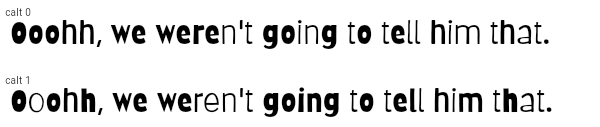
/// The Barriecito font supports the `calt` feature. It causes some
|
||
/// letters in close proximity to other instances of themselves to
|
||
/// use different glyphs, to give the appearance of more variation
|
||
/// in the glyphs, rather than having each letter always use a
|
||
/// particular glyph.
|
||
///
|
||
/// ```dart dartImports
|
||
/// import 'dart:ui';
|
||
/// ```
|
||
///
|
||
/// ```dart
|
||
/// Widget build(BuildContext context) {
|
||
/// // The Barriecito font can be downloaded from Google Fonts (https://www.google.com/fonts).
|
||
/// return const Text(
|
||
/// 'Ooohh, we weren\'t going to tell him that.',
|
||
/// style: TextStyle(
|
||
/// fontFamily: 'Barriecito',
|
||
/// fontFeatures: <FontFeature>[
|
||
/// FontFeature.contextualAlternates(),
|
||
/// ],
|
||
/// ),
|
||
/// );
|
||
/// }
|
||
/// ```
|
||
///
|
||
/// 
|
||
/// {@end-tool}
|
||
///
|
||
/// See also:
|
||
///
|
||
/// * [FontFeature.randomize], which is more a rarely supported but more
|
||
/// powerful way to get a similar effect.
|
||
/// * <https://docs.microsoft.com/en-us/typography/opentype/spec/features_ae#calt>
|
||
const FontFeature.contextualAlternates() : feature = 'calt', value = 1;
|
||
|
||
// case
|
||
/// Enable case-sensitive forms. (`case`)
|
||
///
|
||
/// Some glyphs, for example parentheses or operators, are typically
|
||
/// designed to fit nicely with mixed case, or even predominantly
|
||
/// lowercase, text. When these glyphs are placed near strings of
|
||
/// capital letters, they appear a little off-center.
|
||
///
|
||
/// This feature, when supported by the font, causes these glyphs to
|
||
/// be shifted slightly, or otherwise adjusted, so as to form a more
|
||
/// aethestically pleasing combination with capital letters.
|
||
///
|
||
/// {@tool sample --template=stateless_widget}
|
||
///
|
||
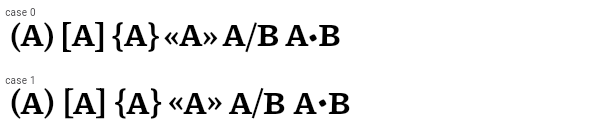
/// The Piazzolla font supports the `case` feature. It causes
|
||
/// parentheses, brackets, braces, guillemets, slashes, bullets, and
|
||
/// some other glyphs (not shown below) to be shifted up slightly so
|
||
/// that capital letters appear centered in comparison. When the
|
||
/// feature is disabled, those glyphs are optimized for use with
|
||
/// lowercase letters, and so capital letters appear to ride higher
|
||
/// relative to the punctuation marks.
|
||
///
|
||
/// The difference is very subtle. It may be most obvious when
|
||
/// examining the square brackets compared to the capital A.
|
||
///
|
||
/// ```dart dartImports
|
||
/// import 'dart:ui';
|
||
/// ```
|
||
///
|
||
/// ```dart
|
||
/// Widget build(BuildContext context) {
|
||
/// // The Piazzolla font can be downloaded from Google Fonts (https://www.google.com/fonts).
|
||
/// return const Text(
|
||
/// '(A) [A] {A} «A» A/B A•B',
|
||
/// style: TextStyle(
|
||
/// fontFamily: 'Piazzolla',
|
||
/// fontFeatures: <FontFeature>[
|
||
/// FontFeature.caseSensitiveForms(),
|
||
/// ],
|
||
/// ),
|
||
/// );
|
||
/// }
|
||
/// ```
|
||
///
|
||
/// 
|
||
/// {@end-tool}
|
||
///
|
||
/// See also:
|
||
///
|
||
/// * <https://docs.microsoft.com/en-us/typography/opentype/spec/features_ae#case>
|
||
const FontFeature.caseSensitiveForms() : feature = 'case', value = 1;
|
||
|
||
// cvXX
|
||
/// Select a character variant. (`cv01` through `cv99`)
|
||
///
|
||
/// Fonts may have up to 99 character variant sets, numbered 1
|
||
/// through 99, each of which can be independently enabled or
|
||
/// disabled.
|
||
///
|
||
/// Related character variants are typically grouped into stylistic
|
||
/// sets, controlled by the [FontFeature.stylisticSet] feature
|
||
/// (`ssXX`).
|
||
///
|
||
/// {@tool sample --template=stateless_widget}
|
||
///
|
||
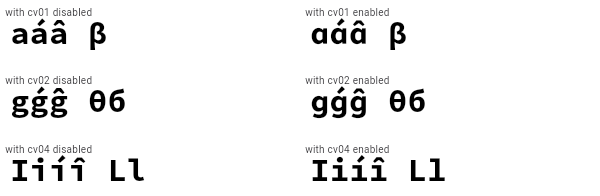
/// The Source Code Pro font supports the `cvXX` feature for several
|
||
/// characters. In the example below, variants 1 (`cv01`), 2
|
||
/// (`cv02`), and 4 (`cv04`) are selected. Variant 1 changes the
|
||
/// rendering of the "a" character, variant 2 changes the lowercase
|
||
/// "g" character, and variant 4 changes the lowercase "i" and "l"
|
||
/// characters. There are also variants (not shown here) that
|
||
/// control the rendering of various greek characters such as beta
|
||
/// and theta.
|
||
///
|
||
/// Notably, this can be contrasted with the stylistic sets, where
|
||
/// the set which affects the "a" character also affects beta, and
|
||
/// the set which affects the "g" character also affects theta and
|
||
/// delta.
|
||
///
|
||
/// ```dart dartImports
|
||
/// import 'dart:ui';
|
||
/// ```
|
||
///
|
||
/// ```dart
|
||
/// Widget build(BuildContext context) {
|
||
/// // The Source Code Pro font can be downloaded from Google Fonts (https://www.google.com/fonts).
|
||
/// return Text(
|
||
/// 'aáâ β gǵĝ θб Iiíî Ll',
|
||
/// style: TextStyle(
|
||
/// fontFamily: 'Source Code Pro',
|
||
/// fontFeatures: <FontFeature>[
|
||
/// FontFeature.characterVariant(1),
|
||
/// FontFeature.characterVariant(2),
|
||
/// FontFeature.characterVariant(4),
|
||
/// ],
|
||
/// ),
|
||
/// );
|
||
/// }
|
||
/// ```
|
||
///
|
||
/// 
|
||
/// {@end-tool}
|
||
///
|
||
/// See also:
|
||
///
|
||
/// * [FontFeature.stylisticSet], which allows for groups of characters
|
||
/// variants to be selected at once, as opposed to individual character variants.
|
||
/// * <https://docs.microsoft.com/en-us/typography/opentype/spec/features_ae#cv01-cv99>
|
||
factory FontFeature.characterVariant(int value) {
|
||
assert(value >= 1);
|
||
assert(value <= 20);
|
||
return FontFeature('cv${value.toString().padLeft(2, "0")}');
|
||
}
|
||
|
||
// dnom
|
||
/// Display digits as denominators. (`dnom`)
|
||
///
|
||
/// This is typically used automatically by the font rendering
|
||
/// system as part of the implementation of `frac` for the denominator
|
||
/// part of fractions (see [FontFeature.fractions]).
|
||
///
|
||
/// {@tool sample --template=stateless_widget}
|
||
///
|
||
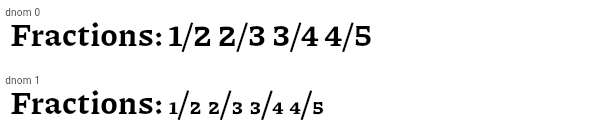
/// The Piazzolla font supports the `dnom` feature. It causes
|
||
/// the digits to be rendered smaller and near the bottom of the EM box.
|
||
///
|
||
/// ```dart dartImports
|
||
/// import 'dart:ui';
|
||
/// ```
|
||
///
|
||
/// ```dart
|
||
/// Widget build(BuildContext context) {
|
||
/// // The Piazzolla font can be downloaded from Google Fonts (https://www.google.com/fonts).
|
||
/// return const Text(
|
||
/// 'Fractions: 1/2 2/3 3/4 4/5',
|
||
/// style: TextStyle(
|
||
/// fontFamily: 'Piazzolla',
|
||
/// fontFeatures: <FontFeature>[
|
||
/// FontFeature.denominator(),
|
||
/// ],
|
||
/// ),
|
||
/// );
|
||
/// }
|
||
/// ```
|
||
///
|
||
/// 
|
||
/// {@end-tool}
|
||
///
|
||
/// See also:
|
||
///
|
||
/// * <https://docs.microsoft.com/en-us/typography/opentype/spec/features_ae#dnom>
|
||
const FontFeature.denominator() : feature = 'dnom', value = 1;
|
||
|
||
// frac
|
||
/// Use ligatures to represent fractions. (`afrc`)
|
||
///
|
||
/// When this feature is enabled (and the font supports it),
|
||
/// sequences of digits separated by U+002F SOLIDUS character (/) or
|
||
/// U+2044 FRACTION SLASH (⁄) are replaced by ligatures that
|
||
/// represent the corresponding fraction.
|
||
///
|
||
/// This feature may imply the [FontFeature.numerator] and
|
||
/// [FontFeature.denominator] features.
|
||
///
|
||
/// {@tool sample --template=stateless_widget}
|
||
///
|
||
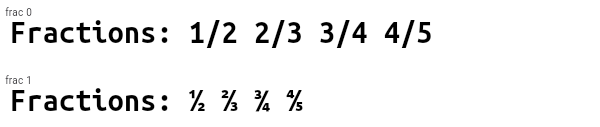
/// The Ubuntu Mono font supports the `frac` feature. It causes
|
||
/// digits around slashes to be turned into dedicated fraction
|
||
/// glpyhs. This contrasts to the effect seen with
|
||
/// [FontFeature.alternativeFractions].
|
||
///
|
||
/// ```dart dartImports
|
||
/// import 'dart:ui';
|
||
/// ```
|
||
///
|
||
/// ```dart
|
||
/// Widget build(BuildContext context) {
|
||
/// // The Ubuntu Mono font can be downloaded from Google Fonts (https://www.google.com/fonts).
|
||
/// return const Text(
|
||
/// 'Fractions: 1/2 2/3 3/4 4/5',
|
||
/// style: TextStyle(
|
||
/// fontFamily: 'Ubuntu Mono',
|
||
/// fontFeatures: <FontFeature>[
|
||
/// FontFeature.fractions(),
|
||
/// ],
|
||
/// ),
|
||
/// );
|
||
/// }
|
||
/// ```
|
||
///
|
||
/// 
|
||
/// {@end-tool}
|
||
///
|
||
/// See also:
|
||
///
|
||
/// * [FontFeature.alternativeFractions], which has a similar (but different) effect.
|
||
/// * <https://docs.microsoft.com/en-us/typography/opentype/spec/features_fj#frac>
|
||
const FontFeature.fractions() : feature = 'frac', value = 1;
|
||
|
||
// hist
|
||
/// Use historical forms. (`hist`)
|
||
///
|
||
/// Some fonts have alteratives for letters whose forms have changed
|
||
/// through the ages. In the Latin alphabet, this is common for
|
||
/// example with the long-form "s" or the Fraktur "k". This feature enables
|
||
/// those alternative glyphs.
|
||
///
|
||
/// This does not enable legacy ligatures, only single-character alternatives.
|
||
/// To enable historical ligatures, use [FontFeature.historicalLigatures].
|
||
///
|
||
/// This feature may override other glyph-substitution features.
|
||
///
|
||
/// {@tool sample --template=stateless_widget}
|
||
///
|
||
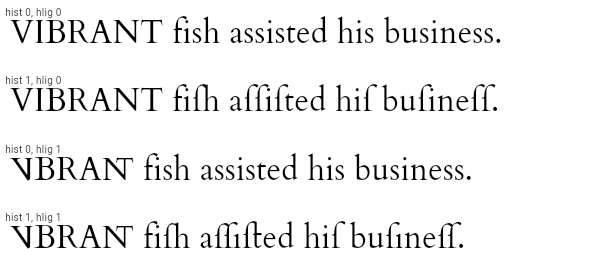
/// The Cardo font supports the `hist` feature specifically for the
|
||
/// letter "s": it changes occurrences of that letter for the glyph
|
||
/// used by U+017F LATIN SMALL LETTER LONG S.
|
||
///
|
||
/// ```dart dartImports
|
||
/// import 'dart:ui';
|
||
/// ```
|
||
///
|
||
/// ```dart
|
||
/// Widget build(BuildContext context) {
|
||
/// // The Cardo font can be downloaded from Google Fonts (https://www.google.com/fonts).
|
||
/// return const Text(
|
||
/// 'VIBRANT fish assisted his business.',
|
||
/// style: TextStyle(
|
||
/// fontFamily: 'Sorts Mill Goudy',
|
||
/// fontFeatures: <FontFeature>[
|
||
/// FontFeature.historicalForms(), // Enables "hist".
|
||
/// // Use FontFeature.historicalLigatures() to enable "hlig" as well.
|
||
/// ],
|
||
/// ),
|
||
/// );
|
||
/// }
|
||
/// ```
|
||
///
|
||
/// 
|
||
/// {@end-tool}
|
||
///
|
||
/// See also:
|
||
///
|
||
/// * <https://docs.microsoft.com/en-us/typography/opentype/spec/features_fj#hist>
|
||
const FontFeature.historicalForms() : feature = 'hist', value = 1;
|
||
|
||
// hlig
|
||
/// Use historical ligatures. (`hlig`)
|
||
///
|
||
/// Some fonts support ligatures that have fallen out of favor today,
|
||
/// but were historically in common use. This feature enables those
|
||
/// ligatures.
|
||
///
|
||
/// For example, the "long s" glyph was historically typeset with
|
||
/// characters such as "t" and "h" as a single ligature.
|
||
///
|
||
/// This does not enable the legacy forms, only ligatures. See
|
||
/// [FontFeature.historicalForms] to enable single characters to be
|
||
/// replaced with their historical alternatives. Combining both is
|
||
/// usually desired since the ligatures typically apply specifically
|
||
/// to characters that have historical forms as well. For example,
|
||
/// the historical forms feature might replace the "s" character
|
||
/// with the "long s" (ſ) character, while the historical ligatures
|
||
/// feature might specifically apply to cases where "long s" is
|
||
/// followed by other characters such as "t". In such cases, without
|
||
/// the historical forms being enabled, the ligatures would only
|
||
/// apply when the "long s" is used explicitly.
|
||
///
|
||
/// This feature may override other glyph-substitution features.
|
||
///
|
||
/// {@tool sample --template=stateless_widget}
|
||
///
|
||
/// The Cardo font supports the `hlig` feature. It has legacy
|
||
/// ligatures for "VI" and "NT", and various ligatures involving the
|
||
/// "long s". In the example below, both historical forms (`hist 1`)
|
||
/// and historical ligatures (`hlig 1`) are enabled, so, for
|
||
/// instance, "fish" becomes "fiſh" which is then rendered using a
|
||
/// ligature for the last two characters.
|
||
///
|
||
/// Similarly, the word "business" is turned into "buſineſſ" by
|
||
/// `hist`, and the `ſi` and `ſſ` pairs are ligated by `hlig`.
|
||
/// Observe in particular the position of the dot of the "i" in
|
||
/// "business" in the various combinations of these features.
|
||
///
|
||
/// ```dart dartImports
|
||
/// import 'dart:ui';
|
||
/// ```
|
||
///
|
||
/// ```dart
|
||
/// Widget build(BuildContext context) {
|
||
/// // The Cardo font can be downloaded from Google Fonts (https://www.google.com/fonts).
|
||
/// return const Text(
|
||
/// 'VIBRANT fish assisted his business.',
|
||
/// style: TextStyle(
|
||
/// fontFamily: 'Sorts Mill Goudy',
|
||
/// fontFeatures: <FontFeature>[
|
||
/// FontFeature.historicalForms(), // Enables "hist".
|
||
/// FontFeature.historicalLigatures() // Enables "hlig".
|
||
/// ],
|
||
/// ),
|
||
/// );
|
||
/// }
|
||
/// ```
|
||
///
|
||
/// 
|
||
/// {@end-tool}
|
||
///
|
||
/// See also:
|
||
///
|
||
/// * <https://docs.microsoft.com/en-us/typography/opentype/spec/features_fj#hlig>
|
||
const FontFeature.historicalLigatures() : feature = 'hlig', value = 1;
|
||
|
||
// lnum
|
||
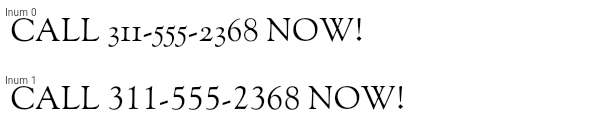
/// Use lining figures. (`lnum`)
|
||
///
|
||
/// Some fonts have digits that, like lowercase latin letters, have
|
||
/// both descenders and ascenders. In some situations, especially in
|
||
/// conjunction with capital letters, this leads to an aesthetically
|
||
/// questionable irregularity. Lining figures, on the other hand,
|
||
/// have a uniform height, and align with the baseline and the
|
||
/// height of capital letters. Conceptually, they can be thought of
|
||
/// as "capital digits".
|
||
///
|
||
/// This feature may conflict with [FontFeature.oldstyleFigures].
|
||
///
|
||
/// {@tool sample --template=stateless_widget}
|
||
///
|
||
/// The Sorts Mill Goudy font supports the `lnum` feature. It causes
|
||
/// digits to fit more seamlessly with capital letters.
|
||
///
|
||
/// ```dart dartImports
|
||
/// import 'dart:ui';
|
||
/// ```
|
||
///
|
||
/// ```dart
|
||
/// Widget build(BuildContext context) {
|
||
/// // The Sorts Mill Goudy font can be downloaded from Google Fonts (https://www.google.com/fonts).
|
||
/// return const Text(
|
||
/// 'CALL 311-555-2368 NOW!',
|
||
/// style: TextStyle(
|
||
/// fontFamily: 'Sorts Mill Goudy',
|
||
/// fontFeatures: <FontFeature>[
|
||
/// FontFeature.liningFigures(),
|
||
/// ],
|
||
/// ),
|
||
/// );
|
||
/// }
|
||
/// ```
|
||
///
|
||
/// 
|
||
/// {@end-tool}
|
||
///
|
||
/// See also:
|
||
///
|
||
/// * <https://docs.microsoft.com/en-us/typography/opentype/spec/features_ko#lnum>
|
||
const FontFeature.liningFigures() : feature = 'lnum', value = 1;
|
||
|
||
// locl
|
||
/// Use locale-specific glyphs. (`locl`)
|
||
///
|
||
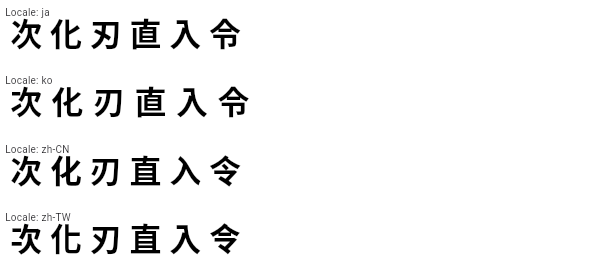
/// Some characters, most notably those in the Unicode Han
|
||
/// Unification blocks, vary in presentation based on the locale in
|
||
/// use. For example, the ideograph for "grass" (U+8349, 草) has a
|
||
/// broken top line in Traditional Chinese, but a solid top line in
|
||
/// Simplified Chinese, Japanese, Korean, and Vietnamese. This kind
|
||
/// of variation also exists with other alphabets, for example
|
||
/// Cyrilic characters as used in the Bulgarian and Serbian
|
||
/// alphabets vary from their Russian counterparts.
|
||
///
|
||
/// A particular font may default to the forms for the locale for
|
||
/// which it was constructed, but still support alternative forms
|
||
/// for other locales. When this feature is enabled, the locale (as
|
||
/// specified using [painting.TextStyle.locale], for instance) is
|
||
/// used to determine which glyphs to use when locale-specific
|
||
/// alternatives exist. Disabling this feature causes the font
|
||
/// rendering to ignore locale information and only use the default
|
||
/// glyphs.
|
||
///
|
||
/// This feature is enabled by default. Using
|
||
/// `FontFeature.localeAware(enable: false)` disables the
|
||
/// locale-awareness. (So does not specifying the locale in the
|
||
/// first place, of course.)
|
||
///
|
||
/// {@tool sample --template=stateless_widget}
|
||
///
|
||
/// The Noto Sans CJK font supports the `locl` feature for CJK characters.
|
||
/// In this example, the `localeAware` feature is not explicitly used, as it is
|
||
/// enabled by default. This example instead shows how to set the locale,
|
||
/// thus demonstrating how Noto Sans adapts the glyph shapes to the locale.
|
||
///
|
||
/// ```dart dartImports
|
||
/// import 'dart:ui';
|
||
/// ```
|
||
///
|
||
/// ```dart
|
||
/// Widget build(BuildContext context) {
|
||
/// // The Noto family of fonts can be downloaded from Google Fonts (https://www.google.com/fonts).
|
||
/// return const Text(
|
||
/// '次 化 刃 直 入 令',
|
||
/// locale: const Locale('zh', 'CN'), // or Locale('ja'), Locale('ko'), Locale('zh', 'TW'), etc
|
||
/// style: TextStyle(
|
||
/// fontFamily: 'Noto Sans',
|
||
/// ),
|
||
/// );
|
||
/// }
|
||
/// ```
|
||
///
|
||
/// 
|
||
/// {@end-tool}
|
||
///
|
||
/// See also:
|
||
///
|
||
/// * <https://docs.microsoft.com/en-us/typography/opentype/spec/features_ko#locl>
|
||
/// * <https://en.wikipedia.org/wiki/Han_unification>
|
||
/// * <https://en.wikipedia.org/wiki/Cyrillic_script>
|
||
const FontFeature.localeAware({ bool enable = true }) : feature = 'locl', value = enable ? 1 : 0;
|
||
|
||
// nalt
|
||
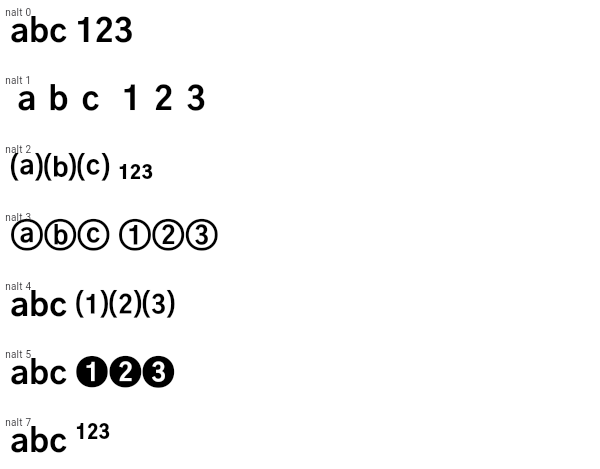
/// Display alternative glyphs for numerals (alternate annotation forms). (`nalt`)
|
||
///
|
||
/// Replaces glyphs used in numbering lists (e.g. 1, 2, 3...; or a, b, c...) with notational
|
||
/// variants that might be more typographically interesting.
|
||
///
|
||
/// Fonts sometimes support multiple alternatives, and the argument
|
||
/// selects the set to use (a positive integer, or 0 to disable the
|
||
/// feature). The default set if none is specified is 1.
|
||
///
|
||
/// {@tool sample --template=stateless_widget}
|
||
///
|
||
/// The Gothic A1 font supports several notational variant sets via
|
||
/// the `nalt` feature.
|
||
///
|
||
/// Set 1 changes the spacing of the glyphs. Set 2 parenthesizes the
|
||
/// latin letters and reduces the numerals to subscripts. Set 3
|
||
/// circles the glyphs. Set 4 parenthesizes the digits. Set 5 uses
|
||
/// reverse-video circles for the digits. Set 7 superscripts the
|
||
/// digits.
|
||
///
|
||
/// The code below shows how to select set 3.
|
||
///
|
||
/// ```dart dartImports
|
||
/// import 'dart:ui';
|
||
/// ```
|
||
///
|
||
/// ```dart
|
||
/// Widget build(BuildContext context) {
|
||
/// // The Gothic A1 font can be downloaded from Google Fonts (https://www.google.com/fonts).
|
||
/// return const Text(
|
||
/// 'abc 123',
|
||
/// style: TextStyle(
|
||
/// fontFamily: 'Gothic A1',
|
||
/// fontFeatures: <FontFeature>[
|
||
/// FontFeature.notationalForms(3), // circled letters and digits
|
||
/// ],
|
||
/// ),
|
||
/// );
|
||
/// }
|
||
/// ```
|
||
///
|
||
/// 
|
||
/// {@end-tool}
|
||
///
|
||
/// See also:
|
||
///
|
||
/// * <https://docs.microsoft.com/en-us/typography/opentype/spec/features_ko#nalt>
|
||
const FontFeature.notationalForms([this.value = 1]) : feature = 'nalt', assert(value >= 0);
|
||
|
||
// numr
|
||
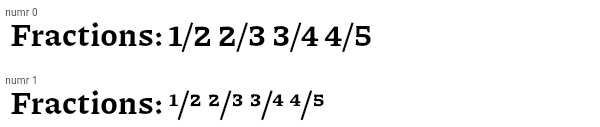
/// Display digits as numerators. (`numr`)
|
||
///
|
||
/// This is typically used automatically by the font rendering
|
||
/// system as part of the implementation of `frac` for the numerator
|
||
/// part of fractions (see [FontFeature.fractions]).
|
||
///
|
||
/// {@tool sample --template=stateless_widget}
|
||
///
|
||
/// The Piazzolla font supports the `numr` feature. It causes
|
||
/// the digits to be rendered smaller and near the top of the EM box.
|
||
///
|
||
/// ```dart dartImports
|
||
/// import 'dart:ui';
|
||
/// ```
|
||
///
|
||
/// ```dart
|
||
/// Widget build(BuildContext context) {
|
||
/// // The Piazzolla font can be downloaded from Google Fonts (https://www.google.com/fonts).
|
||
/// return const Text(
|
||
/// 'Fractions: 1/2 2/3 3/4 4/5',
|
||
/// style: TextStyle(
|
||
/// fontFamily: 'Piazzolla',
|
||
/// fontFeatures: <FontFeature>[
|
||
/// FontFeature.numerators(),
|
||
/// ],
|
||
/// ),
|
||
/// );
|
||
/// }
|
||
/// ```
|
||
///
|
||
/// 
|
||
/// {@end-tool}
|
||
///
|
||
/// See also:
|
||
///
|
||
/// * <https://docs.microsoft.com/en-us/typography/opentype/spec/features_ko#numr>
|
||
const FontFeature.numerators() : feature = 'numr', value = 1;
|
||
|
||
// onum
|
||
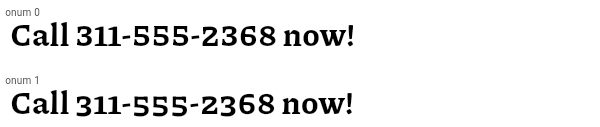
/// Use oldstyle figures. (`onum`)
|
||
///
|
||
/// Some fonts have variants of the figures (e.g. the digit 9) that,
|
||
/// when this feature is enabled, render with descenders under the
|
||
/// baseline instead of being entirely above the baseline. If the
|
||
/// default digits are lining figures, this allows the selection of
|
||
/// digits that fit better with mixed case (uppercase and lowercase)
|
||
/// text.
|
||
///
|
||
/// This overrides [FontFeature.slashedZero] and may conflict with
|
||
/// [FontFeature.liningFigures].
|
||
///
|
||
/// {@tool sample --template=stateless_widget}
|
||
///
|
||
/// The Piazzolla font supports the `onum` feature. It causes
|
||
/// digits to extend below the baseline.
|
||
///
|
||
/// ```dart dartImports
|
||
/// import 'dart:ui';
|
||
/// ```
|
||
///
|
||
/// ```dart
|
||
/// Widget build(BuildContext context) {
|
||
/// // The Piazzolla font can be downloaded from Google Fonts (https://www.google.com/fonts).
|
||
/// return const Text(
|
||
/// 'Call 311-555-2368 now!',
|
||
/// style: TextStyle(
|
||
/// fontFamily: 'Piazzolla',
|
||
/// fontFeatures: <FontFeature>[
|
||
/// FontFeature.oldstyleFigures(),
|
||
/// ],
|
||
/// ),
|
||
/// );
|
||
/// }
|
||
/// ```
|
||
///
|
||
/// 
|
||
/// {@end-tool}
|
||
///
|
||
/// See also:
|
||
///
|
||
/// * <https://docs.microsoft.com/en-us/typography/opentype/spec/features_ko#onum>
|
||
/// * <https://en.wikipedia.org/wiki/Text_figures>
|
||
const FontFeature.oldstyleFigures() : feature = 'onum', value = 1;
|
||
|
||
// ordn
|
||
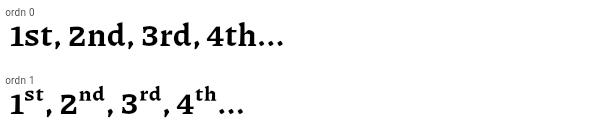
/// Use ordinal forms for alphabetic glyphs. (`ordn`)
|
||
///
|
||
/// Some fonts have variants of the alphabetic glyphs intended for
|
||
/// use after numbers when expressing ordinals, as in "1st", "2nd",
|
||
/// "3rd". This feature enables those alternative glyphs.
|
||
///
|
||
/// This may override other features that substitute glyphs.
|
||
///
|
||
/// {@tool sample --template=stateless_widget}
|
||
///
|
||
/// The Piazzolla font supports the `ordn` feature. It causes
|
||
/// alphabetic glyphs to become smaller and superscripted.
|
||
///
|
||
/// ```dart dartImports
|
||
/// import 'dart:ui';
|
||
/// ```
|
||
///
|
||
/// ```dart
|
||
/// Widget build(BuildContext context) {
|
||
/// // The Piazzolla font can be downloaded from Google Fonts (https://www.google.com/fonts).
|
||
/// return const Text(
|
||
/// '1st, 2nd, 3rd, 4th...',
|
||
/// style: TextStyle(
|
||
/// fontFamily: 'Piazzolla',
|
||
/// fontFeatures: <FontFeature>[
|
||
/// FontFeature.ordinalForms(),
|
||
/// ],
|
||
/// ),
|
||
/// );
|
||
/// }
|
||
/// ```
|
||
///
|
||
/// 
|
||
/// {@end-tool}
|
||
///
|
||
/// See also:
|
||
///
|
||
/// * <https://docs.microsoft.com/en-us/typography/opentype/spec/features_ko#ordn>
|
||
const FontFeature.ordinalForms() : feature = 'ordn', value = 1;
|
||
|
||
// pnum
|
||
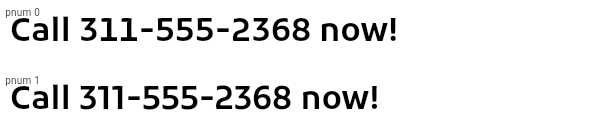
/// Use proportional (varying width) figures. (`pnum`)
|
||
///
|
||
/// For fonts that have both proportional and tabular (monospace) figures,
|
||
/// this enables the proportional figures.
|
||
///
|
||
/// This is mutually exclusive with [FontFeature.tabularFigures].
|
||
///
|
||
/// The default behavior varies from font to font.
|
||
///
|
||
/// {@tool sample --template=stateless_widget}
|
||
///
|
||
/// The Kufam font supports the `pnum` feature. It causes the digits
|
||
/// to become proportionally-sized, rather than all being the same
|
||
/// width. In this font this is especially noticeable with the digit
|
||
/// "1": normally, the 1 has very noticeable serifs in this
|
||
/// sans-serif font, but with the proportionally figures enabled,
|
||
/// the digit becomes much narrower.
|
||
///
|
||
/// ```dart dartImports
|
||
/// import 'dart:ui';
|
||
/// ```
|
||
///
|
||
/// ```dart
|
||
/// Widget build(BuildContext context) {
|
||
/// // The Kufam font can be downloaded from Google Fonts (https://www.google.com/fonts).
|
||
/// return const Text(
|
||
/// 'Call 311-555-2368 now!',
|
||
/// style: TextStyle(
|
||
/// fontFamily: 'Kufam',
|
||
/// fontFeatures: <FontFeature>[
|
||
/// FontFeature.proportionalFigures(),
|
||
/// ],
|
||
/// ),
|
||
/// );
|
||
/// }
|
||
/// ```
|
||
///
|
||
/// 
|
||
/// {@end-tool}
|
||
///
|
||
/// See also:
|
||
///
|
||
/// * <https://docs.microsoft.com/en-us/typography/opentype/spec/features_pt#pnum>
|
||
const FontFeature.proportionalFigures() : feature = 'pnum', value = 1;
|
||
|
||
// rand
|
||
/// Randomize the alternate forms used in text. (`rand`)
|
||
///
|
||
/// For example, this can be used with suitably-prepared handwriting fonts to
|
||
/// vary the forms used for each character, so that, for instance, the word
|
||
/// "cross-section" would be rendered with two different "c"s, two different "o"s,
|
||
/// and three different "s"s.
|
||
///
|
||
/// Contextual alternates ([FontFeature.contextualAlternates])
|
||
/// provide a similar effect in some fonts, without using
|
||
/// randomness.
|
||
///
|
||
/// See also:
|
||
///
|
||
/// * <https://docs.microsoft.com/en-us/typography/opentype/spec/features_pt#rand>
|
||
const FontFeature.randomize() : feature = 'rand', value = 1;
|
||
|
||
// salt
|
||
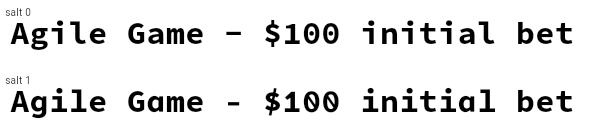
/// Enable stylistic alternates. (`salt`)
|
||
///
|
||
/// Some fonts have alternative forms that are not tied to a
|
||
/// particular purpose (such as being historical forms, or
|
||
/// contextually relevant alternatives, or ligatures, etc). This
|
||
/// font feature enables these purely stylistic alternatives.
|
||
///
|
||
/// This may override other features that substitute glyphs.
|
||
///
|
||
/// {@tool sample --template=stateless_widget}
|
||
///
|
||
/// The Source Code Pro font supports the `salt` feature. It causes
|
||
/// some glyphs to be rendered differently, for example the "a" and
|
||
/// "g" glyphs change from their typographically common
|
||
/// double-storey forms to simpler single-storey forms, the dollar
|
||
/// sign's line changes from discontinuous to continuous (and is
|
||
/// angled), and the "0" rendering changes from a center dot to a
|
||
/// slash.
|
||
///
|
||
/// ```dart dartImports
|
||
/// import 'dart:ui';
|
||
/// ```
|
||
///
|
||
/// ```dart
|
||
/// Widget build(BuildContext context) {
|
||
/// // The Source Code Pro font can be downloaded from Google Fonts (https://www.google.com/fonts).
|
||
/// return const Text(
|
||
/// r'Agile Game - $100 initial bet',
|
||
/// style: TextStyle(
|
||
/// fontFamily: 'Source Code Pro',
|
||
/// fontFeatures: <FontFeature>[
|
||
/// FontFeature.stylisticAlternates(),
|
||
/// ],
|
||
/// ),
|
||
/// );
|
||
/// }
|
||
/// ```
|
||
///
|
||
/// 
|
||
/// {@end-tool}
|
||
///
|
||
/// See also:
|
||
///
|
||
/// * [FontFeature.contextualAlternates], which is enables alternates specific to certain contexts.
|
||
/// * <https://docs.microsoft.com/en-us/typography/opentype/spec/features_pt#salt>
|
||
const FontFeature.stylisticAlternates() : feature = 'salt', value = 1;
|
||
|
||
// sinf
|
||
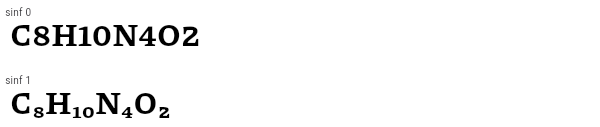
/// Use scientific inferiors. (`sinf`)
|
||
///
|
||
/// Some fonts have variants of the figures (e.g. the digit 2) that,
|
||
/// when this feature is enabled, render in a manner more
|
||
/// appropriate for subscripted digits ("inferiors") used in
|
||
/// scientific contexts, e.g. the subscripts in chemical formulae.
|
||
///
|
||
/// This may override other features that substitute glyphs.
|
||
///
|
||
/// {@tool sample --template=stateless_widget}
|
||
///
|
||
/// The Piazzolla font supports the `sinf` feature. It causes
|
||
/// digits to be smaller and subscripted.
|
||
///
|
||
/// ```dart dartImports
|
||
/// import 'dart:ui';
|
||
/// ```
|
||
///
|
||
/// ```dart
|
||
/// Widget build(BuildContext context) {
|
||
/// // The Piazzolla font can be downloaded from Google Fonts (https://www.google.com/fonts).
|
||
/// return const Text(
|
||
/// 'C8H10N4O2',
|
||
/// style: TextStyle(
|
||
/// fontFamily: 'Piazzolla',
|
||
/// fontFeatures: <FontFeature>[
|
||
/// FontFeature.scientificInferiors(),
|
||
/// ],
|
||
/// ),
|
||
/// );
|
||
/// }
|
||
/// ```
|
||
///
|
||
/// 
|
||
/// {@end-tool}
|
||
///
|
||
/// See also:
|
||
///
|
||
/// * <https://docs.microsoft.com/en-us/typography/opentype/spec/features_pt#sinf>
|
||
const FontFeature.scientificInferiors() : feature = 'sinf', value = 1;
|
||
|
||
// ssXX
|
||
/// Select a stylistic set. (`ss01` through `ss20`)
|
||
///
|
||
/// Fonts may have up to 20 stylistic sets, numbered 1 through 20,
|
||
/// each of which can be independently enabled or disabled.
|
||
///
|
||
/// For more fine-grained control, in some fonts individual
|
||
/// character variants can also be controlled by the
|
||
/// [FontFeature.characterVariant] feature (`cvXX`).
|
||
///
|
||
/// {@tool sample --template=stateless_widget}
|
||
///
|
||
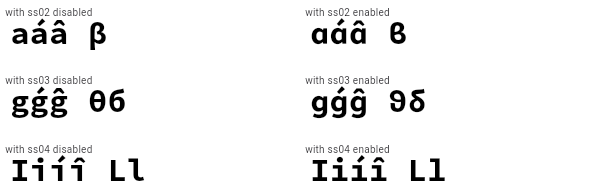
/// The Source Code Pro font supports the `ssXX` feature for several
|
||
/// sets. In the example below, stylistic sets 2 (`ss02`), 3
|
||
/// (`ss03`), and 4 (`ss04`) are selected. Stylistic set 2 changes
|
||
/// the rendering of the "a" character and the beta character,
|
||
/// stylistic set 3 changes the lowercase "g", theta, and delta
|
||
/// characters, and stylistic set 4 changes the lowercase "i" and
|
||
/// "l" characters.
|
||
///
|
||
/// This font also supports character variants (see
|
||
/// [FontFeature.characterVariant]).
|
||
///
|
||
/// ```dart dartImports
|
||
/// import 'dart:ui';
|
||
/// ```
|
||
///
|
||
/// ```dart
|
||
/// Widget build(BuildContext context) {
|
||
/// // The Source Code Pro font can be downloaded from Google Fonts (https://www.google.com/fonts).
|
||
/// return Text(
|
||
/// 'aáâ β gǵĝ θб Iiíî Ll',
|
||
/// style: TextStyle(
|
||
/// fontFamily: 'Source Code Pro',
|
||
/// fontFeatures: <FontFeature>[
|
||
/// FontFeature.stylisticSet(2),
|
||
/// FontFeature.stylisticSet(3),
|
||
/// FontFeature.stylisticSet(4),
|
||
/// ],
|
||
/// ),
|
||
/// );
|
||
/// }
|
||
/// ```
|
||
///
|
||
/// 
|
||
/// {@end-tool}
|
||
///
|
||
/// {@tool sample --template=stateless_widget}
|
||
///
|
||
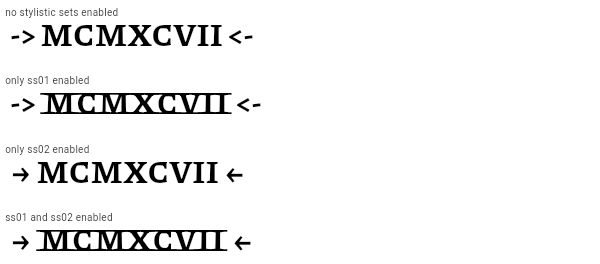
/// The Piazzolla font supports the `ssXX` feature for for more
|
||
/// elaborate stylistic effects. Set 1 turns some Latin characters
|
||
/// into Roman numerals, set 2 enables some ASCII characters to be
|
||
/// used to create pretty arrows, and so forth.
|
||
///
|
||
/// _These_ stylistic sets do _not_ correspond to character variants.
|
||
///
|
||
/// ```dart dartImports
|
||
/// import 'dart:ui';
|
||
/// ```
|
||
///
|
||
/// ```dart
|
||
/// Widget build(BuildContext context) {
|
||
/// // The Piazzolla font can be downloaded from Google Fonts (https://www.google.com/fonts).
|
||
/// return Text(
|
||
/// '-> MCMXCVII <-', // 1997
|
||
/// style: TextStyle(
|
||
/// fontFamily: 'Piazzolla',
|
||
/// fontFeatures: <FontFeature>[
|
||
/// FontFeature.stylisticSet(1),
|
||
/// FontFeature.stylisticSet(2),
|
||
/// ],
|
||
/// ),
|
||
/// );
|
||
/// }
|
||
/// ```
|
||
///
|
||
/// 
|
||
/// {@end-tool}
|
||
///
|
||
/// See also:
|
||
///
|
||
/// * [FontFeature.characterVariant], which allows for individual character
|
||
/// variants to be selected, as opposed to entire sets.
|
||
/// * <https://docs.microsoft.com/en-us/typography/opentype/spec/features_pt#ssxx>
|
||
factory FontFeature.stylisticSet(int value) {
|
||
assert(value >= 1);
|
||
assert(value <= 20);
|
||
return FontFeature('ss${value.toString().padLeft(2, "0")}');
|
||
}
|
||
|
||
// subs
|
||
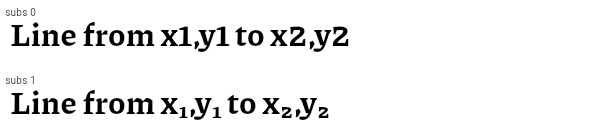
/// Enable subscripts. (`subs`)
|
||
///
|
||
/// This feature causes some fonts to change some glyphs to their subscripted form.
|
||
///
|
||
/// It typically does not affect all glyphs, and so is not appropriate for generally causing
|
||
/// all text to be subscripted.
|
||
///
|
||
/// This may override other features that substitute glyphs.
|
||
///
|
||
/// {@tool sample --template=stateless_widget}
|
||
///
|
||
/// The Piazzolla font supports the `subs` feature. It causes
|
||
/// digits to be smaller and subscripted.
|
||
///
|
||
/// ```dart dartImports
|
||
/// import 'dart:ui';
|
||
/// ```
|
||
///
|
||
/// ```dart
|
||
/// Widget build(BuildContext context) {
|
||
/// // The Piazzolla font can be downloaded from Google Fonts (https://www.google.com/fonts).
|
||
/// return const Text(
|
||
/// 'Line from x1,y1 to x2,y2',
|
||
/// style: TextStyle(
|
||
/// fontFamily: 'Piazzolla',
|
||
/// fontFeatures: <FontFeature>[
|
||
/// FontFeature.subscripts(),
|
||
/// ],
|
||
/// ),
|
||
/// );
|
||
/// }
|
||
/// ```
|
||
///
|
||
/// 
|
||
/// {@end-tool}
|
||
///
|
||
/// See also:
|
||
///
|
||
/// * <https://docs.microsoft.com/en-us/typography/opentype/spec/features_pt#subs>
|
||
/// * [FontFeature.scientificInferiors], which is similar but intended specifically for
|
||
/// subscripts used in scientific contexts.
|
||
/// * [FontFeature.superscripts], which is similar but for subscripting.
|
||
const FontFeature.subscripts() : feature = 'subs', value = 1;
|
||
|
||
// sups
|
||
/// Enable superscripts. (`sups`)
|
||
///
|
||
/// This feature causes some fonts to change some glyphs to their
|
||
/// superscripted form. This may be more than just changing their
|
||
/// position. For example, digits might change to lining figures
|
||
/// (see [FontFeature.liningFigures]) in addition to being raised
|
||
/// and shrunk.
|
||
///
|
||
/// It typically does not affect all glyphs, and so is not
|
||
/// appropriate for generally causing all text to be superscripted.
|
||
///
|
||
/// This may override other features that substitute glyphs.
|
||
///
|
||
/// {@tool sample --template=stateless_widget}
|
||
///
|
||
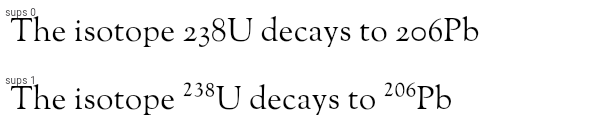
/// The Sorts Mill Goudy font supports the `sups` feature. It causes
|
||
/// digits to be smaller, superscripted, and changes them to lining
|
||
/// figures (so they are all the same height).
|
||
///
|
||
/// ```dart dartImports
|
||
/// import 'dart:ui';
|
||
/// ```
|
||
///
|
||
/// ```dart
|
||
/// Widget build(BuildContext context) {
|
||
/// // The Sorts Mill Goudy font can be downloaded from Google Fonts (https://www.google.com/fonts).
|
||
/// return const Text(
|
||
/// 'The isotope 238U decays to 206Pb',
|
||
/// style: TextStyle(
|
||
/// fontFamily: 'Sorts Mill Goudy',
|
||
/// fontFeatures: <FontFeature>[
|
||
/// FontFeature.superscripts(),
|
||
/// ],
|
||
/// ),
|
||
/// );
|
||
/// }
|
||
/// ```
|
||
///
|
||
/// 
|
||
/// {@end-tool}
|
||
///
|
||
/// See also:
|
||
///
|
||
/// * <https://docs.microsoft.com/en-us/typography/opentype/spec/features_pt#sups>
|
||
/// * [FontFeature.subscripts], which is similar but for subscripting.
|
||
const FontFeature.superscripts() : feature = 'sups', value = 1;
|
||
|
||
// swsh
|
||
/// Enable swash glyphs. (`swsh`)
|
||
///
|
||
/// Some fonts have beautiful flourishes on some characters. These
|
||
/// come in many forms, such as exaggerated serifs, long tails, long
|
||
/// entry strokes, or other forms of decorative extensions to the
|
||
/// base character.
|
||
///
|
||
/// This feature enables the rendering of these flourishes. Some
|
||
/// fonts have many swashes per character; the argument, if
|
||
/// specified, selects which swash to use (0 disables them
|
||
/// altogether).
|
||
///
|
||
/// Some fonts have an absurd number of alternative swashes. For
|
||
/// example, Adobe's Poetica famously has 63 different ampersand
|
||
/// forms available through this feature!
|
||
///
|
||
/// {@tool sample --template=stateless_widget}
|
||
///
|
||
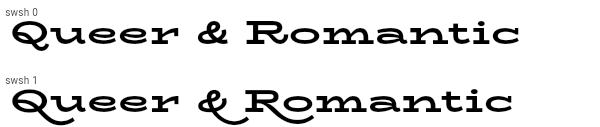
/// The BioRhyme Expanded font supports the `swsh` feature specifically
|
||
/// for the capital "Q" and "R" glyphs and the ampersand.
|
||
///
|
||
/// ```dart dartImports
|
||
/// import 'dart:ui';
|
||
/// ```
|
||
///
|
||
/// ```dart
|
||
/// Widget build(BuildContext context) {
|
||
/// // The BioRhyme Expanded font can be downloaded from Google Fonts (https://www.google.com/fonts).
|
||
/// return const Text(
|
||
/// 'Queer & Romantic',
|
||
/// style: TextStyle(
|
||
/// fontFamily: 'BioRhyme Expanded',
|
||
/// fontFeatures: <FontFeature>[
|
||
/// FontFeature.swash(),
|
||
/// ],
|
||
/// ),
|
||
/// );
|
||
/// }
|
||
/// ```
|
||
///
|
||
/// 
|
||
/// {@end-tool}
|
||
///
|
||
/// See also:
|
||
///
|
||
/// * <https://docs.microsoft.com/en-us/typography/opentype/spec/features_pt#swsh>
|
||
/// * <https://en.wikipedia.org/wiki/Swash_(typography)>
|
||
const FontFeature.swash([this.value = 1]) : feature = 'swsh', assert(value >= 0);
|
||
|
||
// tnum
|
||
/// Use tabular (monospace) figures. (`tnum`)
|
||
///
|
||
/// For fonts that have both proportional (varying width) and tabular figures,
|
||
/// this enables the tabular figures. Tabular figures are monospaced (all the
|
||
/// same width), so that they align in tables of figures.
|
||
///
|
||
/// This is mutually exclusive with [FontFeature.proportionalFigures].
|
||
///
|
||
/// The default behavior varies from font to font.
|
||
///
|
||
/// {@tool sample --template=stateless_widget}
|
||
///
|
||
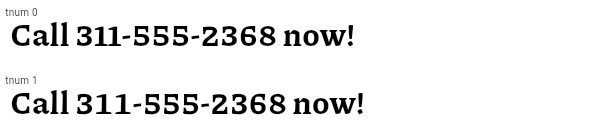
/// The Piazzolla font supports the `tnum` feature. It causes the
|
||
/// digits to become uniformally-sized, rather than having variable
|
||
/// widths. In this font this is especially noticeable with the
|
||
/// digit "1"; with tabular figures enabled, the "1" digit is more
|
||
/// widely spaced.
|
||
///
|
||
/// ```dart dartImports
|
||
/// import 'dart:ui';
|
||
/// ```
|
||
///
|
||
/// ```dart
|
||
/// Widget build(BuildContext context) {
|
||
/// // The Piazzolla font can be downloaded from Google Fonts (https://www.google.com/fonts).
|
||
/// return const Text(
|
||
/// 'Call 311-555-2368 now!',
|
||
/// style: TextStyle(
|
||
/// fontFamily: 'Piazzolla',
|
||
/// fontFeatures: <FontFeature>[
|
||
/// FontFeature.tabularFigures(),
|
||
/// ],
|
||
/// ),
|
||
/// );
|
||
/// }
|
||
/// ```
|
||
///
|
||
/// 
|
||
/// {@end-tool}
|
||
///
|
||
/// See also:
|
||
///
|
||
/// * <https://docs.microsoft.com/en-us/typography/opentype/spec/features_pt#tnum>
|
||
const FontFeature.tabularFigures() : feature = 'tnum', value = 1;
|
||
|
||
// zero
|
||
/// Use the slashed zero. (`zero`)
|
||
///
|
||
/// Some fonts contain both a circular zero and a zero with a slash. This
|
||
/// enables the use of the latter form.
|
||
///
|
||
/// This is overridden by [FontFeature.oldstyleFigures].
|
||
///
|
||
/// {@tool sample --template=stateless_widget}
|
||
///
|
||
/// The Source Code Pro font supports the `zero` feature. It causes the
|
||
/// zero digit to be drawn with a slash rather than the default rendering,
|
||
/// which in this case has a dot through the zero rather than a slash.
|
||
///
|
||
/// ```dart dartImports
|
||
/// import 'dart:ui';
|
||
/// ```
|
||
///
|
||
/// ```dart
|
||
/// Widget build(BuildContext context) {
|
||
/// // The Source Code Pro font can be downloaded from Google Fonts (https://www.google.com/fonts).
|
||
/// return const Text(
|
||
/// 'One million is: 1,000,000.00',
|
||
/// style: TextStyle(
|
||
/// fontFamily: 'Source Code Pro',
|
||
/// fontFeatures: <FontFeature>[
|
||
/// FontFeature.slashedZero(),
|
||
/// ],
|
||
/// ),
|
||
/// );
|
||
/// }
|
||
/// ```
|
||
///
|
||
/// 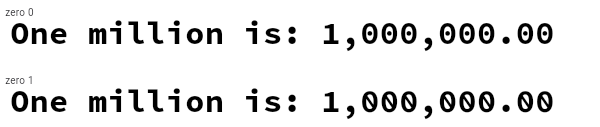
|
||
/// {@end-tool}
|
||
///
|
||
/// See also:
|
||
///
|
||
/// * <https://docs.microsoft.com/en-us/typography/opentype/spec/features_uz#zero>
|
||
const FontFeature.slashedZero() : feature = 'zero', value = 1;
|
||
|
||
// ------------------------------------------------------------------------
|
||
// End of feature tags list.
|
||
|
||
/// The tag that identifies the effect of this feature. Must consist of 4
|
||
/// ASCII characters (typically lowercase letters).
|
||
///
|
||
/// These features are defined in a registry maintained by Microsoft:
|
||
/// <https://docs.microsoft.com/en-us/typography/opentype/spec/featuretags>
|
||
final String feature;
|
||
|
||
/// The value assigned to this feature.
|
||
///
|
||
/// Must be a positive integer. Many features are Boolean values that accept
|
||
/// values of either 0 (feature is disabled) or 1 (feature is enabled). Other
|
||
/// features have a bound range of values (which may be documented in these
|
||
/// API docs for features that have dedicated constructors, and are generally
|
||
/// documented in the official registry). In some cases the precise supported
|
||
/// range depends on the font.
|
||
///
|
||
/// See also:
|
||
///
|
||
/// * <https://docs.microsoft.com/en-us/typography/opentype/spec/featurelist>
|
||
final int value;
|
||
|
||
static const int _kEncodedSize = 8;
|
||
|
||
void _encode(ByteData byteData) {
|
||
assert(feature.codeUnits.every((int c) => c >= 0x20 && c <= 0x7F));
|
||
for (int i = 0; i < 4; i++) {
|
||
byteData.setUint8(i, feature.codeUnitAt(i));
|
||
}
|
||
byteData.setInt32(4, value, _kFakeHostEndian);
|
||
}
|
||
|
||
@override
|
||
bool operator ==(Object other) {
|
||
if (other.runtimeType != runtimeType)
|
||
return false;
|
||
return other is FontFeature
|
||
&& other.feature == feature
|
||
&& other.value == value;
|
||
}
|
||
|
||
@override
|
||
int get hashCode => hashValues(feature, value);
|
||
|
||
@override
|
||
String toString() => "FontFeature('$feature', $value)";
|
||
}
|
||
|
||
/// Whether and how to align text horizontally.
|
||
// The order of this enum must match the order of the values in RenderStyleConstants.h's ETextAlign.
|
||
enum TextAlign {
|
||
/// Align the text on the left edge of the container.
|
||
left,
|
||
|
||
/// Align the text on the right edge of the container.
|
||
right,
|
||
|
||
/// Align the text in the center of the container.
|
||
center,
|
||
|
||
/// Stretch lines of text that end with a soft line break to fill the width of
|
||
/// the container.
|
||
///
|
||
/// Lines that end with hard line breaks are aligned towards the [start] edge.
|
||
justify,
|
||
|
||
/// Align the text on the leading edge of the container.
|
||
///
|
||
/// For left-to-right text ([TextDirection.ltr]), this is the left edge.
|
||
///
|
||
/// For right-to-left text ([TextDirection.rtl]), this is the right edge.
|
||
start,
|
||
|
||
/// Align the text on the trailing edge of the container.
|
||
///
|
||
/// For left-to-right text ([TextDirection.ltr]), this is the right edge.
|
||
///
|
||
/// For right-to-left text ([TextDirection.rtl]), this is the left edge.
|
||
end,
|
||
}
|
||
|
||
/// A horizontal line used for aligning text.
|
||
enum TextBaseline {
|
||
/// The horizontal line used to align the bottom of glyphs for alphabetic characters.
|
||
alphabetic,
|
||
|
||
/// The horizontal line used to align ideographic characters.
|
||
ideographic,
|
||
}
|
||
|
||
/// A linear decoration to draw near the text.
|
||
class TextDecoration {
|
||
const TextDecoration._(this._mask);
|
||
|
||
/// Creates a decoration that paints the union of all the given decorations.
|
||
factory TextDecoration.combine(List<TextDecoration> decorations) {
|
||
int mask = 0;
|
||
for (final TextDecoration decoration in decorations)
|
||
mask |= decoration._mask;
|
||
return TextDecoration._(mask);
|
||
}
|
||
|
||
final int _mask;
|
||
|
||
/// Whether this decoration will paint at least as much decoration as the given decoration.
|
||
bool contains(TextDecoration other) {
|
||
return (_mask | other._mask) == _mask;
|
||
}
|
||
|
||
/// Do not draw a decoration
|
||
static const TextDecoration none = TextDecoration._(0x0);
|
||
|
||
/// Draw a line underneath each line of text
|
||
static const TextDecoration underline = TextDecoration._(0x1);
|
||
|
||
/// Draw a line above each line of text
|
||
static const TextDecoration overline = TextDecoration._(0x2);
|
||
|
||
/// Draw a line through each line of text
|
||
static const TextDecoration lineThrough = TextDecoration._(0x4);
|
||
|
||
@override
|
||
bool operator ==(Object other) {
|
||
return other is TextDecoration
|
||
&& other._mask == _mask;
|
||
}
|
||
|
||
@override
|
||
int get hashCode => _mask.hashCode;
|
||
|
||
@override
|
||
String toString() {
|
||
if (_mask == 0)
|
||
return 'TextDecoration.none';
|
||
final List<String> values = <String>[];
|
||
if (_mask & underline._mask != 0)
|
||
values.add('underline');
|
||
if (_mask & overline._mask != 0)
|
||
values.add('overline');
|
||
if (_mask & lineThrough._mask != 0)
|
||
values.add('lineThrough');
|
||
if (values.length == 1)
|
||
return 'TextDecoration.${values[0]}';
|
||
return 'TextDecoration.combine([${values.join(", ")}])';
|
||
}
|
||
}
|
||
|
||
/// The style in which to draw a text decoration
|
||
enum TextDecorationStyle {
|
||
/// Draw a solid line
|
||
solid,
|
||
|
||
/// Draw two lines
|
||
double,
|
||
|
||
/// Draw a dotted line
|
||
dotted,
|
||
|
||
/// Draw a dashed line
|
||
dashed,
|
||
|
||
/// Draw a sinusoidal line
|
||
wavy
|
||
}
|
||
|
||
/// {@macro dart.ui.textLeadingDistribution}
|
||
enum TextLeadingDistribution {
|
||
/// Distributes the [leading](https://en.wikipedia.org/wiki/Leading)
|
||
/// of the text proportionally above and below the text, to the font's
|
||
/// ascent/discent ratio.
|
||
///
|
||
/// {@template dart.ui.leading}
|
||
/// The leading of a text run is defined as
|
||
/// `TextStyle.height * TextStyle.fontSize - TextStyle.fontSize`. When
|
||
/// [TextStyle.height] is not set, the text run uses the leading specified by
|
||
/// the font instead.
|
||
/// {@endtemplate}
|
||
proportional,
|
||
|
||
/// Distributes the ["leading"](https://en.wikipedia.org/wiki/Leading)
|
||
/// of the text evenly above and below the text (i.e. evenly above the
|
||
/// font's ascender and below the descender).
|
||
///
|
||
/// {@macro dart.ui.leading}
|
||
///
|
||
/// The leading can become negative when [TextStyle.height] is smaller than
|
||
/// 1.0.
|
||
///
|
||
/// This is the default strategy used by CSS, known as
|
||
/// ["half-leading"](https://www.w3.org/TR/css-inline-3/#half-leading).
|
||
even,
|
||
}
|
||
|
||
/// {@template dart.ui.textHeightBehavior}
|
||
/// Defines how to apply [TextStyle.height] over and under text.
|
||
///
|
||
/// [applyHeightToFirstAscent] and [applyHeightToLastDescent] represent whether
|
||
/// the [TextStyle.height] modifier will be applied to the corresponding metric.
|
||
/// By default both properties are true, and [TextStyle.height] is applied as
|
||
/// normal. When set to false, the font's default ascent will be used.
|
||
///
|
||
/// [leadingDistribution] determines how the [leading] is distributed over and
|
||
/// under text. This property applies before [applyHeightToFirstAscent] and
|
||
/// [applyHeightToLastDescent].
|
||
///
|
||
/// {@endtemplate}
|
||
class TextHeightBehavior {
|
||
|
||
/// Creates a new TextHeightBehavior object.
|
||
///
|
||
/// * applyHeightToFirstAscent: When true, the [TextStyle.height] modifier
|
||
/// will be applied to the ascent of the first line. When false, the font's
|
||
/// default ascent will be used.
|
||
/// * applyHeightToLastDescent: When true, the [TextStyle.height] modifier
|
||
/// will be applied to the descent of the last line. When false, the font's
|
||
/// default descent will be used.
|
||
/// * leadingDistribution: How the [leading] is distributed over and under
|
||
/// text.
|
||
///
|
||
/// All properties default to true (height modifications applied as normal).
|
||
const TextHeightBehavior({
|
||
this.applyHeightToFirstAscent = true,
|
||
this.applyHeightToLastDescent = true,
|
||
this.leadingDistribution = TextLeadingDistribution.proportional,
|
||
});
|
||
|
||
/// Creates a new TextHeightBehavior object from an encoded form.
|
||
///
|
||
/// See [_encode] for the creation of the encoded form.
|
||
const TextHeightBehavior._fromEncoded(int encoded, this.leadingDistribution)
|
||
: applyHeightToFirstAscent = (encoded & 0x1) == 0,
|
||
applyHeightToLastDescent = (encoded & 0x2) == 0;
|
||
|
||
/// Whether to apply the [TextStyle.height] modifier to the ascent of the first
|
||
/// line in the paragraph.
|
||
///
|
||
/// When true, the [TextStyle.height] modifier will be applied to to the ascent
|
||
/// of the first line. When false, the font's default ascent will be used and
|
||
/// the [TextStyle.height] will have no effect on the ascent of the first line.
|
||
///
|
||
/// This property only has effect if a non-null [TextStyle.height] is specified.
|
||
///
|
||
/// Defaults to true (height modifications applied as normal).
|
||
final bool applyHeightToFirstAscent;
|
||
|
||
/// Whether to apply the [TextStyle.height] modifier to the descent of the last
|
||
/// line in the paragraph.
|
||
///
|
||
/// When true, the [TextStyle.height] modifier will be applied to to the descent
|
||
/// of the last line. When false, the font's default descent will be used and
|
||
/// the [TextStyle.height] will have no effect on the descent of the last line.
|
||
///
|
||
/// This property only has effect if a non-null [TextStyle.height] is specified.
|
||
///
|
||
/// Defaults to true (height modifications applied as normal).
|
||
final bool applyHeightToLastDescent;
|
||
|
||
/// {@template dart.ui.textLeadingDistribution}
|
||
/// How the ["leading"](https://en.wikipedia.org/wiki/Leading) is distributed
|
||
/// over and under the text.
|
||
///
|
||
/// Does not affect layout when [TextStyle.height] is not specified. The
|
||
/// leading can become negative, for example, when [TextLeadingDistribution.even]
|
||
/// is used with a [TextStyle.height] much smaller than 1.0.
|
||
/// {@endtemplate}
|
||
///
|
||
/// Defaults to [TextLeadingDistribution.proportional],
|
||
final TextLeadingDistribution leadingDistribution;
|
||
|
||
/// Returns an encoded int representation of this object (excluding
|
||
/// [leadingDistribution]).
|
||
int _encode() {
|
||
return (applyHeightToFirstAscent ? 0 : 1 << 0)
|
||
| (applyHeightToLastDescent ? 0 : 1 << 1);
|
||
}
|
||
|
||
@override
|
||
bool operator ==(Object other) {
|
||
if (other.runtimeType != runtimeType)
|
||
return false;
|
||
return other is TextHeightBehavior
|
||
&& other.applyHeightToFirstAscent == applyHeightToFirstAscent
|
||
&& other.applyHeightToLastDescent == applyHeightToLastDescent
|
||
&& other.leadingDistribution == leadingDistribution;
|
||
}
|
||
|
||
@override
|
||
int get hashCode {
|
||
return hashValues(
|
||
applyHeightToFirstAscent,
|
||
applyHeightToLastDescent,
|
||
leadingDistribution.index,
|
||
);
|
||
}
|
||
|
||
@override
|
||
String toString() {
|
||
return 'TextHeightBehavior('
|
||
'applyHeightToFirstAscent: $applyHeightToFirstAscent, '
|
||
'applyHeightToLastDescent: $applyHeightToLastDescent, '
|
||
'leadingDistribution: $leadingDistribution'
|
||
')';
|
||
}
|
||
}
|
||
|
||
/// Determines if lists [a] and [b] are deep equivalent.
|
||
///
|
||
/// Returns true if the lists are both null, or if they are both non-null, have
|
||
/// the same length, and contain the same elements in the same order. Returns
|
||
/// false otherwise.
|
||
bool _listEquals<T>(List<T>? a, List<T>? b) {
|
||
if (a == null)
|
||
return b == null;
|
||
if (b == null || a.length != b.length)
|
||
return false;
|
||
for (int index = 0; index < a.length; index += 1) {
|
||
if (a[index] != b[index])
|
||
return false;
|
||
}
|
||
return true;
|
||
}
|
||
|
||
// This encoding must match the C++ version of ParagraphBuilder::pushStyle.
|
||
//
|
||
// The encoded array buffer has 8 elements.
|
||
//
|
||
// - Element 0: A bit field where the ith bit indicates whether the ith element
|
||
// has a non-null value. Bits 8 to 12 indicate whether |fontFamily|,
|
||
// |fontSize|, |letterSpacing|, |wordSpacing|, and |height| are non-null,
|
||
// respectively. Bit 0 indicates the [TextLeadingDistribution] of the text
|
||
// style.
|
||
//
|
||
// - Element 1: The |color| in ARGB with 8 bits per channel.
|
||
//
|
||
// - Element 2: A bit field indicating which text decorations are present in
|
||
// the |textDecoration| list. The ith bit is set if there's a TextDecoration
|
||
// with enum index i in the list.
|
||
//
|
||
// - Element 3: The |decorationColor| in ARGB with 8 bits per channel.
|
||
//
|
||
// - Element 4: The bit field of the |decorationStyle|.
|
||
//
|
||
// - Element 5: The index of the |fontWeight|.
|
||
//
|
||
// - Element 6: The enum index of the |fontStyle|.
|
||
//
|
||
// - Element 7: The enum index of the |textBaseline|.
|
||
//
|
||
Int32List _encodeTextStyle(
|
||
Color? color,
|
||
TextDecoration? decoration,
|
||
Color? decorationColor,
|
||
TextDecorationStyle? decorationStyle,
|
||
double? decorationThickness,
|
||
FontWeight? fontWeight,
|
||
FontStyle? fontStyle,
|
||
TextBaseline? textBaseline,
|
||
String? fontFamily,
|
||
List<String>? fontFamilyFallback,
|
||
double? fontSize,
|
||
double? letterSpacing,
|
||
double? wordSpacing,
|
||
double? height,
|
||
Locale? locale,
|
||
Paint? background,
|
||
Paint? foreground,
|
||
List<Shadow>? shadows,
|
||
List<FontFeature>? fontFeatures,
|
||
) {
|
||
final Int32List result = Int32List(9);
|
||
// The 0th bit of result[0] is reserved for leadingDistribution.
|
||
|
||
if (color != null) {
|
||
result[0] |= 1 << 1;
|
||
result[1] = color.value;
|
||
}
|
||
if (decoration != null) {
|
||
result[0] |= 1 << 2;
|
||
result[2] = decoration._mask;
|
||
}
|
||
if (decorationColor != null) {
|
||
result[0] |= 1 << 3;
|
||
result[3] = decorationColor.value;
|
||
}
|
||
if (decorationStyle != null) {
|
||
result[0] |= 1 << 4;
|
||
result[4] = decorationStyle.index;
|
||
}
|
||
if (fontWeight != null) {
|
||
result[0] |= 1 << 5;
|
||
result[5] = fontWeight.index;
|
||
}
|
||
if (fontStyle != null) {
|
||
result[0] |= 1 << 6;
|
||
result[6] = fontStyle.index;
|
||
}
|
||
if (textBaseline != null) {
|
||
result[0] |= 1 << 7;
|
||
result[7] = textBaseline.index;
|
||
}
|
||
if (decorationThickness != null) {
|
||
result[0] |= 1 << 8;
|
||
}
|
||
if (fontFamily != null || (fontFamilyFallback != null && fontFamilyFallback.isNotEmpty)) {
|
||
result[0] |= 1 << 9;
|
||
// Passed separately to native.
|
||
}
|
||
if (fontSize != null) {
|
||
result[0] |= 1 << 10;
|
||
// Passed separately to native.
|
||
}
|
||
if (letterSpacing != null) {
|
||
result[0] |= 1 << 11;
|
||
// Passed separately to native.
|
||
}
|
||
if (wordSpacing != null) {
|
||
result[0] |= 1 << 12;
|
||
// Passed separately to native.
|
||
}
|
||
if (height != null) {
|
||
result[0] |= 1 << 13;
|
||
// Passed separately to native.
|
||
}
|
||
if (locale != null) {
|
||
result[0] |= 1 << 14;
|
||
// Passed separately to native.
|
||
}
|
||
if (background != null) {
|
||
result[0] |= 1 << 15;
|
||
// Passed separately to native.
|
||
}
|
||
if (foreground != null) {
|
||
result[0] |= 1 << 16;
|
||
// Passed separately to native.
|
||
}
|
||
if (shadows != null) {
|
||
result[0] |= 1 << 17;
|
||
// Passed separately to native.
|
||
}
|
||
if (fontFeatures != null) {
|
||
result[0] |= 1 << 18;
|
||
// Passed separately to native.
|
||
}
|
||
|
||
return result;
|
||
}
|
||
|
||
/// An opaque object that determines the size, position, and rendering of text.
|
||
///
|
||
/// See also:
|
||
///
|
||
/// * [TextStyle](https://api.flutter.dev/flutter/painting/TextStyle-class.html), the class in the [painting] library.
|
||
///
|
||
class TextStyle {
|
||
/// Creates a new TextStyle object.
|
||
///
|
||
/// * `color`: The color to use when painting the text. If this is specified, `foreground` must be null.
|
||
/// * `decoration`: The decorations to paint near the text (e.g., an underline).
|
||
/// * `decorationColor`: The color in which to paint the text decorations.
|
||
/// * `decorationStyle`: The style in which to paint the text decorations (e.g., dashed).
|
||
/// * `decorationThickness`: The thickness of the decoration as a muliplier on the thickness specified by the font.
|
||
/// * `fontWeight`: The typeface thickness to use when painting the text (e.g., bold).
|
||
/// * `fontStyle`: The typeface variant to use when drawing the letters (e.g., italics).
|
||
/// * `fontFamily`: The name of the font to use when painting the text (e.g., Roboto). If a `fontFamilyFallback` is
|
||
/// provided and `fontFamily` is not, then the first font family in `fontFamilyFallback` will take the position of
|
||
/// the preferred font family. When a higher priority font cannot be found or does not contain a glyph, a lower
|
||
/// priority font will be used.
|
||
/// * `fontFamilyFallback`: An ordered list of the names of the fonts to fallback on when a glyph cannot
|
||
/// be found in a higher priority font. When the `fontFamily` is null, the first font family in this list
|
||
/// is used as the preferred font. Internally, the 'fontFamily` is concatenated to the front of this list.
|
||
/// When no font family is provided through 'fontFamilyFallback' (null or empty) or `fontFamily`, then the
|
||
/// platform default font will be used.
|
||
/// * `fontSize`: The size of glyphs (in logical pixels) to use when painting the text.
|
||
/// * `letterSpacing`: The amount of space (in logical pixels) to add between each letter.
|
||
/// * `wordSpacing`: The amount of space (in logical pixels) to add at each sequence of white-space (i.e. between each word).
|
||
/// * `textBaseline`: The common baseline that should be aligned between this text span and its parent text span, or, for the root text spans, with the line box.
|
||
/// * `height`: The height of this text span, as a multiplier of the font size. Omitting `height` will allow the line height
|
||
/// to take the height as defined by the font, which may not be exactly the height of the fontSize.
|
||
/// * `leadingDistribution`: When `height` is specified, how the extra vertical space should be distributed over and under the text. Defaults
|
||
/// to the paragraph's [TextHeightBehavior] if left unspecified.
|
||
/// * `locale`: The locale used to select region-specific glyphs.
|
||
/// * `background`: The paint drawn as a background for the text.
|
||
/// * `foreground`: The paint used to draw the text. If this is specified, `color` must be null.
|
||
/// * `fontFeatures`: The font features that should be applied to the text.
|
||
TextStyle({
|
||
Color? color,
|
||
TextDecoration? decoration,
|
||
Color? decorationColor,
|
||
TextDecorationStyle? decorationStyle,
|
||
double? decorationThickness,
|
||
FontWeight? fontWeight,
|
||
FontStyle? fontStyle,
|
||
TextBaseline? textBaseline,
|
||
String? fontFamily,
|
||
List<String>? fontFamilyFallback,
|
||
double? fontSize,
|
||
double? letterSpacing,
|
||
double? wordSpacing,
|
||
double? height,
|
||
TextLeadingDistribution? leadingDistribution,
|
||
Locale? locale,
|
||
Paint? background,
|
||
Paint? foreground,
|
||
List<Shadow>? shadows,
|
||
List<FontFeature>? fontFeatures,
|
||
}) : assert(color == null || foreground == null,
|
||
'Cannot provide both a color and a foreground\n'
|
||
'The color argument is just a shorthand for "foreground: Paint()..color = color".'
|
||
),
|
||
_encoded = _encodeTextStyle(
|
||
color,
|
||
decoration,
|
||
decorationColor,
|
||
decorationStyle,
|
||
decorationThickness,
|
||
fontWeight,
|
||
fontStyle,
|
||
textBaseline,
|
||
fontFamily,
|
||
fontFamilyFallback,
|
||
fontSize,
|
||
letterSpacing,
|
||
wordSpacing,
|
||
height,
|
||
locale,
|
||
background,
|
||
foreground,
|
||
shadows,
|
||
fontFeatures,
|
||
),
|
||
_leadingDistribution = leadingDistribution,
|
||
_fontFamily = fontFamily ?? '',
|
||
_fontFamilyFallback = fontFamilyFallback,
|
||
_fontSize = fontSize,
|
||
_letterSpacing = letterSpacing,
|
||
_wordSpacing = wordSpacing,
|
||
_height = height,
|
||
_decorationThickness = decorationThickness,
|
||
_locale = locale,
|
||
_background = background,
|
||
_foreground = foreground,
|
||
_shadows = shadows,
|
||
_fontFeatures = fontFeatures;
|
||
|
||
final Int32List _encoded;
|
||
final String _fontFamily;
|
||
final List<String>? _fontFamilyFallback;
|
||
final double? _fontSize;
|
||
final double? _letterSpacing;
|
||
final double? _wordSpacing;
|
||
final double? _height;
|
||
final double? _decorationThickness;
|
||
final Locale? _locale;
|
||
final Paint? _background;
|
||
final Paint? _foreground;
|
||
final List<Shadow>? _shadows;
|
||
final List<FontFeature>? _fontFeatures;
|
||
final TextLeadingDistribution? _leadingDistribution;
|
||
|
||
@override
|
||
bool operator ==(Object other) {
|
||
if (identical(this, other))
|
||
return true;
|
||
return other is TextStyle
|
||
&& other._leadingDistribution == _leadingDistribution
|
||
&& other._fontFamily == _fontFamily
|
||
&& other._fontSize == _fontSize
|
||
&& other._letterSpacing == _letterSpacing
|
||
&& other._wordSpacing == _wordSpacing
|
||
&& other._height == _height
|
||
&& other._decorationThickness == _decorationThickness
|
||
&& other._locale == _locale
|
||
&& other._background == _background
|
||
&& other._foreground == _foreground
|
||
&& _listEquals<int>(other._encoded, _encoded)
|
||
&& _listEquals<Shadow>(other._shadows, _shadows)
|
||
&& _listEquals<String>(other._fontFamilyFallback, _fontFamilyFallback)
|
||
&& _listEquals<FontFeature>(other._fontFeatures, _fontFeatures);
|
||
}
|
||
|
||
@override
|
||
int get hashCode => hashValues(hashList(_encoded), _leadingDistribution, _fontFamily, _fontFamilyFallback, _fontSize, _letterSpacing, _wordSpacing, _height, _locale, _background, _foreground, hashList(_shadows), _decorationThickness, hashList(_fontFeatures));
|
||
|
||
@override
|
||
String toString() {
|
||
return 'TextStyle('
|
||
'color: ${ _encoded[0] & 0x00002 == 0x00002 ? Color(_encoded[1]) : "unspecified"}, '
|
||
'decoration: ${ _encoded[0] & 0x00004 == 0x00004 ? TextDecoration._(_encoded[2]) : "unspecified"}, '
|
||
'decorationColor: ${ _encoded[0] & 0x00008 == 0x00008 ? Color(_encoded[3]) : "unspecified"}, '
|
||
'decorationStyle: ${ _encoded[0] & 0x00010 == 0x00010 ? TextDecorationStyle.values[_encoded[4]] : "unspecified"}, '
|
||
// The decorationThickness is not in encoded order in order to keep it near the other decoration properties.
|
||
'decorationThickness: ${_encoded[0] & 0x00100 == 0x00100 ? _decorationThickness : "unspecified"}, '
|
||
'fontWeight: ${ _encoded[0] & 0x00020 == 0x00020 ? FontWeight.values[_encoded[5]] : "unspecified"}, '
|
||
'fontStyle: ${ _encoded[0] & 0x00040 == 0x00040 ? FontStyle.values[_encoded[6]] : "unspecified"}, '
|
||
'textBaseline: ${ _encoded[0] & 0x00080 == 0x00080 ? TextBaseline.values[_encoded[7]] : "unspecified"}, '
|
||
'fontFamily: ${ _encoded[0] & 0x00200 == 0x00200
|
||
&& _fontFamily != '' ? _fontFamily : "unspecified"}, '
|
||
'fontFamilyFallback: ${ _encoded[0] & 0x00200 == 0x00200
|
||
&& _fontFamilyFallback != null
|
||
&& _fontFamilyFallback!.isNotEmpty ? _fontFamilyFallback : "unspecified"}, '
|
||
'fontSize: ${ _encoded[0] & 0x00400 == 0x00400 ? _fontSize : "unspecified"}, '
|
||
'letterSpacing: ${ _encoded[0] & 0x00800 == 0x00800 ? "${_letterSpacing}x" : "unspecified"}, '
|
||
'wordSpacing: ${ _encoded[0] & 0x01000 == 0x01000 ? "${_wordSpacing}x" : "unspecified"}, '
|
||
'height: ${ _encoded[0] & 0x02000 == 0x02000 ? "${_height}x" : "unspecified"}, '
|
||
'leadingDistribution: ${_leadingDistribution ?? "unspecified"}, '
|
||
'locale: ${ _encoded[0] & 0x04000 == 0x04000 ? _locale : "unspecified"}, '
|
||
'background: ${ _encoded[0] & 0x08000 == 0x08000 ? _background : "unspecified"}, '
|
||
'foreground: ${ _encoded[0] & 0x10000 == 0x10000 ? _foreground : "unspecified"}, '
|
||
'shadows: ${ _encoded[0] & 0x20000 == 0x20000 ? _shadows : "unspecified"}, '
|
||
'fontFeatures: ${ _encoded[0] & 0x40000 == 0x40000 ? _fontFeatures : "unspecified"}'
|
||
')';
|
||
}
|
||
}
|
||
|
||
// This encoding must match the C++ version ParagraphBuilder::build.
|
||
//
|
||
// The encoded array buffer has 6 elements.
|
||
//
|
||
// - Element 0: A bit mask indicating which fields are non-null.
|
||
// Bit 0 is unused. Bits 1-n are set if the corresponding index in the
|
||
// encoded array is non-null. The remaining bits represent fields that
|
||
// are passed separately from the array.
|
||
//
|
||
// - Element 1: The enum index of the |textAlign|.
|
||
//
|
||
// - Element 2: The enum index of the |textDirection|.
|
||
//
|
||
// - Element 3: The index of the |fontWeight|.
|
||
//
|
||
// - Element 4: The enum index of the |fontStyle|.
|
||
//
|
||
// - Element 5: The value of |maxLines|.
|
||
//
|
||
// - Element 6: The encoded value of |textHeightBehavior|, except its leading
|
||
// distribution.
|
||
Int32List _encodeParagraphStyle(
|
||
TextAlign? textAlign,
|
||
TextDirection? textDirection,
|
||
int? maxLines,
|
||
String? fontFamily,
|
||
double? fontSize,
|
||
double? height,
|
||
TextHeightBehavior? textHeightBehavior,
|
||
FontWeight? fontWeight,
|
||
FontStyle? fontStyle,
|
||
StrutStyle? strutStyle,
|
||
String? ellipsis,
|
||
Locale? locale,
|
||
) {
|
||
final Int32List result = Int32List(7); // also update paragraph_builder.cc
|
||
if (textAlign != null) {
|
||
result[0] |= 1 << 1;
|
||
result[1] = textAlign.index;
|
||
}
|
||
if (textDirection != null) {
|
||
result[0] |= 1 << 2;
|
||
result[2] = textDirection.index;
|
||
}
|
||
if (fontWeight != null) {
|
||
result[0] |= 1 << 3;
|
||
result[3] = fontWeight.index;
|
||
}
|
||
if (fontStyle != null) {
|
||
result[0] |= 1 << 4;
|
||
result[4] = fontStyle.index;
|
||
}
|
||
if (maxLines != null) {
|
||
result[0] |= 1 << 5;
|
||
result[5] = maxLines;
|
||
}
|
||
if (textHeightBehavior != null) {
|
||
result[0] |= 1 << 6;
|
||
result[6] = textHeightBehavior._encode();
|
||
}
|
||
if (fontFamily != null) {
|
||
result[0] |= 1 << 7;
|
||
// Passed separately to native.
|
||
}
|
||
if (fontSize != null) {
|
||
result[0] |= 1 << 8;
|
||
// Passed separately to native.
|
||
}
|
||
if (height != null) {
|
||
result[0] |= 1 << 9;
|
||
// Passed separately to native.
|
||
}
|
||
if (strutStyle != null) {
|
||
result[0] |= 1 << 10;
|
||
// Passed separately to native.
|
||
}
|
||
if (ellipsis != null) {
|
||
result[0] |= 1 << 11;
|
||
// Passed separately to native.
|
||
}
|
||
if (locale != null) {
|
||
result[0] |= 1 << 12;
|
||
// Passed separately to native.
|
||
}
|
||
return result;
|
||
}
|
||
|
||
/// An opaque object that determines the configuration used by
|
||
/// [ParagraphBuilder] to position lines within a [Paragraph] of text.
|
||
class ParagraphStyle {
|
||
/// Creates a new ParagraphStyle object.
|
||
///
|
||
/// * `textAlign`: The alignment of the text within the lines of the
|
||
/// paragraph. If the last line is ellipsized (see `ellipsis` below), the
|
||
/// alignment is applied to that line after it has been truncated but before
|
||
/// the ellipsis has been added.
|
||
// See: https://github.com/flutter/flutter/issues/9819
|
||
///
|
||
/// * `textDirection`: The directionality of the text, left-to-right (e.g.
|
||
/// Norwegian) or right-to-left (e.g. Hebrew). This controls the overall
|
||
/// directionality of the paragraph, as well as the meaning of
|
||
/// [TextAlign.start] and [TextAlign.end] in the `textAlign` field.
|
||
///
|
||
/// * `maxLines`: The maximum number of lines painted. Lines beyond this
|
||
/// number are silently dropped. For example, if `maxLines` is 1, then only
|
||
/// one line is rendered. If `maxLines` is null, but `ellipsis` is not null,
|
||
/// then lines after the first one that overflows the width constraints are
|
||
/// dropped. The width constraints are those set in the
|
||
/// [ParagraphConstraints] object passed to the [Paragraph.layout] method.
|
||
///
|
||
/// * `fontFamily`: The name of the font family to apply when painting the text,
|
||
/// in the absence of a `textStyle` being attached to the span.
|
||
///
|
||
/// * `fontSize`: The fallback size of glyphs (in logical pixels) to
|
||
/// use when painting the text. This is used when there is no [TextStyle].
|
||
///
|
||
/// * `height`: The fallback height of the spans as a multiplier of the font
|
||
/// size. The fallback height is used when no height is provided through
|
||
/// [TextStyle.height]. Omitting `height` here and in [TextStyle] will allow
|
||
/// the line height to take the height as defined by the font, which may not
|
||
/// be exactly the height of the `fontSize`.
|
||
///
|
||
/// * `textHeightBehavior`: Specifies how the `height` multiplier is
|
||
/// applied to ascent of the first line and the descent of the last line.
|
||
///
|
||
/// * `leadingDistribution`: Specifies how the extra vertical space added by
|
||
/// the `height` multiplier should be distributed over and under the text.
|
||
/// Defaults to [TextLeadingDistribution.proportional].
|
||
///
|
||
/// * `fontWeight`: The typeface thickness to use when painting the text
|
||
/// (e.g., bold).
|
||
///
|
||
/// * `fontStyle`: The typeface variant to use when drawing the letters (e.g.,
|
||
/// italics).
|
||
///
|
||
/// * `strutStyle`: The properties of the strut. Strut defines a set of minimum
|
||
/// vertical line height related metrics and can be used to obtain more
|
||
/// advanced line spacing behavior.
|
||
///
|
||
/// * `ellipsis`: String used to ellipsize overflowing text. If `maxLines` is
|
||
/// not null, then the `ellipsis`, if any, is applied to the last rendered
|
||
/// line, if that line overflows the width constraints. If `maxLines` is
|
||
/// null, then the `ellipsis` is applied to the first line that overflows
|
||
/// the width constraints, and subsequent lines are dropped. The width
|
||
/// constraints are those set in the [ParagraphConstraints] object passed to
|
||
/// the [Paragraph.layout] method. The empty string and the null value are
|
||
/// considered equivalent and turn off this behavior.
|
||
///
|
||
/// * `locale`: The locale used to select region-specific glyphs.
|
||
ParagraphStyle({
|
||
TextAlign? textAlign,
|
||
TextDirection? textDirection,
|
||
int? maxLines,
|
||
String? fontFamily,
|
||
double? fontSize,
|
||
double? height,
|
||
TextHeightBehavior? textHeightBehavior,
|
||
FontWeight? fontWeight,
|
||
FontStyle? fontStyle,
|
||
StrutStyle? strutStyle,
|
||
String? ellipsis,
|
||
Locale? locale,
|
||
}) : _encoded = _encodeParagraphStyle(
|
||
textAlign,
|
||
textDirection,
|
||
maxLines,
|
||
fontFamily,
|
||
fontSize,
|
||
height,
|
||
textHeightBehavior,
|
||
fontWeight,
|
||
fontStyle,
|
||
strutStyle,
|
||
ellipsis,
|
||
locale,
|
||
),
|
||
_fontFamily = fontFamily,
|
||
_fontSize = fontSize,
|
||
_height = height,
|
||
_strutStyle = strutStyle,
|
||
_ellipsis = ellipsis,
|
||
_locale = locale,
|
||
_leadingDistribution = textHeightBehavior?.leadingDistribution ?? TextLeadingDistribution.proportional;
|
||
|
||
final Int32List _encoded;
|
||
final String? _fontFamily;
|
||
final double? _fontSize;
|
||
final double? _height;
|
||
final StrutStyle? _strutStyle;
|
||
final String? _ellipsis;
|
||
final Locale? _locale;
|
||
final TextLeadingDistribution _leadingDistribution;
|
||
|
||
@override
|
||
bool operator ==(Object other) {
|
||
if (identical(this, other))
|
||
return true;
|
||
if (other.runtimeType != runtimeType)
|
||
return false;
|
||
return other is ParagraphStyle
|
||
&& other._fontFamily == _fontFamily
|
||
&& other._fontSize == _fontSize
|
||
&& other._height == _height
|
||
&& other._strutStyle == _strutStyle
|
||
&& other._ellipsis == _ellipsis
|
||
&& other._locale == _locale
|
||
&& other._leadingDistribution == _leadingDistribution
|
||
&& _listEquals<int>(other._encoded, _encoded);
|
||
}
|
||
|
||
@override
|
||
int get hashCode => hashValues(hashList(_encoded), _fontFamily, _fontSize, _height, _ellipsis, _locale, _leadingDistribution);
|
||
|
||
@override
|
||
String toString() {
|
||
return 'ParagraphStyle('
|
||
'textAlign: ${ _encoded[0] & 0x002 == 0x002 ? TextAlign.values[_encoded[1]] : "unspecified"}, '
|
||
'textDirection: ${ _encoded[0] & 0x004 == 0x004 ? TextDirection.values[_encoded[2]] : "unspecified"}, '
|
||
'fontWeight: ${ _encoded[0] & 0x008 == 0x008 ? FontWeight.values[_encoded[3]] : "unspecified"}, '
|
||
'fontStyle: ${ _encoded[0] & 0x010 == 0x010 ? FontStyle.values[_encoded[4]] : "unspecified"}, '
|
||
'maxLines: ${ _encoded[0] & 0x020 == 0x020 ? _encoded[5] : "unspecified"}, '
|
||
'textHeightBehavior: ${
|
||
_encoded[0] & 0x040 == 0x040 ?
|
||
TextHeightBehavior._fromEncoded(_encoded[6], _leadingDistribution).toString() : "unspecified"}, '
|
||
'fontFamily: ${ _encoded[0] & 0x080 == 0x080 ? _fontFamily : "unspecified"}, '
|
||
'fontSize: ${ _encoded[0] & 0x100 == 0x100 ? _fontSize : "unspecified"}, '
|
||
'height: ${ _encoded[0] & 0x200 == 0x200 ? "${_height}x" : "unspecified"}, '
|
||
'ellipsis: ${ _encoded[0] & 0x400 == 0x400 ? "\"$_ellipsis\"" : "unspecified"}, '
|
||
'locale: ${ _encoded[0] & 0x800 == 0x800 ? _locale : "unspecified"}'
|
||
')';
|
||
}
|
||
}
|
||
|
||
// Serialize strut properties into ByteData. This encoding errs towards
|
||
// compactness. The first 8 bits is a bitmask that records which properties
|
||
// are null. The rest of the values are encoded in the same order encountered
|
||
// in the bitmask. The final returned value truncates any unused bytes
|
||
// at the end. For ease of decoding, all 8 bit ints are stored before any 32 bit
|
||
// ints.
|
||
//
|
||
// We serialize this more thoroughly than ParagraphStyle because it is
|
||
// much more likely that the strut is empty/null and we wish to add
|
||
// minimal overhead for non-strut cases.
|
||
ByteData _encodeStrut(
|
||
String? fontFamily,
|
||
List<String>? fontFamilyFallback,
|
||
double? fontSize,
|
||
double? height,
|
||
TextLeadingDistribution? leadingDistribution,
|
||
double? leading,
|
||
FontWeight? fontWeight,
|
||
FontStyle? fontStyle,
|
||
bool? forceStrutHeight) {
|
||
if (fontFamily == null &&
|
||
fontSize == null &&
|
||
height == null &&
|
||
leadingDistribution == null &&
|
||
leading == null &&
|
||
fontWeight == null &&
|
||
fontStyle == null &&
|
||
forceStrutHeight == null)
|
||
return ByteData(0);
|
||
|
||
final ByteData data = ByteData(16); // Max size is 16 bytes
|
||
int bitmask = 0; // 8 bit mask
|
||
int byteCount = 1;
|
||
if (fontWeight != null) {
|
||
bitmask |= 1 << 0;
|
||
data.setInt8(byteCount, fontWeight.index);
|
||
byteCount += 1;
|
||
}
|
||
if (fontStyle != null) {
|
||
bitmask |= 1 << 1;
|
||
data.setInt8(byteCount, fontStyle.index);
|
||
byteCount += 1;
|
||
}
|
||
if (fontFamily != null || (fontFamilyFallback != null && fontFamilyFallback.isNotEmpty)){
|
||
bitmask |= 1 << 2;
|
||
// passed separately to native
|
||
}
|
||
|
||
// The 3rd bit (0-indexed) is reserved for leadingDistribution.
|
||
|
||
if (fontSize != null) {
|
||
bitmask |= 1 << 4;
|
||
data.setFloat32(byteCount, fontSize, _kFakeHostEndian);
|
||
byteCount += 4;
|
||
}
|
||
if (height != null) {
|
||
bitmask |= 1 << 5;
|
||
data.setFloat32(byteCount, height, _kFakeHostEndian);
|
||
byteCount += 4;
|
||
|
||
}
|
||
if (leading != null) {
|
||
bitmask |= 1 << 6;
|
||
data.setFloat32(byteCount, leading, _kFakeHostEndian);
|
||
byteCount += 4;
|
||
}
|
||
if (forceStrutHeight ?? false) {
|
||
bitmask |= 1 << 7;
|
||
}
|
||
|
||
data.setInt8(0, bitmask);
|
||
|
||
assert(byteCount <= 16);
|
||
assert(bitmask >> 8 == 0, 'strut bitmask overflow: $bitmask');
|
||
return ByteData.view(data.buffer, 0, byteCount);
|
||
}
|
||
|
||
/// See also:
|
||
///
|
||
/// * [StrutStyle](https://api.flutter.dev/flutter/painting/StrutStyle-class.html), the class in the [painting] library.
|
||
///
|
||
class StrutStyle {
|
||
/// Creates a new StrutStyle object.
|
||
///
|
||
/// * `fontFamily`: The name of the font to use when painting the text (e.g.,
|
||
/// Roboto).
|
||
///
|
||
/// * `fontFamilyFallback`: An ordered list of font family names that will be
|
||
/// searched for when the font in `fontFamily` cannot be found.
|
||
///
|
||
/// * `fontSize`: The size of glyphs (in logical pixels) to use when painting
|
||
/// the text.
|
||
///
|
||
/// * `height`: The minimum height of the line boxes, as a multiplier of the
|
||
/// font size. The lines of the paragraph will be at least
|
||
/// `(height + leading) * fontSize` tall when `fontSize` is not null. Omitting
|
||
/// `height` will allow the minimum line height to take the height as defined
|
||
/// by the font, which may not be exactly the height of the `fontSize`. When
|
||
/// `fontSize` is null, there is no minimum line height. Tall glyphs due to
|
||
/// baseline alignment or large [TextStyle.fontSize] may cause the actual line
|
||
/// height after layout to be taller than specified here. The `fontSize` must
|
||
/// be provided for this property to take effect.
|
||
///
|
||
/// * `leading`: The minimum amount of leading between lines as a multiple of
|
||
/// the font size. `fontSize` must be provided for this property to take
|
||
/// effect. The leading added by this property is distributed evenly over
|
||
/// and under the text, regardless of `leadingDistribution`.
|
||
///
|
||
/// * `leadingDistribution`: how the extra vertical space added by the
|
||
/// `height` multiplier should be distributed over and under the text,
|
||
/// independent of `leading` (which is always distributed evenly over and
|
||
/// under text). Defaults to the paragraph's [TextHeightBehavior]'s leading
|
||
/// distribution.
|
||
///
|
||
/// * `fontWeight`: The typeface thickness to use when painting the text
|
||
/// (e.g., bold).
|
||
///
|
||
/// * `fontStyle`: The typeface variant to use when drawing the letters (e.g.,
|
||
/// italics).
|
||
///
|
||
/// * `forceStrutHeight`: When true, the paragraph will force all lines to be exactly
|
||
/// `(height + leading) * fontSize` tall from baseline to baseline.
|
||
/// [TextStyle] is no longer able to influence the line height, and any tall
|
||
/// glyphs may overlap with lines above. If a `fontFamily` is specified, the
|
||
/// total ascent of the first line will be the min of the `Ascent + half-leading`
|
||
/// of the `fontFamily` and `(height + leading) * fontSize`. Otherwise, it
|
||
/// will be determined by the Ascent + half-leading of the first text.
|
||
StrutStyle({
|
||
String? fontFamily,
|
||
List<String>? fontFamilyFallback,
|
||
double? fontSize,
|
||
double? height,
|
||
TextLeadingDistribution? leadingDistribution,
|
||
double? leading,
|
||
FontWeight? fontWeight,
|
||
FontStyle? fontStyle,
|
||
bool? forceStrutHeight,
|
||
}) : _encoded = _encodeStrut(
|
||
fontFamily,
|
||
fontFamilyFallback,
|
||
fontSize,
|
||
height,
|
||
leadingDistribution,
|
||
leading,
|
||
fontWeight,
|
||
fontStyle,
|
||
forceStrutHeight,
|
||
),
|
||
_leadingDistribution = leadingDistribution,
|
||
_fontFamily = fontFamily,
|
||
_fontFamilyFallback = fontFamilyFallback;
|
||
|
||
final ByteData _encoded; // Most of the data for strut is encoded.
|
||
final String? _fontFamily;
|
||
final List<String>? _fontFamilyFallback;
|
||
final TextLeadingDistribution? _leadingDistribution;
|
||
|
||
bool get _enabled => _encoded.lengthInBytes > 0;
|
||
|
||
@override
|
||
bool operator ==(Object other) {
|
||
if (identical(this, other))
|
||
return true;
|
||
if (other.runtimeType != runtimeType)
|
||
return false;
|
||
return other is StrutStyle
|
||
&& other._fontFamily == _fontFamily
|
||
&& other._leadingDistribution == _leadingDistribution
|
||
&& _listEquals<String>(other._fontFamilyFallback, _fontFamilyFallback)
|
||
&& _listEquals<int>(other._encoded.buffer.asInt8List(), _encoded.buffer.asInt8List());
|
||
}
|
||
|
||
@override
|
||
int get hashCode => hashValues(hashList(_encoded.buffer.asInt8List()), _fontFamily, _leadingDistribution);
|
||
|
||
}
|
||
|
||
/// A direction in which text flows.
|
||
///
|
||
/// Some languages are written from the left to the right (for example, English,
|
||
/// Tamil, or Chinese), while others are written from the right to the left (for
|
||
/// example Aramaic, Hebrew, or Urdu). Some are also written in a mixture, for
|
||
/// example Arabic is mostly written right-to-left, with numerals written
|
||
/// left-to-right.
|
||
///
|
||
/// The text direction must be provided to APIs that render text or lay out
|
||
/// boxes horizontally, so that they can determine which direction to start in:
|
||
/// either right-to-left, [TextDirection.rtl]; or left-to-right,
|
||
/// [TextDirection.ltr].
|
||
///
|
||
/// ## Design discussion
|
||
///
|
||
/// Flutter is designed to address the needs of applications written in any of
|
||
/// the world's currently-used languages, whether they use a right-to-left or
|
||
/// left-to-right writing direction. Flutter does not support other writing
|
||
/// modes, such as vertical text or boustrophedon text, as these are rarely used
|
||
/// in computer programs.
|
||
///
|
||
/// It is common when developing user interface frameworks to pick a default
|
||
/// text direction — typically left-to-right, the direction most familiar to the
|
||
/// engineers working on the framework — because this simplifies the development
|
||
/// of applications on the platform. Unfortunately, this frequently results in
|
||
/// the platform having unexpected left-to-right biases or assumptions, as
|
||
/// engineers will typically miss places where they need to support
|
||
/// right-to-left text. This then results in bugs that only manifest in
|
||
/// right-to-left environments.
|
||
///
|
||
/// In an effort to minimize the extent to which Flutter experiences this
|
||
/// category of issues, the lowest levels of the Flutter framework do not have a
|
||
/// default text reading direction. Any time a reading direction is necessary,
|
||
/// for example when text is to be displayed, or when a
|
||
/// writing-direction-dependent value is to be interpreted, the reading
|
||
/// direction must be explicitly specified. Where possible, such as in `switch`
|
||
/// statements, the right-to-left case is listed first, to avoid the impression
|
||
/// that it is an afterthought.
|
||
///
|
||
/// At the higher levels (specifically starting at the widgets library), an
|
||
/// ambient [Directionality] is introduced, which provides a default. Thus, for
|
||
/// instance, a [Text] widget in the scope of a [MaterialApp] widget does not
|
||
/// need to be given an explicit writing direction. The [Directionality.of]
|
||
/// static method can be used to obtain the ambient text direction for a
|
||
/// particular [BuildContext].
|
||
///
|
||
/// ### Known left-to-right biases in Flutter
|
||
///
|
||
/// Despite the design intent described above, certain left-to-right biases have
|
||
/// nonetheless crept into Flutter's design. These include:
|
||
///
|
||
/// * The [Canvas] origin is at the top left, and the x-axis increases in a
|
||
/// left-to-right direction.
|
||
///
|
||
/// * The default localization in the widgets and material libraries is
|
||
/// American English, which is left-to-right.
|
||
///
|
||
/// ### Visual properties vs directional properties
|
||
///
|
||
/// Many classes in the Flutter framework are offered in two versions, a
|
||
/// visually-oriented variant, and a text-direction-dependent variant. For
|
||
/// example, [EdgeInsets] is described in terms of top, left, right, and bottom,
|
||
/// while [EdgeInsetsDirectional] is described in terms of top, start, end, and
|
||
/// bottom, where start and end correspond to right and left in right-to-left
|
||
/// text and left and right in left-to-right text.
|
||
///
|
||
/// There are distinct use cases for each of these variants.
|
||
///
|
||
/// Text-direction-dependent variants are useful when developing user interfaces
|
||
/// that should "flip" with the text direction. For example, a paragraph of text
|
||
/// in English will typically be left-aligned and a quote will be indented from
|
||
/// the left, while in Arabic it will be right-aligned and indented from the
|
||
/// right. Both of these cases are described by the direction-dependent
|
||
/// [TextAlign.start] and [EdgeInsetsDirectional.start].
|
||
///
|
||
/// In contrast, the visual variants are useful when the text direction is known
|
||
/// and not affected by the reading direction. For example, an application
|
||
/// giving driving directions might show a "turn left" arrow on the left and a
|
||
/// "turn right" arrow on the right — and would do so whether the application
|
||
/// was localized to French (left-to-right) or Hebrew (right-to-left).
|
||
///
|
||
/// In practice, it is also expected that many developers will only be
|
||
/// targeting one language, and in that case it may be simpler to think in
|
||
/// visual terms.
|
||
// The order of this enum must match the order of the values in TextDirection.h's TextDirection.
|
||
enum TextDirection {
|
||
/// The text flows from right to left (e.g. Arabic, Hebrew).
|
||
rtl,
|
||
|
||
/// The text flows from left to right (e.g., English, French).
|
||
ltr,
|
||
}
|
||
|
||
/// A rectangle enclosing a run of text.
|
||
///
|
||
/// This is similar to [Rect] but includes an inherent [TextDirection].
|
||
@pragma('vm:entry-point')
|
||
class TextBox {
|
||
/// Creates an object that describes a box containing text.
|
||
const TextBox.fromLTRBD(
|
||
this.left,
|
||
this.top,
|
||
this.right,
|
||
this.bottom,
|
||
this.direction,
|
||
);
|
||
|
||
/// The left edge of the text box, irrespective of direction.
|
||
///
|
||
/// To get the leading edge (which may depend on the [direction]), consider [start].
|
||
final double left;
|
||
|
||
/// The top edge of the text box.
|
||
final double top;
|
||
|
||
/// The right edge of the text box, irrespective of direction.
|
||
///
|
||
/// To get the trailing edge (which may depend on the [direction]), consider [end].
|
||
final double right;
|
||
|
||
/// The bottom edge of the text box.
|
||
final double bottom;
|
||
|
||
/// The direction in which text inside this box flows.
|
||
final TextDirection direction;
|
||
|
||
/// Returns a rect of the same size as this box.
|
||
Rect toRect() => Rect.fromLTRB(left, top, right, bottom);
|
||
|
||
/// The [left] edge of the box for left-to-right text; the [right] edge of the box for right-to-left text.
|
||
///
|
||
/// See also:
|
||
///
|
||
/// * [direction], which specifies the text direction.
|
||
double get start {
|
||
return (direction == TextDirection.ltr) ? left : right;
|
||
}
|
||
|
||
/// The [right] edge of the box for left-to-right text; the [left] edge of the box for right-to-left text.
|
||
///
|
||
/// See also:
|
||
///
|
||
/// * [direction], which specifies the text direction.
|
||
double get end {
|
||
return (direction == TextDirection.ltr) ? right : left;
|
||
}
|
||
|
||
@override
|
||
bool operator ==(Object other) {
|
||
if (identical(this, other))
|
||
return true;
|
||
if (other.runtimeType != runtimeType)
|
||
return false;
|
||
return other is TextBox
|
||
&& other.left == left
|
||
&& other.top == top
|
||
&& other.right == right
|
||
&& other.bottom == bottom
|
||
&& other.direction == direction;
|
||
}
|
||
|
||
@override
|
||
int get hashCode => hashValues(left, top, right, bottom, direction);
|
||
|
||
@override
|
||
String toString() => 'TextBox.fromLTRBD(${left.toStringAsFixed(1)}, ${top.toStringAsFixed(1)}, ${right.toStringAsFixed(1)}, ${bottom.toStringAsFixed(1)}, $direction)';
|
||
}
|
||
|
||
/// A way to disambiguate a [TextPosition] when its offset could match two
|
||
/// different locations in the rendered string.
|
||
///
|
||
/// For example, at an offset where the rendered text wraps, there are two
|
||
/// visual positions that the offset could represent: one prior to the line
|
||
/// break (at the end of the first line) and one after the line break (at the
|
||
/// start of the second line). A text affinity disambiguates between these two
|
||
/// cases.
|
||
///
|
||
/// This affects only line breaks caused by wrapping, not explicit newline
|
||
/// characters. For newline characters, the position is fully specified by the
|
||
/// offset alone, and there is no ambiguity.
|
||
///
|
||
/// [TextAffinity] also affects bidirectional text at the interface between LTR
|
||
/// and RTL text. Consider the following string, where the lowercase letters
|
||
/// will be displayed as LTR and the uppercase letters RTL: "helloHELLO". When
|
||
/// rendered, the string would appear visually as "helloOLLEH". An offset of 5
|
||
/// would be ambiguous without a corresponding [TextAffinity]. Looking at the
|
||
/// string in code, the offset represents the position just after the "o" and
|
||
/// just before the "H". When rendered, this offset could be either in the
|
||
/// middle of the string to the right of the "o" or at the end of the string to
|
||
/// the right of the "H".
|
||
enum TextAffinity {
|
||
/// The position has affinity for the upstream side of the text position, i.e.
|
||
/// in the direction of the beginning of the string.
|
||
///
|
||
/// In the example of an offset at the place where text is wrapping, upstream
|
||
/// indicates the end of the first line.
|
||
///
|
||
/// In the bidirectional text example "helloHELLO", an offset of 5 with
|
||
/// [TextAffinity] upstream would appear in the middle of the rendered text,
|
||
/// just to the right of the "o". See the definition of [TextAffinity] for the
|
||
/// full example.
|
||
upstream,
|
||
|
||
/// The position has affinity for the downstream side of the text position,
|
||
/// i.e. in the direction of the end of the string.
|
||
///
|
||
/// In the example of an offset at the place where text is wrapping,
|
||
/// downstream indicates the beginning of the second line.
|
||
///
|
||
/// In the bidirectional text example "helloHELLO", an offset of 5 with
|
||
/// [TextAffinity] downstream would appear at the end of the rendered text,
|
||
/// just to the right of the "H". See the definition of [TextAffinity] for the
|
||
/// full example.
|
||
downstream,
|
||
}
|
||
|
||
/// A position in a string of text.
|
||
///
|
||
/// A TextPosition can be used to locate a position in a string in code (using
|
||
/// the [offset] property), and it can also be used to locate the same position
|
||
/// visually in a rendered string of text (using [offset] and, when needed to
|
||
/// resolve ambiguity, [affinity]).
|
||
///
|
||
/// The location of an offset in a rendered string is ambiguous in two cases.
|
||
/// One happens when rendered text is forced to wrap. In this case, the offset
|
||
/// where the wrap occurs could visually appear either at the end of the first
|
||
/// line or the beginning of the second line. The second way is with
|
||
/// bidirectional text. An offset at the interface between two different text
|
||
/// directions could have one of two locations in the rendered text.
|
||
///
|
||
/// See the documentation for [TextAffinity] for more information on how
|
||
/// TextAffinity disambiguates situations like these.
|
||
class TextPosition {
|
||
/// Creates an object representing a particular position in a string.
|
||
///
|
||
/// The arguments must not be null (so the [offset] argument is required).
|
||
const TextPosition({
|
||
required this.offset,
|
||
this.affinity = TextAffinity.downstream,
|
||
}) : assert(offset != null),
|
||
assert(affinity != null);
|
||
|
||
/// The index of the character that immediately follows the position in the
|
||
/// string representation of the text.
|
||
///
|
||
/// For example, given the string `'Hello'`, offset 0 represents the cursor
|
||
/// being before the `H`, while offset 5 represents the cursor being just
|
||
/// after the `o`.
|
||
final int offset;
|
||
|
||
/// Disambiguates cases where the position in the string given by [offset]
|
||
/// could represent two different visual positions in the rendered text. For
|
||
/// example, this can happen when text is forced to wrap, or when one string
|
||
/// of text is rendered with multiple text directions.
|
||
///
|
||
/// See the documentation for [TextAffinity] for more information on how
|
||
/// TextAffinity disambiguates situations like these.
|
||
final TextAffinity affinity;
|
||
|
||
@override
|
||
bool operator ==(Object other) {
|
||
if (other.runtimeType != runtimeType)
|
||
return false;
|
||
return other is TextPosition
|
||
&& other.offset == offset
|
||
&& other.affinity == affinity;
|
||
}
|
||
|
||
@override
|
||
int get hashCode => hashValues(offset, affinity);
|
||
|
||
@override
|
||
String toString() {
|
||
return 'TextPosition(offset: $offset, affinity: $affinity)';
|
||
}
|
||
}
|
||
|
||
/// A range of characters in a string of text.
|
||
class TextRange {
|
||
/// Creates a text range.
|
||
///
|
||
/// The [start] and [end] arguments must not be null. Both the [start] and
|
||
/// [end] must either be greater than or equal to zero or both exactly -1.
|
||
///
|
||
/// The text included in the range includes the character at [start], but not
|
||
/// the one at [end].
|
||
///
|
||
/// Instead of creating an empty text range, consider using the [empty]
|
||
/// constant.
|
||
const TextRange({
|
||
required this.start,
|
||
required this.end,
|
||
}) : assert(start != null && start >= -1),
|
||
assert(end != null && end >= -1);
|
||
|
||
/// A text range that starts and ends at offset.
|
||
///
|
||
/// The [offset] argument must be non-null and greater than or equal to -1.
|
||
const TextRange.collapsed(int offset)
|
||
: assert(offset != null && offset >= -1),
|
||
start = offset,
|
||
end = offset;
|
||
|
||
/// A text range that contains nothing and is not in the text.
|
||
static const TextRange empty = TextRange(start: -1, end: -1);
|
||
|
||
/// The index of the first character in the range.
|
||
///
|
||
/// If [start] and [end] are both -1, the text range is empty.
|
||
final int start;
|
||
|
||
/// The next index after the characters in this range.
|
||
///
|
||
/// If [start] and [end] are both -1, the text range is empty.
|
||
final int end;
|
||
|
||
/// Whether this range represents a valid position in the text.
|
||
bool get isValid => start >= 0 && end >= 0;
|
||
|
||
/// Whether this range is empty (but still potentially placed inside the text).
|
||
bool get isCollapsed => start == end;
|
||
|
||
/// Whether the start of this range precedes the end.
|
||
bool get isNormalized => end >= start;
|
||
|
||
/// The text before this range.
|
||
String textBefore(String text) {
|
||
assert(isNormalized);
|
||
return text.substring(0, start);
|
||
}
|
||
|
||
/// The text after this range.
|
||
String textAfter(String text) {
|
||
assert(isNormalized);
|
||
return text.substring(end);
|
||
}
|
||
|
||
/// The text inside this range.
|
||
String textInside(String text) {
|
||
assert(isNormalized);
|
||
return text.substring(start, end);
|
||
}
|
||
|
||
@override
|
||
bool operator ==(Object other) {
|
||
if (identical(this, other))
|
||
return true;
|
||
return other is TextRange
|
||
&& other.start == start
|
||
&& other.end == end;
|
||
}
|
||
|
||
@override
|
||
int get hashCode => hashValues(
|
||
start.hashCode,
|
||
end.hashCode,
|
||
);
|
||
|
||
@override
|
||
String toString() => 'TextRange(start: $start, end: $end)';
|
||
}
|
||
|
||
/// Layout constraints for [Paragraph] objects.
|
||
///
|
||
/// Instances of this class are typically used with [Paragraph.layout].
|
||
///
|
||
/// The only constraint that can be specified is the [width]. See the discussion
|
||
/// at [width] for more details.
|
||
class ParagraphConstraints {
|
||
/// Creates constraints for laying out a paragraph.
|
||
///
|
||
/// The [width] argument must not be null.
|
||
const ParagraphConstraints({
|
||
required this.width,
|
||
}) : assert(width != null);
|
||
|
||
/// The width the paragraph should use whey computing the positions of glyphs.
|
||
///
|
||
/// If possible, the paragraph will select a soft line break prior to reaching
|
||
/// this width. If no soft line break is available, the paragraph will select
|
||
/// a hard line break prior to reaching this width. If that would force a line
|
||
/// break without any characters having been placed (i.e. if the next
|
||
/// character to be laid out does not fit within the given width constraint)
|
||
/// then the next character is allowed to overflow the width constraint and a
|
||
/// forced line break is placed after it (even if an explicit line break
|
||
/// follows).
|
||
///
|
||
/// The width influences how ellipses are applied. See the discussion at
|
||
/// [new ParagraphStyle] for more details.
|
||
///
|
||
/// This width is also used to position glyphs according to the [TextAlign]
|
||
/// alignment described in the [ParagraphStyle] used when building the
|
||
/// [Paragraph] with a [ParagraphBuilder].
|
||
final double width;
|
||
|
||
@override
|
||
bool operator ==(Object other) {
|
||
if (other.runtimeType != runtimeType)
|
||
return false;
|
||
return other is ParagraphConstraints
|
||
&& other.width == width;
|
||
}
|
||
|
||
@override
|
||
int get hashCode => width.hashCode;
|
||
|
||
@override
|
||
String toString() => 'ParagraphConstraints(width: $width)';
|
||
}
|
||
|
||
/// Defines various ways to vertically bound the boxes returned by
|
||
/// [Paragraph.getBoxesForRange].
|
||
///
|
||
/// See [BoxWidthStyle] for a similar property to control width.
|
||
enum BoxHeightStyle {
|
||
/// Provide tight bounding boxes that fit heights per run. This style may result
|
||
/// in uneven bounding boxes that do not nicely connect with adjacent boxes.
|
||
tight,
|
||
|
||
/// The height of the boxes will be the maximum height of all runs in the
|
||
/// line. All boxes in the same line will be the same height.
|
||
///
|
||
/// This does not guarantee that the boxes will cover the entire vertical height of the line
|
||
/// when there is additional line spacing.
|
||
///
|
||
/// See [BoxHeightStyle.includeLineSpacingTop], [BoxHeightStyle.includeLineSpacingMiddle],
|
||
/// and [BoxHeightStyle.includeLineSpacingBottom] for styles that will cover
|
||
/// the entire line.
|
||
max,
|
||
|
||
/// Extends the top and bottom edge of the bounds to fully cover any line
|
||
/// spacing.
|
||
///
|
||
/// The top and bottom of each box will cover half of the
|
||
/// space above and half of the space below the line.
|
||
///
|
||
/// {@template dart.ui.boxHeightStyle.includeLineSpacing}
|
||
/// The top edge of each line should be the same as the bottom edge
|
||
/// of the line above. There should be no gaps in vertical coverage given any
|
||
/// amount of line spacing. Line spacing is not included above the first line
|
||
/// and below the last line due to no additional space present there.
|
||
/// {@endtemplate}
|
||
includeLineSpacingMiddle,
|
||
|
||
/// Extends the top edge of the bounds to fully cover any line spacing.
|
||
///
|
||
/// The line spacing will be added to the top of the box.
|
||
///
|
||
/// {@macro dart.ui.boxHeightStyle.includeLineSpacing}
|
||
includeLineSpacingTop,
|
||
|
||
/// Extends the bottom edge of the bounds to fully cover any line spacing.
|
||
///
|
||
/// The line spacing will be added to the bottom of the box.
|
||
///
|
||
/// {@macro dart.ui.boxHeightStyle.includeLineSpacing}
|
||
includeLineSpacingBottom,
|
||
|
||
/// Calculate box heights based on the metrics of this paragraph's [StrutStyle].
|
||
///
|
||
/// Boxes based on the strut will have consistent heights throughout the
|
||
/// entire paragraph. The top edge of each line will align with the bottom
|
||
/// edge of the previous line. It is possible for glyphs to extend outside
|
||
/// these boxes.
|
||
strut,
|
||
}
|
||
|
||
/// Defines various ways to horizontally bound the boxes returned by
|
||
/// [Paragraph.getBoxesForRange].
|
||
///
|
||
/// See [BoxHeightStyle] for a similar property to control height.
|
||
enum BoxWidthStyle {
|
||
/// Provide tight bounding boxes that fit widths to the runs of each line
|
||
/// independently.
|
||
tight,
|
||
|
||
/// Adds up to two additional boxes as needed at the beginning and/or end
|
||
/// of each line so that the widths of the boxes in line are the same width
|
||
/// as the widest line in the paragraph.
|
||
///
|
||
/// The additional boxes on each line are only added when the relevant box
|
||
/// at the relevant edge of that line does not span the maximum width of
|
||
/// the paragraph.
|
||
max,
|
||
}
|
||
|
||
/// Where to vertically align the placeholder relative to the surrounding text.
|
||
///
|
||
/// Used by [ParagraphBuilder.addPlaceholder].
|
||
enum PlaceholderAlignment {
|
||
/// Match the baseline of the placeholder with the baseline.
|
||
///
|
||
/// The [TextBaseline] to use must be specified and non-null when using this
|
||
/// alignment mode.
|
||
baseline,
|
||
|
||
/// Align the bottom edge of the placeholder with the baseline such that the
|
||
/// placeholder sits on top of the baseline.
|
||
///
|
||
/// The [TextBaseline] to use must be specified and non-null when using this
|
||
/// alignment mode.
|
||
aboveBaseline,
|
||
|
||
/// Align the top edge of the placeholder with the baseline specified
|
||
/// such that the placeholder hangs below the baseline.
|
||
///
|
||
/// The [TextBaseline] to use must be specified and non-null when using this
|
||
/// alignment mode.
|
||
belowBaseline,
|
||
|
||
/// Align the top edge of the placeholder with the top edge of the text.
|
||
///
|
||
/// When the placeholder is very tall, the extra space will hang from
|
||
/// the top and extend through the bottom of the line.
|
||
top,
|
||
|
||
/// Align the bottom edge of the placeholder with the bottom edge of the text.
|
||
///
|
||
/// When the placeholder is very tall, the extra space will rise from the
|
||
/// bottom and extend through the top of the line.
|
||
bottom,
|
||
|
||
/// Align the middle of the placeholder with the middle of the text.
|
||
///
|
||
/// When the placeholder is very tall, the extra space will grow equally
|
||
/// from the top and bottom of the line.
|
||
middle,
|
||
}
|
||
|
||
/// [LineMetrics] stores the measurements and statistics of a single line in the
|
||
/// paragraph.
|
||
///
|
||
/// The measurements here are for the line as a whole, and represent the maximum
|
||
/// extent of the line instead of per-run or per-glyph metrics. For more detailed
|
||
/// metrics, see [TextBox] and [Paragraph.getBoxesForRange].
|
||
///
|
||
/// [LineMetrics] should be obtained directly from the [Paragraph.computeLineMetrics]
|
||
/// method.
|
||
class LineMetrics {
|
||
/// Creates a [LineMetrics] object with only the specified values.
|
||
LineMetrics({
|
||
required this.hardBreak,
|
||
required this.ascent,
|
||
required this.descent,
|
||
required this.unscaledAscent,
|
||
required this.height,
|
||
required this.width,
|
||
required this.left,
|
||
required this.baseline,
|
||
required this.lineNumber,
|
||
});
|
||
|
||
/// True if this line ends with an explicit line break (e.g. '\n') or is the end
|
||
/// of the paragraph. False otherwise.
|
||
final bool hardBreak;
|
||
|
||
/// The rise from the [baseline] as calculated from the font and style for this line.
|
||
///
|
||
/// This is the final computed ascent and can be impacted by the strut, height, scaling,
|
||
/// as well as outlying runs that are very tall.
|
||
///
|
||
/// The [ascent] is provided as a positive value, even though it is typically defined
|
||
/// in fonts as negative. This is to ensure the signage of operations with these
|
||
/// metrics directly reflects the intended signage of the value. For example,
|
||
/// the y coordinate of the top edge of the line is `baseline - ascent`.
|
||
final double ascent;
|
||
|
||
/// The drop from the [baseline] as calculated from the font and style for this line.
|
||
///
|
||
/// This is the final computed ascent and can be impacted by the strut, height, scaling,
|
||
/// as well as outlying runs that are very tall.
|
||
///
|
||
/// The y coordinate of the bottom edge of the line is `baseline + descent`.
|
||
final double descent;
|
||
|
||
/// The rise from the [baseline] as calculated from the font and style for this line
|
||
/// ignoring the [TextStyle.height].
|
||
///
|
||
/// The [unscaledAscent] is provided as a positive value, even though it is typically
|
||
/// defined in fonts as negative. This is to ensure the signage of operations with
|
||
/// these metrics directly reflects the intended signage of the value.
|
||
final double unscaledAscent;
|
||
|
||
/// Total height of the line from the top edge to the bottom edge.
|
||
///
|
||
/// This is equivalent to `round(ascent + descent)`. This value is provided
|
||
/// separately due to rounding causing sub-pixel differences from the unrounded
|
||
/// values.
|
||
final double height;
|
||
|
||
/// Width of the line from the left edge of the leftmost glyph to the right
|
||
/// edge of the rightmost glyph.
|
||
///
|
||
/// This is not the same as the width of the pargraph.
|
||
///
|
||
/// See also:
|
||
///
|
||
/// * [Paragraph.width], the max width passed in during layout.
|
||
/// * [Paragraph.longestLine], the width of the longest line in the paragraph.
|
||
final double width;
|
||
|
||
/// The x coordinate of left edge of the line.
|
||
///
|
||
/// The right edge can be obtained with `left + width`.
|
||
final double left;
|
||
|
||
/// The y coordinate of the baseline for this line from the top of the paragraph.
|
||
///
|
||
/// The bottom edge of the paragraph up to and including this line may be obtained
|
||
/// through `baseline + descent`.
|
||
final double baseline;
|
||
|
||
/// The number of this line in the overall paragraph, with the first line being
|
||
/// index zero.
|
||
///
|
||
/// For example, the first line is line 0, second line is line 1.
|
||
final int lineNumber;
|
||
|
||
@override
|
||
bool operator ==(Object other) {
|
||
if (other.runtimeType != runtimeType) {
|
||
return false;
|
||
}
|
||
return other is LineMetrics
|
||
&& other.hardBreak == hardBreak
|
||
&& other.ascent == ascent
|
||
&& other.descent == descent
|
||
&& other.unscaledAscent == unscaledAscent
|
||
&& other.height == height
|
||
&& other.width == width
|
||
&& other.left == left
|
||
&& other.baseline == baseline
|
||
&& other.lineNumber == lineNumber;
|
||
}
|
||
|
||
@override
|
||
int get hashCode => hashValues(hardBreak, ascent, descent, unscaledAscent, height, width, left, baseline, lineNumber);
|
||
|
||
@override
|
||
String toString() {
|
||
return 'LineMetrics(hardBreak: $hardBreak, '
|
||
'ascent: $ascent, '
|
||
'descent: $descent, '
|
||
'unscaledAscent: $unscaledAscent, '
|
||
'height: $height, '
|
||
'width: $width, '
|
||
'left: $left, '
|
||
'baseline: $baseline, '
|
||
'lineNumber: $lineNumber)';
|
||
}
|
||
}
|
||
|
||
/// A paragraph of text.
|
||
///
|
||
/// A paragraph retains the size and position of each glyph in the text and can
|
||
/// be efficiently resized and painted.
|
||
///
|
||
/// To create a [Paragraph] object, use a [ParagraphBuilder].
|
||
///
|
||
/// Paragraphs can be displayed on a [Canvas] using the [Canvas.drawParagraph]
|
||
/// method.
|
||
@pragma('vm:entry-point')
|
||
class Paragraph extends NativeFieldWrapperClass2 {
|
||
/// This class is created by the engine, and should not be instantiated
|
||
/// or extended directly.
|
||
///
|
||
/// To create a [Paragraph] object, use a [ParagraphBuilder].
|
||
@pragma('vm:entry-point')
|
||
Paragraph._();
|
||
|
||
/// The amount of horizontal space this paragraph occupies.
|
||
///
|
||
/// Valid only after [layout] has been called.
|
||
double get width native 'Paragraph_width';
|
||
|
||
/// The amount of vertical space this paragraph occupies.
|
||
///
|
||
/// Valid only after [layout] has been called.
|
||
double get height native 'Paragraph_height';
|
||
|
||
/// The distance from the left edge of the leftmost glyph to the right edge of
|
||
/// the rightmost glyph in the paragraph.
|
||
///
|
||
/// Valid only after [layout] has been called.
|
||
double get longestLine native 'Paragraph_longestLine';
|
||
|
||
/// The minimum width that this paragraph could be without failing to paint
|
||
/// its contents within itself.
|
||
///
|
||
/// Valid only after [layout] has been called.
|
||
double get minIntrinsicWidth native 'Paragraph_minIntrinsicWidth';
|
||
|
||
/// Returns the smallest width beyond which increasing the width never
|
||
/// decreases the height.
|
||
///
|
||
/// Valid only after [layout] has been called.
|
||
double get maxIntrinsicWidth native 'Paragraph_maxIntrinsicWidth';
|
||
|
||
/// The distance from the top of the paragraph to the alphabetic
|
||
/// baseline of the first line, in logical pixels.
|
||
double get alphabeticBaseline native 'Paragraph_alphabeticBaseline';
|
||
|
||
/// The distance from the top of the paragraph to the ideographic
|
||
/// baseline of the first line, in logical pixels.
|
||
double get ideographicBaseline native 'Paragraph_ideographicBaseline';
|
||
|
||
/// True if there is more vertical content, but the text was truncated, either
|
||
/// because we reached `maxLines` lines of text or because the `maxLines` was
|
||
/// null, `ellipsis` was not null, and one of the lines exceeded the width
|
||
/// constraint.
|
||
///
|
||
/// See the discussion of the `maxLines` and `ellipsis` arguments at
|
||
/// [new ParagraphStyle].
|
||
bool get didExceedMaxLines native 'Paragraph_didExceedMaxLines';
|
||
|
||
/// Computes the size and position of each glyph in the paragraph.
|
||
///
|
||
/// The [ParagraphConstraints] control how wide the text is allowed to be.
|
||
void layout(ParagraphConstraints constraints) => _layout(constraints.width);
|
||
void _layout(double width) native 'Paragraph_layout';
|
||
|
||
List<TextBox> _decodeTextBoxes(Float32List encoded) {
|
||
final int count = encoded.length ~/ 5;
|
||
final List<TextBox> boxes = <TextBox>[];
|
||
int position = 0;
|
||
for (int index = 0; index < count; index += 1) {
|
||
boxes.add(TextBox.fromLTRBD(
|
||
encoded[position++],
|
||
encoded[position++],
|
||
encoded[position++],
|
||
encoded[position++],
|
||
TextDirection.values[encoded[position++].toInt()],
|
||
));
|
||
}
|
||
return boxes;
|
||
}
|
||
|
||
/// Returns a list of text boxes that enclose the given text range.
|
||
///
|
||
/// The [boxHeightStyle] and [boxWidthStyle] parameters allow customization
|
||
/// of how the boxes are bound vertically and horizontally. Both style
|
||
/// parameters default to the tight option, which will provide close-fitting
|
||
/// boxes and will not account for any line spacing.
|
||
///
|
||
/// Coordinates of the TextBox are relative to the upper-left corner of the paragraph,
|
||
/// where positive y values indicate down.
|
||
///
|
||
/// The [boxHeightStyle] and [boxWidthStyle] parameters must not be null.
|
||
///
|
||
/// See [BoxHeightStyle] and [BoxWidthStyle] for full descriptions of each option.
|
||
List<TextBox> getBoxesForRange(int start, int end, {BoxHeightStyle boxHeightStyle = BoxHeightStyle.tight, BoxWidthStyle boxWidthStyle = BoxWidthStyle.tight}) {
|
||
assert(boxHeightStyle != null);
|
||
assert(boxWidthStyle != null);
|
||
return _decodeTextBoxes(_getBoxesForRange(start, end, boxHeightStyle.index, boxWidthStyle.index));
|
||
}
|
||
// See paragraph.cc for the layout of this return value.
|
||
Float32List _getBoxesForRange(int start, int end, int boxHeightStyle, int boxWidthStyle) native 'Paragraph_getRectsForRange';
|
||
|
||
/// Returns a list of text boxes that enclose all placeholders in the paragraph.
|
||
///
|
||
/// The order of the boxes are in the same order as passed in through
|
||
/// [ParagraphBuilder.addPlaceholder].
|
||
///
|
||
/// Coordinates of the [TextBox] are relative to the upper-left corner of the paragraph,
|
||
/// where positive y values indicate down.
|
||
List<TextBox> getBoxesForPlaceholders() {
|
||
return _decodeTextBoxes(_getBoxesForPlaceholders());
|
||
}
|
||
Float32List _getBoxesForPlaceholders() native 'Paragraph_getRectsForPlaceholders';
|
||
|
||
/// Returns the text position closest to the given offset.
|
||
TextPosition getPositionForOffset(Offset offset) {
|
||
final List<int> encoded = _getPositionForOffset(offset.dx, offset.dy);
|
||
return TextPosition(offset: encoded[0], affinity: TextAffinity.values[encoded[1]]);
|
||
}
|
||
List<int> _getPositionForOffset(double dx, double dy) native 'Paragraph_getPositionForOffset';
|
||
|
||
/// Returns the [TextRange] of the word at the given [TextPosition].
|
||
///
|
||
/// Characters not part of a word, such as spaces, symbols, and punctuation,
|
||
/// have word breaks on both sides. In such cases, this method will return
|
||
/// [offset, offset+1]. Word boundaries are defined more precisely in Unicode
|
||
/// Standard Annex #29 http://www.unicode.org/reports/tr29/#Word_Boundaries
|
||
TextRange getWordBoundary(TextPosition position) {
|
||
final List<int> boundary = _getWordBoundary(position.offset);
|
||
return TextRange(start: boundary[0], end: boundary[1]);
|
||
}
|
||
List<int> _getWordBoundary(int offset) native 'Paragraph_getWordBoundary';
|
||
|
||
/// Returns the [TextRange] of the line at the given [TextPosition].
|
||
///
|
||
/// The newline (if any) is returned as part of the range.
|
||
///
|
||
/// Not valid until after layout.
|
||
///
|
||
/// This can potentially be expensive, since it needs to compute the line
|
||
/// metrics, so use it sparingly.
|
||
TextRange getLineBoundary(TextPosition position) {
|
||
final List<int> boundary = _getLineBoundary(position.offset);
|
||
return TextRange(start: boundary[0], end: boundary[1]);
|
||
}
|
||
List<int> _getLineBoundary(int offset) native 'Paragraph_getLineBoundary';
|
||
|
||
// Redirecting the paint function in this way solves some dependency problems
|
||
// in the C++ code. If we straighten out the C++ dependencies, we can remove
|
||
// this indirection.
|
||
void _paint(Canvas canvas, double x, double y) native 'Paragraph_paint';
|
||
|
||
/// Returns the full list of [LineMetrics] that describe in detail the various
|
||
/// metrics of each laid out line.
|
||
///
|
||
/// Not valid until after layout.
|
||
///
|
||
/// This can potentially return a large amount of data, so it is not recommended
|
||
/// to repeatedly call this. Instead, cache the results.
|
||
List<LineMetrics> computeLineMetrics() {
|
||
final Float64List encoded = _computeLineMetrics();
|
||
final int count = encoded.length ~/ 9;
|
||
int position = 0;
|
||
final List<LineMetrics> metrics = <LineMetrics>[
|
||
for (int index = 0; index < count; index += 1)
|
||
LineMetrics(
|
||
hardBreak: encoded[position++] != 0,
|
||
ascent: encoded[position++],
|
||
descent: encoded[position++],
|
||
unscaledAscent: encoded[position++],
|
||
height: encoded[position++],
|
||
width: encoded[position++],
|
||
left: encoded[position++],
|
||
baseline: encoded[position++],
|
||
lineNumber: encoded[position++].toInt(),
|
||
)
|
||
];
|
||
return metrics;
|
||
}
|
||
Float64List _computeLineMetrics() native 'Paragraph_computeLineMetrics';
|
||
}
|
||
|
||
/// Builds a [Paragraph] containing text with the given styling information.
|
||
///
|
||
/// To set the paragraph's alignment, truncation, and ellipsizing behavior, pass
|
||
/// an appropriately-configured [ParagraphStyle] object to the
|
||
/// [new ParagraphBuilder] constructor.
|
||
///
|
||
/// Then, call combinations of [pushStyle], [addText], and [pop] to add styled
|
||
/// text to the object.
|
||
///
|
||
/// Finally, call [build] to obtain the constructed [Paragraph] object. After
|
||
/// this point, the builder is no longer usable.
|
||
///
|
||
/// After constructing a [Paragraph], call [Paragraph.layout] on it and then
|
||
/// paint it with [Canvas.drawParagraph].
|
||
class ParagraphBuilder extends NativeFieldWrapperClass2 {
|
||
|
||
/// Creates a new [ParagraphBuilder] object, which is used to create a
|
||
/// [Paragraph].
|
||
@pragma('vm:entry-point')
|
||
ParagraphBuilder(ParagraphStyle style)
|
||
: _defaultLeadingDistribution = style._leadingDistribution {
|
||
List<String>? strutFontFamilies;
|
||
final StrutStyle? strutStyle = style._strutStyle;
|
||
final ByteData? encodedStrutStyle;
|
||
if (strutStyle != null && strutStyle._enabled) {
|
||
final String? fontFamily = strutStyle._fontFamily;
|
||
strutFontFamilies = <String>[
|
||
if (fontFamily != null) fontFamily,
|
||
...?strutStyle._fontFamilyFallback,
|
||
];
|
||
|
||
assert(TextLeadingDistribution.values.length <= 2);
|
||
final TextLeadingDistribution leadingDistribution = strutStyle._leadingDistribution
|
||
?? style._leadingDistribution;
|
||
encodedStrutStyle = strutStyle._encoded;
|
||
int bitmask = encodedStrutStyle.getInt8(0);
|
||
bitmask |= (leadingDistribution.index) << 3;
|
||
encodedStrutStyle.setInt8(0, bitmask);
|
||
} else {
|
||
encodedStrutStyle = null;
|
||
}
|
||
_constructor(
|
||
style._encoded,
|
||
encodedStrutStyle,
|
||
style._fontFamily,
|
||
strutFontFamilies,
|
||
style._fontSize,
|
||
style._height,
|
||
style._ellipsis,
|
||
_encodeLocale(style._locale)
|
||
);
|
||
}
|
||
|
||
void _constructor(
|
||
Int32List encoded,
|
||
ByteData? strutData,
|
||
String? fontFamily,
|
||
List<dynamic>? strutFontFamily,
|
||
double? fontSize,
|
||
double? height,
|
||
String? ellipsis,
|
||
String locale
|
||
) native 'ParagraphBuilder_constructor';
|
||
|
||
/// The number of placeholders currently in the paragraph.
|
||
int get placeholderCount => _placeholderCount;
|
||
int _placeholderCount = 0;
|
||
|
||
/// The scales of the placeholders in the paragraph.
|
||
List<double> get placeholderScales => _placeholderScales;
|
||
List<double> _placeholderScales = <double>[];
|
||
|
||
final TextLeadingDistribution _defaultLeadingDistribution;
|
||
/// Applies the given style to the added text until [pop] is called.
|
||
///
|
||
/// See [pop] for details.
|
||
void pushStyle(TextStyle style) {
|
||
final List<String> fullFontFamilies = <String>[];
|
||
fullFontFamilies.add(style._fontFamily);
|
||
if (style._fontFamilyFallback != null)
|
||
fullFontFamilies.addAll(style._fontFamilyFallback!);
|
||
|
||
final Int32List encoded = style._encoded;
|
||
final TextLeadingDistribution finalLeadingDistribution = style._leadingDistribution ?? _defaultLeadingDistribution;
|
||
// ensure the enum can be represented using 1 bit.
|
||
assert(TextLeadingDistribution.values.length <= 2);
|
||
|
||
// Use the leading distribution from the paragraph's style if it's not
|
||
// explicitly set in `style`.
|
||
encoded[0] |= finalLeadingDistribution.index << 0;
|
||
|
||
ByteData? encodedFontFeatures;
|
||
final List<FontFeature>? fontFeatures = style._fontFeatures;
|
||
if (fontFeatures != null) {
|
||
encodedFontFeatures = ByteData(fontFeatures.length * FontFeature._kEncodedSize);
|
||
int byteOffset = 0;
|
||
for (final FontFeature feature in fontFeatures) {
|
||
feature._encode(ByteData.view(encodedFontFeatures.buffer, byteOffset, FontFeature._kEncodedSize));
|
||
byteOffset += FontFeature._kEncodedSize;
|
||
}
|
||
}
|
||
|
||
_pushStyle(
|
||
encoded,
|
||
fullFontFamilies,
|
||
style._fontSize,
|
||
style._letterSpacing,
|
||
style._wordSpacing,
|
||
style._height,
|
||
style._decorationThickness,
|
||
_encodeLocale(style._locale),
|
||
style._background?._objects,
|
||
style._background?._data,
|
||
style._foreground?._objects,
|
||
style._foreground?._data,
|
||
Shadow._encodeShadows(style._shadows),
|
||
encodedFontFeatures,
|
||
);
|
||
}
|
||
|
||
void _pushStyle(
|
||
Int32List encoded,
|
||
List<dynamic> fontFamilies,
|
||
double? fontSize,
|
||
double? letterSpacing,
|
||
double? wordSpacing,
|
||
double? height,
|
||
double? decorationThickness,
|
||
String locale,
|
||
List<dynamic>? backgroundObjects,
|
||
ByteData? backgroundData,
|
||
List<dynamic>? foregroundObjects,
|
||
ByteData? foregroundData,
|
||
ByteData shadowsData,
|
||
ByteData? fontFeaturesData,
|
||
) native 'ParagraphBuilder_pushStyle';
|
||
|
||
static String _encodeLocale(Locale? locale) => locale?.toString() ?? '';
|
||
|
||
/// Ends the effect of the most recent call to [pushStyle].
|
||
///
|
||
/// Internally, the paragraph builder maintains a stack of text styles. Text
|
||
/// added to the paragraph is affected by all the styles in the stack. Calling
|
||
/// [pop] removes the topmost style in the stack, leaving the remaining styles
|
||
/// in effect.
|
||
void pop() native 'ParagraphBuilder_pop';
|
||
|
||
/// Adds the given text to the paragraph.
|
||
///
|
||
/// The text will be styled according to the current stack of text styles.
|
||
void addText(String text) {
|
||
final String? error = _addText(text);
|
||
if (error != null)
|
||
throw ArgumentError(error);
|
||
}
|
||
String? _addText(String text) native 'ParagraphBuilder_addText';
|
||
|
||
/// Adds an inline placeholder space to the paragraph.
|
||
///
|
||
/// The paragraph will contain a rectangular space with no text of the dimensions
|
||
/// specified.
|
||
///
|
||
/// The `width` and `height` parameters specify the size of the placeholder rectangle.
|
||
///
|
||
/// The `alignment` parameter specifies how the placeholder rectangle will be vertically
|
||
/// aligned with the surrounding text. When [PlaceholderAlignment.baseline],
|
||
/// [PlaceholderAlignment.aboveBaseline], and [PlaceholderAlignment.belowBaseline]
|
||
/// alignment modes are used, the baseline needs to be set with the `baseline`.
|
||
/// When using [PlaceholderAlignment.baseline], `baselineOffset` indicates the distance
|
||
/// of the baseline down from the top of of the rectangle. The default `baselineOffset`
|
||
/// is the `height`.
|
||
///
|
||
/// Examples:
|
||
///
|
||
/// * For a 30x50 placeholder with the bottom edge aligned with the bottom of the text, use:
|
||
/// `addPlaceholder(30, 50, PlaceholderAlignment.bottom);`
|
||
/// * For a 30x50 placeholder that is vertically centered around the text, use:
|
||
/// `addPlaceholder(30, 50, PlaceholderAlignment.middle);`.
|
||
/// * For a 30x50 placeholder that sits completely on top of the alphabetic baseline, use:
|
||
/// `addPlaceholder(30, 50, PlaceholderAlignment.aboveBaseline, baseline: TextBaseline.alphabetic)`.
|
||
/// * For a 30x50 placeholder with 40 pixels above and 10 pixels below the alphabetic baseline, use:
|
||
/// `addPlaceholder(30, 50, PlaceholderAlignment.baseline, baseline: TextBaseline.alphabetic, baselineOffset: 40)`.
|
||
///
|
||
/// Lines are permitted to break around each placeholder.
|
||
///
|
||
/// Decorations will be drawn based on the font defined in the most recently
|
||
/// pushed [TextStyle]. The decorations are drawn as if unicode text were present
|
||
/// in the placeholder space, and will draw the same regardless of the height and
|
||
/// alignment of the placeholder. To hide or manually adjust decorations to fit,
|
||
/// a text style with the desired decoration behavior should be pushed before
|
||
/// adding a placeholder.
|
||
///
|
||
/// Any decorations drawn through a placeholder will exist on the same canvas/layer
|
||
/// as the text. This means any content drawn on top of the space reserved by
|
||
/// the placeholder will be drawn over the decoration, possibly obscuring the
|
||
/// decoration.
|
||
///
|
||
/// Placeholders are represented by a unicode 0xFFFC "object replacement character"
|
||
/// in the text buffer. For each placeholder, one object replacement character is
|
||
/// added on to the text buffer.
|
||
///
|
||
/// The `scale` parameter will scale the `width` and `height` by the specified amount,
|
||
/// and keep track of the scale. The scales of placeholders added can be accessed
|
||
/// through [placeholderScales]. This is primarily used for accessibility scaling.
|
||
void addPlaceholder(double width, double height, PlaceholderAlignment alignment, {
|
||
double scale = 1.0,
|
||
double? baselineOffset,
|
||
TextBaseline? baseline,
|
||
}) {
|
||
// Require a baseline to be specified if using a baseline-based alignment.
|
||
assert(!(alignment == PlaceholderAlignment.aboveBaseline ||
|
||
alignment == PlaceholderAlignment.belowBaseline ||
|
||
alignment == PlaceholderAlignment.baseline) || baseline != null);
|
||
// Default the baselineOffset to height if null. This will place the placeholder
|
||
// fully above the baseline, similar to [PlaceholderAlignment.aboveBaseline].
|
||
baselineOffset = baselineOffset ?? height;
|
||
_addPlaceholder(width * scale, height * scale, alignment.index, baselineOffset * scale, baseline?.index);
|
||
_placeholderCount++;
|
||
_placeholderScales.add(scale);
|
||
}
|
||
String? _addPlaceholder(double width, double height, int alignment, double baselineOffset, int? baseline) native 'ParagraphBuilder_addPlaceholder';
|
||
|
||
/// Applies the given paragraph style and returns a [Paragraph] containing the
|
||
/// added text and associated styling.
|
||
///
|
||
/// After calling this function, the paragraph builder object is invalid and
|
||
/// cannot be used further.
|
||
Paragraph build() {
|
||
final Paragraph paragraph = Paragraph._();
|
||
_build(paragraph);
|
||
return paragraph;
|
||
}
|
||
void _build(Paragraph outParagraph) native 'ParagraphBuilder_build';
|
||
}
|
||
|
||
/// Loads a font from a buffer and makes it available for rendering text.
|
||
///
|
||
/// * `list`: A list of bytes containing the font file.
|
||
/// * `fontFamily`: The family name used to identify the font in text styles.
|
||
/// If this is not provided, then the family name will be extracted from the font file.
|
||
Future<void> loadFontFromList(Uint8List list, {String? fontFamily}) {
|
||
return _futurize(
|
||
(_Callback<void> callback) {
|
||
_loadFontFromList(list, callback, fontFamily);
|
||
}
|
||
).then((_) => _sendFontChangeMessage());
|
||
}
|
||
|
||
final ByteData _fontChangeMessage = utf8.encoder.convert(
|
||
json.encode(<String, dynamic>{'type': 'fontsChange'})
|
||
).buffer.asByteData();
|
||
|
||
FutureOr<void> _sendFontChangeMessage() async {
|
||
const String kSystemChannelName = 'flutter/system';
|
||
if (PlatformDispatcher.instance.onPlatformMessage != null) {
|
||
_invoke3<String, ByteData?, PlatformMessageResponseCallback>(
|
||
PlatformDispatcher.instance.onPlatformMessage,
|
||
PlatformDispatcher.instance._onPlatformMessageZone,
|
||
kSystemChannelName,
|
||
_fontChangeMessage,
|
||
(ByteData? responseData) { },
|
||
);
|
||
} else {
|
||
channelBuffers.push(kSystemChannelName, _fontChangeMessage, (ByteData? responseData) { });
|
||
}
|
||
}
|
||
|
||
// TODO(gspencergoog): remove this template block once the framework templates
|
||
// are renamed to not reference it.
|
||
/// {@template flutter.dart:ui.textHeightBehavior}
|
||
/// Defines how the paragraph will apply [TextStyle.height] to the ascent of the
|
||
/// first line and descent of the last line.
|
||
///
|
||
/// Each boolean value represents whether the [TextStyle.height] modifier will
|
||
/// be applied to the corresponding metric. By default, all properties are true,
|
||
/// and [TextStyle.height] is applied as normal. When set to false, the font's
|
||
/// default ascent will be used.
|
||
/// {@endtemplate}
|
||
|
||
void _loadFontFromList(Uint8List list, _Callback<void> callback, String? fontFamily) native 'loadFontFromList';
|