mirror of
https://github.com/flutter/flutter.git
synced 2026-02-20 02:29:02 +08:00
 74356f30dd
fixes [Tab is hardcoding the height of the icons and the text ](https://github.com/flutter/flutter/issues/13322) ### Description This PR introduces `TabBar.textScaler` to provide upper text scale limit for tab label. ### Code sample <details> <summary>expand to view the code sample</summary> ```dart import 'package:flutter/material.dart'; void main() => runApp(const MyApp()); class MyApp extends StatelessWidget { const MyApp({super.key}); @override Widget build(BuildContext context) { return MaterialApp( debugShowCheckedModeBanner: false, home: MediaQuery( data: const MediaQueryData(textScaler: TextScaler.linear(3.0)), child: DefaultTabController( length: 3, child: Scaffold( appBar: AppBar( title: const Text('Sample'), bottom: const TabBar( textScaler: TextScaler.linear(2.0), tabs: <Widget>[ Tab(text: 'Tab 1'), Tab(text: 'Tab 2'), Tab(text: 'Tab 3'), ], ), ), floatingActionButton: Builder(builder: (BuildContext context) { return FloatingActionButton( onPressed: () { print(MediaQuery.textScalerOf(context)); }, child: const Icon(Icons.add), ); }), ), ), ), ); } } ``` </details> ### Without `TabBar.textScaler` 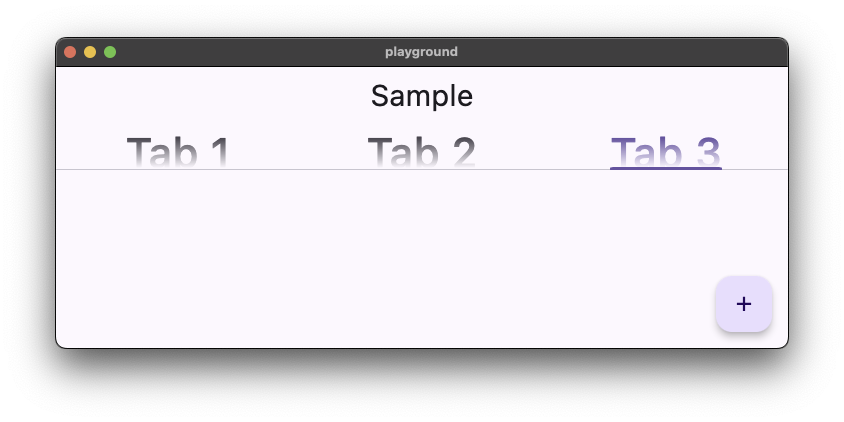 ### With `TabBar.textScaler` ```dart bottom: const TabBar( textScaler: TextScaler.linear(2.0), tabs: <Widget>[ Tab(text: 'Tab 1'), Tab(text: 'Tab 2'), Tab(text: 'Tab 3'), ], ), ``` 