 ea83a6a072
## Description
This pull request fixes VoiceOver tab activation by adding tappable
behavior to the SemanticTab class in the Flutter web engine. The fix
ensures that tabs can be properly activated using assistive technology
commands like VoiceOver's ctrl-option-space, making tab navigation fully
accessible for screen reader users.

## Before
When using VoiceOver to navigate tabs in a Flutter web app, users were
unable to activate tabs using the standard VoiceOver activation command
(ctrl-option-space). The SemanticTab class was missing the Tappable
semantic behavior that enables assistive technology interaction, causing
screen readers to treat tabs as non-interactive elements despite having
tap handlers in the Flutter framework.

**Before behavior:**
https://tab-0605-before.web.app/
- Navigate to a tab using VoiceOver (ctrl-option-arrow)
- Attempt to activate the tab with ctrl-option-space
- Tab does not respond to activation command
- Users cannot switch between tabs using assistive technology

## After
VoiceOver and other screen reader users can now properly activate tabs
using standard assistive technology commands. Tabs respond correctly to
ctrl-option-space and other activation gestures, providing full keyboard
accessibility for tab navigation.

**After behavior:**
https://tab-0605-after.web.app/
- Navigate to a tab using VoiceOver (ctrl-option-arrow)
- Activate the tab with ctrl-option-space
- Tab switches correctly, displaying the associated tab panel
- Consistent behavior across all assistive technologies

## Changes Made
- Added `addTappable()` call to `SemanticTab` constructor in `tabs.dart`
- Added test case "tab with tap action" to verify DOM elements receive
the `flt-tappable` attribute
- Ensures tabs with `hasTap: true` are properly marked as interactive
for assistive technologies

## Testing
Added unit test that verifies:
- Tabs with tap actions receive the `flt-tappable` DOM attribute
- SemanticTab properly integrates with the existing tappable behavior
system

## Issue Fixed
This PR addresses GitHub Issue #169279, which reports that VoiceOver
doesn't allow users to click tabs in Flutter web applications.


## Pre-launch Checklist

- [x] I read the [Contributor Guide] and followed the process outlined
there for submitting PRs.
- [x] I read the [Tree Hygiene] wiki page, which explains my
responsibilities.
- [x] I read and followed the [Flutter Style Guide], including [Features
we expect every widget to implement].
- [x] I signed the [CLA].
- [x] I listed at least one issue that this PR fixes in the description
above.
- [x] I updated/added relevant documentation (doc comments with `///`).
- [x] I added new tests to check the change I am making, or this PR is
[test-exempt].
- [x] I followed the [breaking change policy] and added [Data Driven
Fixes] where supported.
- [x] All existing and new tests are passing.






Flutter is Google's SDK for crafting beautiful, fast user experiences for mobile, web, and desktop from a single codebase. Flutter works with existing code, is used by developers and organizations around the world, and is free and open source.
Documentation
For announcements about new releases, follow the flutter-announce@googlegroups.com mailing list. Our documentation also tracks breaking changes across releases.
Terms of service
The Flutter tool may occasionally download resources from Google servers. By downloading or using the Flutter SDK, you agree to the Google Terms of Service: https://policies.google.com/terms
For example, when installed from GitHub (as opposed to from a prepackaged
archive), the Flutter tool will download the Dart SDK from Google servers
immediately when first run, as it is used to execute the flutter tool itself.
This will also occur when Flutter is upgraded (e.g. by running the flutter upgrade command).
About Flutter
We think Flutter will help you create beautiful, fast apps, with a productive, extensible and open development model, whether you're targeting iOS or Android, web, Windows, macOS, Linux or embedding it as the UI toolkit for a platform of your choice.
Beautiful user experiences
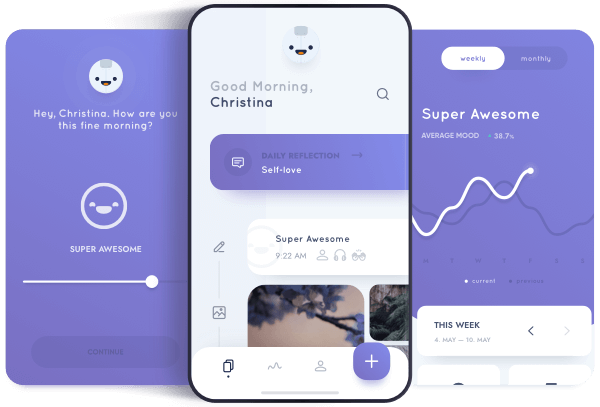
We want to enable designers to deliver their full creative vision without being forced to water it down due to limitations of the underlying framework. Flutter's layered architecture gives you control over every pixel on the screen and its powerful compositing capabilities let you overlay and animate graphics, video, text, and controls without limitation. Flutter includes a full set of widgets that deliver pixel-perfect experiences whether you're building for iOS (Cupertino) or other platforms (Material), along with support for customizing or creating entirely new visual components.
Fast results
Flutter is fast. It's powered by hardware-accelerated 2D graphics libraries like Skia (which underpins Chrome and Android) and Impeller. We architected Flutter to support glitch-free, jank-free graphics at the native speed of your device.
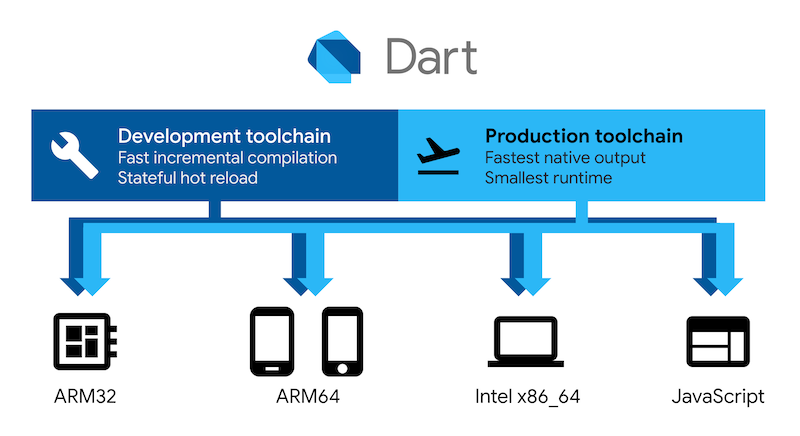
Flutter code is powered by the world-class Dart platform, which enables compilation to 32-bit and 64-bit ARM machine code for iOS and Android, JavaScript and WebAssembly for the web, as well as Intel x64 and ARM for desktop devices.
Productive development
Flutter offers stateful hot reload, allowing you to make changes to your code and see the results instantly without restarting your app or losing its state.

Extensible and open model
Flutter works with any development tool (or none at all), and also includes editor plug-ins for both Visual Studio Code and IntelliJ / Android Studio. Flutter provides tens of thousands of packages to speed your development, regardless of your target platform. And accessing other native code is easy, with support for both FFI (on Android, on iOS, on macOS, and on Windows) as well as platform-specific APIs.
Flutter is a fully open-source project, and we welcome contributions. Information on how to get started can be found in our contributor guide.