 e768c92fbc
* Update packages.

* Add many more global analyses.

* Catch trailing spaces and trailing newlines in all text files.
  Before we were only checking newly added files, but that means we
  missed some.

* Port the trailing spaces logic to work on Windows too.

* Correct all the files with trailing spaces and newlines.

* Refactor some of the dev/bots logic into a utils.dart library.
  Notably, the "exit" and "print" shims for testing are now usable
  from test.dart, analyze.dart, and run_command.dart.

* Add an "exitWithError" function that prints the red lines and
  then exits. This is the preferred way to exit from test.dart,
  analyze.dart, and run_command.dart.

* More consistency in the output of analyze.dart.

* Refactor analyze.dart to use the _allFiles file enumerating logic
  more widely.

* Add some double-checking logic to the _allFiles logic to catch
  cases where changes to that logic end up catching fewer files
  than expected (helps prevent future false positives).

* Add a check to prevent new binary files from being added to
  the repository. Grandfather in the binaries that we've already
  added.

* Update all the dependencies (needed because we now import crypto in
  dev/bots/analyze.dart).
Integration test for touch events on embedded Android views
This test verifies that the synthesized motion events that get to embedded Android view are equal to the motion events that originally hit the FlutterView.
The test app's Android code listens to MotionEvents that get to FlutterView and to an embedded Android view and sends them over a platform channel to the Dart code where the events are matched.
This is what the app looks like:
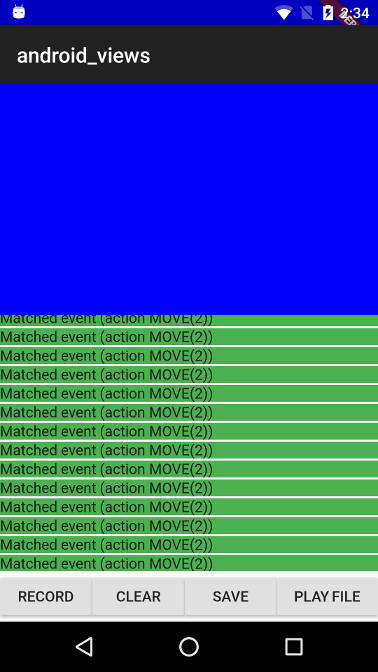
The blue part is the embedded Android view, because it is positioned at the top left corner, the coordinate systems for FlutterView and for the embedded view's virtual display has the same origin (this makes the MotionEvent comparison easier as we don't need to translate the coordinates).
The app includes the following control buttons:
- RECORD - Start listening for MotionEvents for 3 seconds, matched/unmatched events are displayed in the listview as they arrive.
- CLEAR - Clears the events that were recorded so far.
- SAVE - Saves the events that hit FlutterView to a file.
- PLAY FILE - Send a list of events from a bundled asset file to FlutterView.
A recorded touch events sequence is bundled as an asset in the assets_for_android_view package which lives in the goldens repository.
When running this test with flutter drive the record touch sequences is
replayed and the test asserts that the events that got to FlutterView are
equivalent to the ones that got to the embedded view.