 9e9f48dabb
* Create new TextField attribute to control maxLength behaviour

* Create test case for maxLinesIncrementalHeight

* fix maxLinesIncrementalHeight set method

* fix editable_test.dart

* Just introducing some proposed API additions, renaming to expands

* Pass minLines and expands through to child widgets and validate

* minLines can't be null, and expands can't be true when maxLines is 1

* Implement minLines and maxLines height sizing logic

* Simplify minLines validation logic

* expands parameter proof of concept

* min/max mixup bug fix, and tests work with expands false

* Test expands=true cases, and fix textPainter.height being out of date

* Test all behavior matrix cases

* min/max assertion more strict, can't be equal

* Tests work that were missing expands serialization

* Action sheet tests no longer fail due to rounding error

* TextFieldFocus test no longer mysteriously fails

* TODOs for making expands nullable. Will depend on how Expanded wrapping works

* Expanded growth happens when expanded is true and maxLines is null

* Test Expanded wrapper

* No more overflow when wrapped in Expanded

* Docs improvements

* expands can be null

* Simplify error cases to support existing behavior

* Docs examples and other docs cleanup

* Expansion up to perfectly meet the parent size

* Fix analyze null error

* Fix test after move to nullable expands

* minLines defaults to null

* expands is now exclusively for expanding to parent height and not growth between min and max

* _layout rewritten to handle max height. Need to fix prefix tests and
reenable expands

* Tests for textfield overflowing parent

* layoutLineBox is documented and private

* expands works in new _layout

* _layout return numbers seem to perfectly match original _layout

* inputWidth comment after trying it out and failing tests

* Fix analyze errors

* WIP prefix/suffix do affect height

* Prefix/suffix and icons affect height, tests pass, but I'm still visually verifying identical to original

* Tall prefix test that verifies pixel perfect layout

* Fix overflowing edge case and test it

* Clean up comments, old code, and todos

* Changing _expands causes relayout. Wasnt able to figure out how to test though...

* Clean up code review comments

* Fix misalignment when tall prefix and border, and clean up related test

* Simple code review cleanup

* Bring back inputWidth to _layout method

* Fix rounding errors showing up in mac tests

* Fix flake by reordering tests. Without this, the dreaded intrinsicwidth flake is reproducible 50% of the time on my machine.

* Fix more rounding error mac tests
Flutter 


Build beautiful native apps in record time
Flutter is Google’s mobile app SDK for crafting high-quality native interfaces on iOS and Android in record time. Flutter works with existing code, is used by developers and organizations around the world, and is free and open source.
Documentation
Main site: flutter.io
For announcements about new releases and breaking changes, follow the flutter-announce@googlegroups.com mailing list.
Fast development
Flutter's hot reload helps you quickly and easily experiment, build UIs, add features, and fix bugs. Experience sub-second reload times, without losing state, on emulators, simulators, and hardware for iOS and Android.
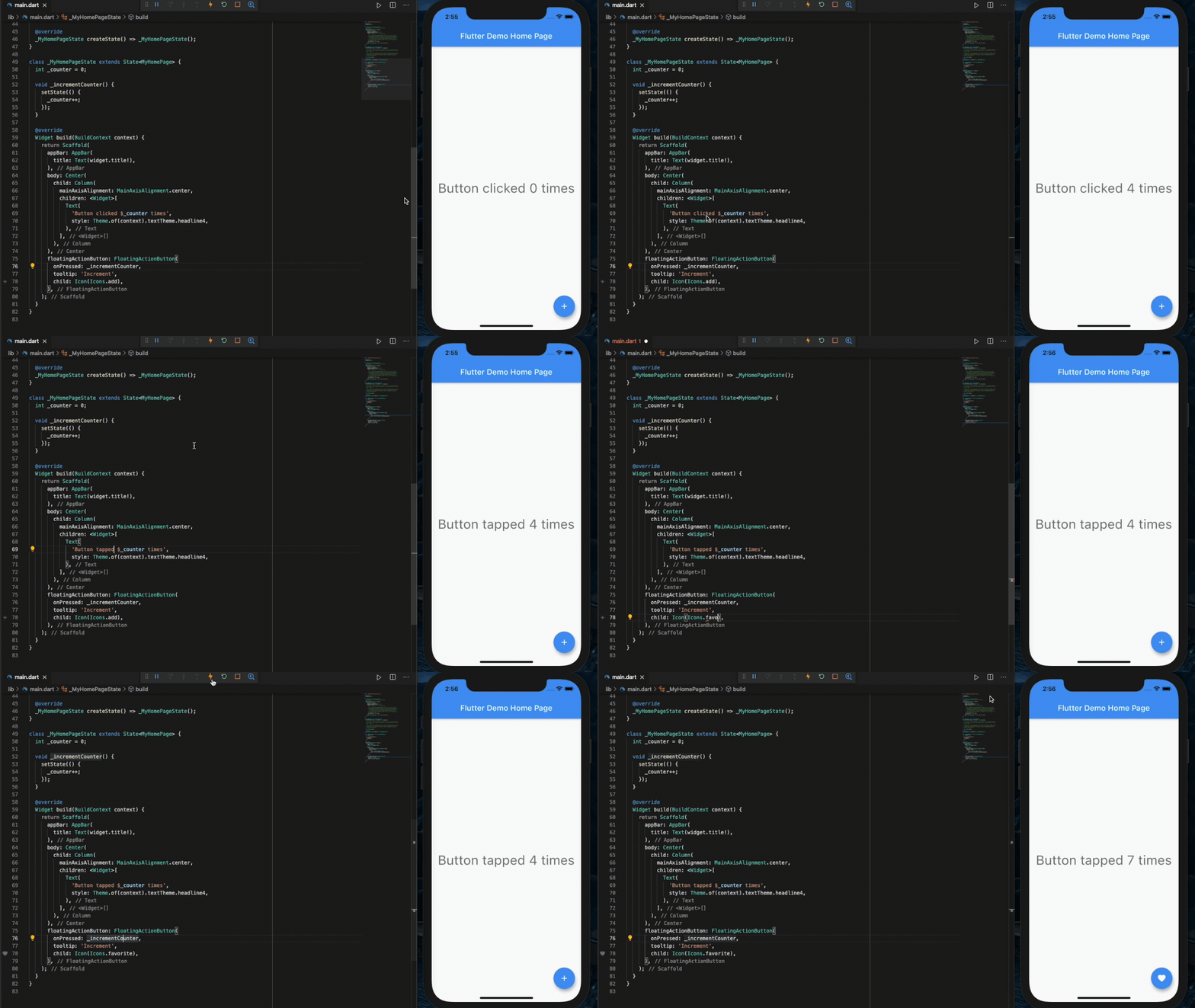
Expressive and flexible UI
Quickly ship features with a focus on native end-user experiences. Layered architecture allows full customization, which results in incredibly fast rendering and expressive and flexible designs.
Delight your users with Flutter's built-in beautiful Material Design and Cupertino (iOS-flavor) widgets, rich motion APIs, smooth natural scrolling, and platform awareness.


Browse the widget catalog.
Modern, reactive framework
Easily compose your UI with Flutter's modern functional-reactive framework and rich set of platform, layout, and foundation widgets. Solve your tough UI challenges with powerful and flexible APIs for 2D, animation, gestures, effects, and more.
class CounterState extends State<Counter> {
  int counter = 0;

  void increment() {
    // Tells the Flutter framework that state has changed,
    // so the framework can run build() and update the display.
    setState(() {
      counter++;
    });
  }

  Widget build(BuildContext context) {
    // This method is rerun every time setState is called.
    // The Flutter framework has been optimized to make rerunning
    // build methods fast, so that you can just rebuild anything that
    // needs updating rather than having to individually change
    // instances of widgets.
    return Row(
      children: <Widget>[
        RaisedButton(
          onPressed: increment,
          child: Text('Increment'),
        ),
        Text('Count: $counter'),
      ],
    );
  }
}
Browse the widget catalog and learn more about the functional-reactive framework.
Access native features and SDKs
Make your app come to life with platform APIs, 3rd party SDKs, and native code. Flutter lets you reuse your existing Java/Kotlin and ObjC/Swift code, and access native features and SDKs on Android and iOS.
Accessing platform features is easy. Here is a snippet from our interop example:
Future<void> getBatteryLevel() async {
  var batteryLevel = 'unknown';
  try {
    int result = await methodChannel.invokeMethod('getBatteryLevel');
    batteryLevel = 'Battery level: $result%';
  } on PlatformException {
    batteryLevel = 'Failed to get battery level.';
  }
  setState(() {
    _batteryLevel = batteryLevel;
  });
}
Learn how to use packages or write platform channels to access native code, APIs, and SDKs.
Unified app development
Flutter has the tools and libraries to help you easily bring your ideas to life on iOS and Android. If you don't have any mobile development experience, Flutter is an easy and fast way to build beautiful mobile apps. If you are an experienced iOS or Android developer, you can use Flutter for your views and leverage much of your existing Java/Kotlin/ObjC/Swift investment.
Learn more about what makes Flutter special in the technical overview.
More resources
Join us in our Gitter chat room or join our public mailing list, flutter-dev@googlegroups.com.
How to contribute
To join the team working on Flutter, see our contributor guide.