 1ef0eadb45
* Support Flutter Driver test for Flutter Web application.

* Support Flutter Driver test for Flutter Web application.

* Fix documentation issues.

* Support Flutter Driver test for Flutter Web application.

* Fix documentation.

* Remove unused file from dartdoc check.

* Sync to date.

* Revert change to dartdoc.

* Address comments.

* Apply suggestions from code review

Co-Authored-By: Jonah Williams <jonahwilliams@google.com>

* Update copyrights.

* Update allowed list for browsers.

* Verify command line arguments for Drive command is correctly parsed.

* Make waitUntilFirstFrameRasterized throw unimplementedError for Flutter Web Driver.

* Add comment for why sync WebDriver is used.

* Update documentations.

* Add more unit tests and update documentation.

* Configure test.dart so that web_extension_test will be executed with --platform=chrome.

* Revert unnecessary changes.

* Add new file path for Windows to blacklist.

* Reconstruct the structure of flutter_driver/test/src folder to remove filtering logic in dev/bots/test.dart/

* Fix path to web_extension_test.dart.

* Add instructions for how to use WebFlutterDriver.

* Update getLayerTree to use sendCommand instead of _sendCommand.

* Update pubspec files.
Integration test for touch events on embedded Android views
This test verifies that the synthesized motion events that get to embedded Android view are equal to the motion events that originally hit the FlutterView.
The test app's Android code listens to MotionEvents that get to FlutterView and to an embedded Android view and sends them over a platform channel to the Dart code where the events are matched.
This is what the app looks like:
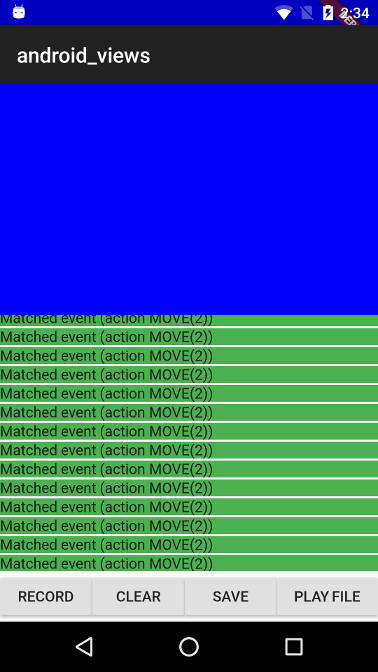
The blue part is the embedded Android view, because it is positioned at the top left corner, the coordinate systems for FlutterView and for the embedded view's virtual display has the same origin (this makes the MotionEvent comparison easier as we don't need to translate the coordinates).
The app includes the following control buttons:
- RECORD - Start listening for MotionEvents for 3 seconds, matched/unmatched events are displayed in the listview as they arrive.
- CLEAR - Clears the events that were recorded so far.
- SAVE - Saves the events that hit FlutterView to a file.
- PLAY FILE - Send a list of events from a bundled asset file to FlutterView.
A recorded touch events sequence is bundled as an asset in the assets_for_android_view package which lives in the goldens repository.
When running this test with flutter drive the record touch sequences is
replayed and the test asserts that the events that got to FlutterView are
equivalent to the ones that got to the embedded view.