 613e43c3ab
### Issue Link:
What is the link to the issue this cherry-pick is addressing?

https://github.com/flutter/flutter/issues/116493

Dependent on engine-side CP https://github.com/flutter/engine/pull/54513

### Changelog Description:
Flutter now bundles iOS framework debugging symbols in app archives built with `flutter build ipa` or Xcode's *Product > Archive* command. This eliminates the need for manual download/bundling of Flutter debug symbols for release build crash log symbolication, and as of Xcode 16, these symbols are now required for app archives to pass App Store validation.

### Impact Description:
Without these bundled symbols, iOS App Store validation fails for Flutter apps under Xcode 16, making it impossible for developers to publish to the iOS App Store.

### Workaround:
Use Xcode 15.

### Risk:
What is the risk level of this cherry-pick?

The change itself is quite simple and in the case where we can't find a bundled Flutter.framework.dSYM inside the flutter tool's artifact cache, we simply fall back to the previous behaviour of not copying it.

In the case where the Flutter.framework.dSYM is found in the artifact cache (which is the expected case), we simply perform a copy using `rsync` as we do with Flutter.framework itself. This is also relatively low-risk.

Further, this change has been verified by @cbracken using Flutter's own organisation on the App Store, and by [a non-Google developer](https://github.com/flutter/flutter/issues/116493#issuecomment-2282226089).

However, I'm flagging as medium-risk since this change has only had two days of bake time for us to collect feedback, and while I expect there's a very low likelihood of an issue, we haven't yet got sufficient feedback to say definitively that we haven't missed any edge-cases.

### Test Coverage:
Are you confident that your fix is well-tested by automated tests?

### Validation Steps:
What are the steps to validate that this fix works?

The developer performing these steps will need to have *App Manager* permissions for their development team in App Store Connect.

1. Install Xcode 16 beta.
2. Make Xcode 16 beta the default on your machine: `xcode-select -s /Applications/Xcode-beta.app`
3. Create the default clickcounter app: `flutter create clickcounter`
4. Open `ios/Runner.xcworkspace` in Xcode beta 16.
5. In the project explorer sidebar, select the *Runner* app, then select the *Signing & Capabilities* tab.
6. Set the bundle identifier to the bundle identifier of your app as configured in App Store Connect.
7. From the team dropdown, select a team for which you have developer permissions.
8. From the menu bar, select *Product > Archive*. This will open the Organizer window. You can open it again later from the *Window* menu or via Command-Option-Shift-O.
9. Select the archive, then click *Validate App.*




Flutter is Google's SDK for crafting beautiful, fast user experiences for mobile, web, and desktop from a single codebase. Flutter works with existing code, is used by developers and organizations around the world, and is free and open source.
Documentation
For announcements about new releases, follow the flutter-announce@googlegroups.com mailing list. Our documentation also tracks breaking changes across releases.
Terms of service
The Flutter tool may occasionally download resources from Google servers. By downloading or using the Flutter SDK, you agree to the Google Terms of Service: https://policies.google.com/terms
For example, when installed from GitHub (as opposed to from a prepackaged
archive), the Flutter tool will download the Dart SDK from Google servers
immediately when first run, as it is used to execute the flutter tool itself.
This will also occur when Flutter is upgraded (e.g. by running the flutter upgrade command).
About Flutter
We think Flutter will help you create beautiful, fast apps, with a productive, extensible and open development model, whether you're targeting iOS or Android, web, Windows, macOS, Linux or embedding it as the UI toolkit for a platform of your choice.
Beautiful user experiences
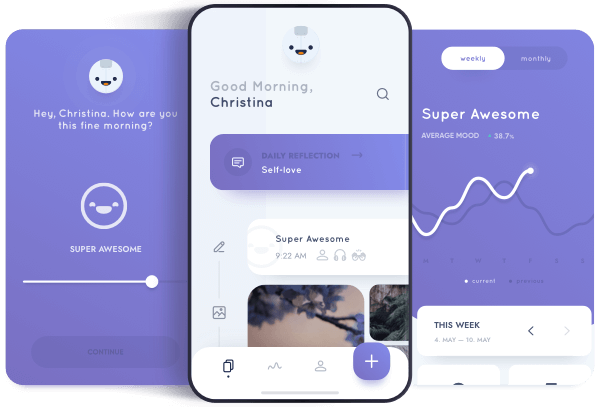
We want to enable designers to deliver their full creative vision without being forced to water it down due to limitations of the underlying framework. Flutter's layered architecture gives you control over every pixel on the screen and its powerful compositing capabilities let you overlay and animate graphics, video, text, and controls without limitation. Flutter includes a full set of widgets that deliver pixel-perfect experiences whether you're building for iOS (Cupertino) or other platforms (Material), along with support for customizing or creating entirely new visual components.
Fast results
Flutter is fast. It's powered by hardware-accelerated 2D graphics libraries like Skia (that underpins Chrome and Android) and Impeller. We architected Flutter to support glitch-free, jank-free graphics at the native speed of your device.
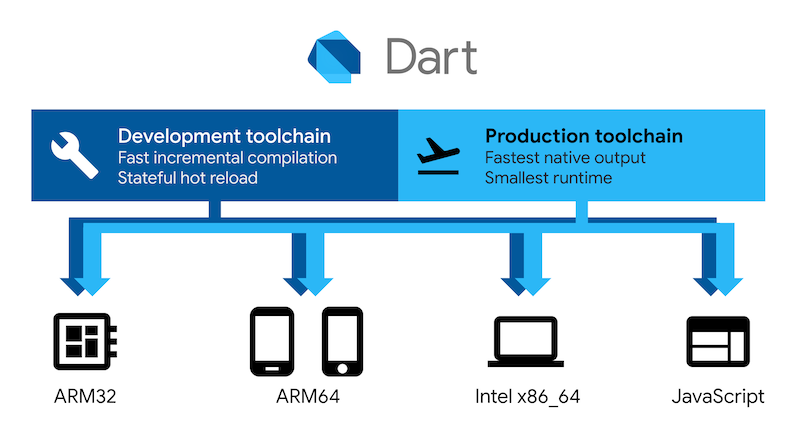
Flutter code is powered by the world-class Dart platform, which enables compilation to 32-bit and 64-bit ARM machine code for iOS and Android, JavaScript and WebAssembly for the web, as well as Intel x64 and ARM for desktop devices.
Productive development
Flutter offers stateful hot reload, allowing you to make changes to your code and see the results instantly without restarting your app or losing its state.

Extensible and open model
Flutter works with any development tool (or none at all), and also includes editor plug-ins for both Visual Studio Code and IntelliJ / Android Studio. Flutter provides tens of thousands of packages to speed your development, regardless of your target platform. And accessing other native code is easy, with support for both FFI (on Android, on iOS, on macOS, and on Windows) as well as platform-specific APIs.
Flutter is a fully open-source project, and we welcome contributions. Information on how to get started can be found in our contributor guide.