 4e13cd07bb
**tl;dr:** A `RenderObject` can only be an effective semantics boundary if it actually owned a `SemanticsNode` in the previous tree generation.

When using the `BlockSemantics` widget it is possible to introduce `RenderObject`s that are configured to be a semantics boundary, but because their semantics are blocked by `BlockSemantics` they will not (immediately) end up owning a `SemanticsNode`. When now a descendant of such a node-less semantics boundary marks itself as needing a semantics update we walk up the tree until we find the closest semantics boundary (which is our node-less `RenderObject`). We now incorrectly assume that this semantics boundary has a valid `SemanticsNode` and only regenerate the semantics subtree below this node. However, because the identified semantics boundary doesn't actually own a valid `SemanticsNode` asserts are throwing (e.g. `Child with id xx is invisible and should not be added to tree.`).

To fix this problem, we can just abort the walk if we reach a semantics boundary without a semantics node because (for now) we know that the semantics information of this branch will not make it into the final semantics tree.
If the semantics block is ever removed, the current algorithm re-generates the semantics for the entire branch and the semantics will be up-to-date then despite the abort. I've added a test to verify this to make sure it continues to work even when we change the algorithm.

Fixes https://github.com/flutter/flutter/issues/13326.
/cc @gavindoughtie FYI
 Flutter


A new mobile app SDK to help developers and designers build modern mobile apps for iOS and Android. Flutter is an alpha, open-source project.
Documentation
- Main site: flutter.io
- Install
- Get started
- Contribute
Fast development
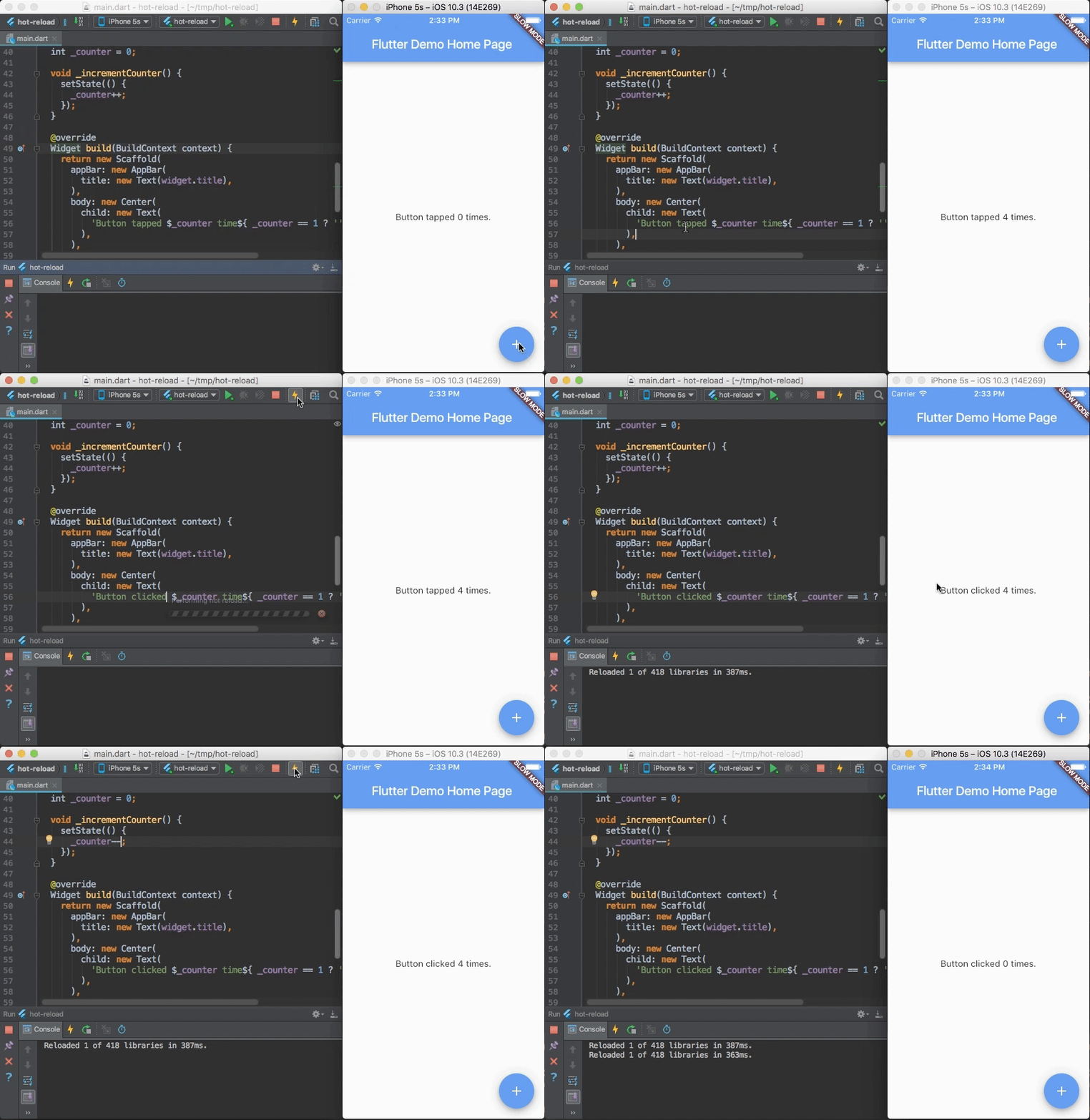
Flutter's hot reload helps you quickly and easily experiment, build UIs, add features, and fix bugs faster. Experience sub-second reload times, without losing state, on emulators, simulators, and hardware for iOS and Android.
Expressive, beautiful UIs
Delight your users with Flutter's built-in beautiful Material Design and Cupertino (iOS-flavor) widgets, rich motion APIs, smooth natural scrolling, and platform awareness.


Browse the widget catalog.
Modern, reactive framework
Easily compose your UI with Flutter's modern functional-reactive framework and rich set of platform, layout, and foundation widgets. Solve your tough UI challenges with powerful and flexible APIs for 2D, animation, gestures, effects, and more.
class CounterState extends State<Counter> {
  int counter = 0;

  void increment() {
    // Tells the Flutter framework that state has changed,
    // so the framework can run build() and update the display.
    setState(() {
      counter++;
    });
  }

  Widget build(BuildContext context) {
    // This method is rerun every time setState is called.
    // The Flutter framework has been optimized to make rerunning
    // build methods fast, so that you can just rebuild anything that
    // needs updating rather than having to individually change
    // instances of widgets.
    return new Row(
      children: <Widget>[
        new RaisedButton(
          onPressed: increment,
          child: new Text('Increment'),
        ),
        new Text('Count: $counter'),
      ],
    );
  }
}
Browse the widget catalog and learn more about the functional-reactive framework.
Access native features and SDKs
Make your app come to life with platform APIs, 3rd party SDKs, and native code. Flutter lets you reuse your existing Java/Kotlin and ObjC/Swift code, and access native features and SDKs on Android and iOS.
Accessing platform features is easy. Here is a snippet from our interop example:
Future<Null> getBatteryLevel() async {
  var batteryLevel = 'unknown';
  try {
    int result = await methodChannel.invokeMethod('getBatteryLevel');
    batteryLevel = 'Battery level: $result%';
  } on PlatformException {
    batteryLevel = 'Failed to get battery level.';
  }
  setState(() {
    _batteryLevel = batteryLevel;
  });
}
Learn how to use packages, or write platform channels, to access native code, APIs, and SDKs.
Unified app development
Flutter has the tools and libraries to help you easily bring your ideas to life on iOS and Android. If you don't have any mobile development experience, Flutter is an easy and fast way to build beautiful mobile apps. If you are an experienced iOS or Android developer, you can use Flutter for your views and leverage much of your existing Java/Kotlin/ObjC/Swift investment.
Build
- Beautiful app UIs
- Rich 2D GPU-accelerated APIs
- Reactive framework
- Animation/motion APIs
- Material Design and iOS widgets
- Fluid coding experience
- Sub-second, stateful hot reload
- IntelliJ: refactor, code completion, etc
- Dart language and core libs
- Package manager
- Full-featured apps
- Interop with mobile OS APIs & SDKs
- Gradle/Java/Kotlin
- Cocoapods/ObjC/Swift
Optimize
- Test
- Unit testing
- Integration testing
- On-device testing
- Debug
- IDE debugger
- Web-based debugger
- async/await aware
- Expression evaluator
- Profile
- Timeline
- CPU and memory
- In-app perf charts
Deploy
- Compile
- Native ARM code
- Dead code elimination
- Distribution
- App Store
- Play Store
Learn more about what makes Flutter special in the technical overview.
Join us in our Gitter chat room or join our public mailing list, flutter-dev@googlegroups.com.