 9d96df2364
WIP

Commits separated as follows:
- Update lints in analysis_options files
- Run `dart fix --apply`
- Clean up leftover analysis issues
- Run `dart format .` in the right places.

Local analysis and testing passes. Checking CI now.

Part of https://github.com/flutter/flutter/issues/178827
- Adoption of flutter_lints in examples/api coming in a separate change
(cc @loic-sharma)

## Pre-launch Checklist

- [ ] I read the [Contributor Guide] and followed the process outlined
there for submitting PRs.
- [ ] I read the [Tree Hygiene] wiki page, which explains my
responsibilities.
- [ ] I read and followed the [Flutter Style Guide], including [Features
we expect every widget to implement].
- [ ] I signed the [CLA].
- [ ] I listed at least one issue that this PR fixes in the description
above.
- [ ] I updated/added relevant documentation (doc comments with `///`).
- [ ] I added new tests to check the change I am making, or this PR is
[test-exempt].
- [ ] I followed the [breaking change policy] and added [Data Driven
Fixes] where supported.
- [ ] All existing and new tests are passing.

If you need help, consider asking for advice on the #hackers-new channel
on [Discord].

**Note**: The Flutter team is currently trialing the use of [Gemini Code
Assist for
GitHub](https://developers.google.com/gemini-code-assist/docs/review-github-code).
Comments from the `gemini-code-assist` bot should not be taken as
authoritative feedback from the Flutter team. If you find its comments
useful you can update your code accordingly, but if you are unsure or
disagree with the feedback, please feel free to wait for a Flutter team
member's review for guidance on which automated comments should be
addressed.

<!-- Links -->
[Contributor Guide]:
https://github.com/flutter/flutter/blob/main/docs/contributing/Tree-hygiene.md#overview
[Tree Hygiene]:
https://github.com/flutter/flutter/blob/main/docs/contributing/Tree-hygiene.md
[test-exempt]:
https://github.com/flutter/flutter/blob/main/docs/contributing/Tree-hygiene.md#tests
[Flutter Style Guide]:
https://github.com/flutter/flutter/blob/main/docs/contributing/Style-guide-for-Flutter-repo.md
[Features we expect every widget to implement]:
https://github.com/flutter/flutter/blob/main/docs/contributing/Style-guide-for-Flutter-repo.md#features-we-expect-every-widget-to-implement
[CLA]: https://cla.developers.google.com/
[flutter/tests]: https://github.com/flutter/tests
[breaking change policy]:
https://github.com/flutter/flutter/blob/main/docs/contributing/Tree-hygiene.md#handling-breaking-changes
[Discord]:
https://github.com/flutter/flutter/blob/main/docs/contributing/Chat.md
[Data Driven Fixes]:
https://github.com/flutter/flutter/blob/main/docs/contributing/Data-driven-Fixes.md
Integration test for touch events on embedded Android views
This test verifies that the synthesized motion events that get to embedded Android view are equal to the motion events that originally hit the FlutterView.
The test app's Android code listens to MotionEvents that get to FlutterView and to an embedded Android view and sends them over a platform channel to the Dart code where the events are matched.
This is what the app looks like:
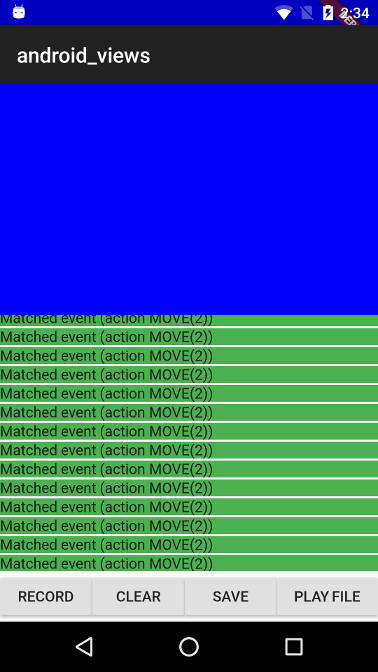
The blue part is the embedded Android view because it is positioned at the top left corner, the coordinate systems for FlutterView and for the embedded view's virtual display has the same origin (this makes the MotionEvent comparison easier as we don't need to translate the coordinates).
The app includes the following control buttons:
- RECORD - Start listening for MotionEvents for 3 seconds, matched/unmatched events are displayed in the listview as they arrive.
- CLEAR - Clears the events that were recorded so far.
- SAVE - Saves the events that hit FlutterView to a file.
- PLAY FILE - Send a list of events from a bundled asset file to FlutterView.
A recorded touch events sequence is bundled as an asset in the assets_for_android_view package which lives in the goldens repository.
When running this test with flutter drive the record touch sequences is
replayed and the test asserts that the events that got to FlutterView are
equivalent to the ones that got to the embedded view.