 2d623278e7
This moves the app template more toward being a more generic starting
point for any Flutter application, eliminating some hard-code
assumptions about there being a single window/engine pair that is
directly bound to the life of the application:
- Moves the runloop into its own class, making it capable of servicing
  any number of engine instances.
- Moves the logic for setting up a window containing only a Flutter view
  into a window subclass for ease of re-use.
- Makes quit-on-window-close an optional property. (Long term this
  should be even more generic, like a quit-when-last-window-closes
  option, but this is a short-term improvement that removes the binding
  between the runloop and the window).
- Allows for multiple instances of Win32Window to exist without issues
  relating to the window class registration.

Since there are getting to be a non-trivial number of files associated
with the runner, this moves the source into a runner/ directory, as is
already done on some other platforms.

Note that creating multiple Flutter windows at the same time still
doesn't work correctly even with this change, but this addresses some of
the known issues, and makes it easier to test in the future (e.g., for
debugging engine-level issues with multiple instances).

Fixes #45397
Integration test for touch events on embedded Android views
This test verifies that the synthesized motion events that get to embedded Android view are equal to the motion events that originally hit the FlutterView.
The test app's Android code listens to MotionEvents that get to FlutterView and to an embedded Android view and sends them over a platform channel to the Dart code where the events are matched.
This is what the app looks like:
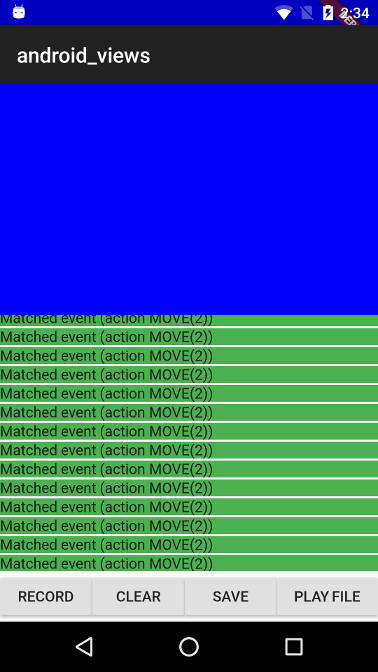
The blue part is the embedded Android view, because it is positioned at the top left corner, the coordinate systems for FlutterView and for the embedded view's virtual display has the same origin (this makes the MotionEvent comparison easier as we don't need to translate the coordinates).
The app includes the following control buttons:
- RECORD - Start listening for MotionEvents for 3 seconds, matched/unmatched events are displayed in the listview as they arrive.
- CLEAR - Clears the events that were recorded so far.
- SAVE - Saves the events that hit FlutterView to a file.
- PLAY FILE - Send a list of events from a bundled asset file to FlutterView.
A recorded touch events sequence is bundled as an asset in the assets_for_android_view package which lives in the goldens repository.
When running this test with flutter drive the record touch sequences is
replayed and the test asserts that the events that got to FlutterView are
equivalent to the ones that got to the embedded view.