This reverts commit
d24c01bd0c.

The original change was reverted because it caused some apps to get
stuck on the splash screen on some phones.

An investigation determined that this was due to a rounding error.
Example: The device reports a physical size of 1008.0 x 2198.0 with a
dpr of 1.912500023841858. Flutter would translate that to a logical size
of 527.0588169589221 x 1149.2810314243163 and use that as the input for
its layout algorithm. Since the constraints here are tight, the layout
algorithm would determine that the resulting logical size of the root
render object must be 527.0588169589221 x 1149.2810314243163.
Translating this back to physical pixels by applying the dpr resulted in
a physical size of 1007.9999999999999 x 2198.0 for the frame. Android
now rejected that frame because it didn't match the expected size of
1008.0 x 2198.0 and since no frame had been rendered would never take
down the splash screen.

Prior to dynamically sized views, this wasn't an issue because we would
hard-code the frame size to whatever the requested size was.

Changes in this PR over the original PR:

* The issue has been fixed now by constraining the calculated physical
size to the input physical constraints which makes sure that we always
end up with a size that is acceptable to the operating system.
* The `ViewConfiguration` was refactored to use the slightly more
convenient `BoxConstraints` over the `ViewConstraints` to represent
constraints. Both essentially represent the same thing, but
`BoxConstraints` are more powerful and we avoid a couple of translations
between the two by translating the` ViewConstraints` from the
`FlutterView` to `BoxConstraints` directly when the `ViewConfiguration`
is created.

All changes over the original PR are contained in the second commit of
this PR.

Fixes b/316813075
Part of https://github.com/flutter/flutter/issues/134501.
Fix and unskip the following CanvasKit tests:

- `test/painting/decoration_test.dart`
- `test/rendering/layers_test.dart`
- `test/widgets/app_overrides_test.dart`
Fixes https://github.com/flutter/flutter/issues/131435, https://github.com/flutter/flutter/issues/104594, https://github.com/flutter/flutter/issues/43400

Currently the method we use for text span hit testing `TextPainter.getPositionForOffset` always returns the closest `TextPosition`, even when the given offset is far away from the text.

The new TextPaintes method tells you the layout bounds `(width =  letterspacing / 2 + x_advance + letterspacing / 2, height = font ascent + font descent)` of a character, the PR changes the hit testing implementation such that a TextSpan is only considered hit if the point-down event landed in one of its character's layout bounds.

Potential issues:

In theory since the text is baseline aligned, we should use the max ascent and max descent of each character to calculate the height of the text span's hit-test region, in case some characters in the span have to fall back to a different font, but that will be slower and it typically doesn't make a huge difference.
This is a breaking change.
I want to build a widget that adds some extra functionality when the inner text overflow. So the problem occurred, I can't find an elegant way to determine if the text is overflowing.
So i expose `didExceedMaxLines` from `RenderParagraph`, I think it can make sense. Have there some advice?
Reverts flutter/flutter#139717
Initiated by: LongCatIsLooong
This change reverts the following previous change:
Original Description:
Fixes https://github.com/flutter/flutter/issues/131435, #104594, #43400
Needs https://github.com/flutter/engine/pull/48774 (to fix the web test failure).

Currently the method we use for text span hit testing `TextPainter.getPositionForOffset` always returns the closest `TextPosition`, even when the given offset is far away from the text.

The new TextPaintes method tells you the layout bounds (`width =  letterspacing / 2 + x_advance + letterspacing / 2`, `height = font ascent + font descent`) of a character, the PR changes the hit testing implementation such that a TextSpan is only considered hit if the point-down event landed in one of it's character's layout bounds.

Potential issues:

1. In theory since the text is baseline aligned, we should use the max ascent and max descent of each character to calculate the height of the text span's hit-test region, in case some characters in the span have to fall back to a different font, but that will be slower and it typically doesn't make a huge difference.

This is a breaking change. It also introduces a new finder and a new method `WidgetTester.tapOnText`: `await tester.tapOnText('string to match')` for ease of migration.
Fixes https://github.com/flutter/flutter/issues/131435, #104594, #43400
Needs https://github.com/flutter/engine/pull/48774 (to fix the web test failure).

Currently the method we use for text span hit testing `TextPainter.getPositionForOffset` always returns the closest `TextPosition`, even when the given offset is far away from the text.

The new TextPaintes method tells you the layout bounds (`width =  letterspacing / 2 + x_advance + letterspacing / 2`, `height = font ascent + font descent`) of a character, the PR changes the hit testing implementation such that a TextSpan is only considered hit if the point-down event landed in one of it's character's layout bounds.

Potential issues:

1. In theory since the text is baseline aligned, we should use the max ascent and max descent of each character to calculate the height of the text span's hit-test region, in case some characters in the span have to fall back to a different font, but that will be slower and it typically doesn't make a huge difference.

This is a breaking change. It also introduces a new finder and a new method `WidgetTester.tapOnText`: `await tester.tapOnText('string to match')` for ease of migration.
Towards https://github.com/flutter/flutter/issues/134501.

This change is based on https://github.com/flutter/engine/pull/48090. It changes the `RenderView` to be dynamically sized based on its content if the `FlutterView` it is configured with allows it (i.e. the `FlutterView` has loose `FlutterView.physicalConstraints`). For that, it uses those `physicalConstraints` as input to the layout algorithm by passing them on to its child (after translating them to logical constraints via the device pixel ratio). The resulting `Size` that the `RenderView` would like to be is then communicated back to the engine by passing it to the `FlutterView.render` call.

Tests will fail until https://github.com/flutter/engine/pull/48090 has rolled into the framework.
This updates the implementation to use the stopwatch from the Clock object and pipes it through to the TestWidgetsFlutterBinding so it will be kept in sync with FakeAsync.

Relands https://github.com/flutter/flutter/pull/138843 attempted to reland https://github.com/flutter/flutter/pull/137381 which attempted to reland #132291
Fixes https://github.com/flutter/flutter/issues/97761

1. The original change was reverted due to flakiness it introduced in tests that use fling gestures.
  * Using a mocked clock through the test binding fixes this now
2. It was reverted a second time because a change at tip of tree broke it, exposing memory leaks, but it was not rebased before landing.
  * These leaks are now fixed
3. It was reverted a third time, because we were so excellently quick to revert those other times, that we did not notice the broken benchmark that only runs in postsubmit.
  * The benchmark is now fixed
**What has been done?**
----------------------
Added new enumeration in `TableCellVerticalAlignment`, which sets the cell size to the same as the topmost cell. There are no noticeable problems in using it in all cells together, as there are in `TableCellVerticalAlignment.fill` which is made not to be used in all cells together because it has another purpose.
**Explanation of the logic**
----------------------
An assignment was made (which already existed in `TableCellVerticalAlignment.top; middle and bottom`) that assigns `rowHeight` the maximum double between the initialized height and the height of its child.

Basically, defining a minimum cell height based on its child, and letting each table row have its own height stipulated from the largest element, creating an `IntrinsicHeight` for TableCell automatically.

As the `TableCellVerticalAlignment` logic already provides for the use of the height of the largest cell in the row, it was possible to reuse this logic, and just not make the break statement that exists to fill in the calculation for `intrinsicHeight`.
Real example in an Android application after added enumeration
----------------------
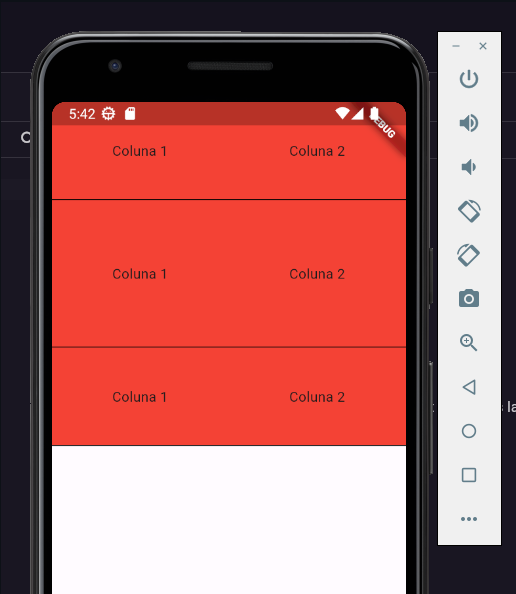
Opened issue
----------------------
FIX: #130261
Reverts flutter/flutter#137381
Initiated by: Piinks
This change reverts the following previous change:
Original Description:
This updates the implementation to use the stopwatch from the Clock object and piping it through to the TestWidgetsFlutterBinding so it will be kept in sync with FakeAsync.

Relands #132291
Fixes https://github.com/flutter/flutter/issues/97761

The change was reverted due to flakiness it introduced in tests that use fling gestures.
* https://github.com/flutter/flutter/issues/135728
Before this change, long-running post-frame callbacks wouldn't show up in the timeline at all.  This adds a timeline event for post-frame callbacks, with a debug flag that will add timeline events for each individual callback.

#testexempt -- we have no way to test calls to the timeline.
Some render box subclasses have a specific layout contract that is tightly coupled with other render box subclasses (e.g. two private classes in a local project file). In these cases, it is also possible that they use a constraints object that is a subclass of `BoxConstraints`. To allow for this, this change makes the `constraints` argument to `RenderBox.computeDryLayout()` a covariant argument.

For completeness' sake, this updates the other render objects in the rendering package to also use the covariant keyword for this argument.
This change collapses the selection at the clicked/tapped location on single click down for desktop platforms, and on single click/tap up for mobile platforms to match native.

This is a change from how `SelectionArea` previously worked. Before this change a single click down would clear the selection. From observing a native browser it looks like when tapping on static text the selection is not cleared but collapsed. A user can still attain the selection from static text using the `window.getSelection` API.

https://jsfiddle.net/juepasn3/11/ You can try this demo out here to observe this behavior yourself. When clicking on static text the selection will change.

This change also allows `Paragraph.selections` to return selections that are collapsed. This for testing purposes to confirm where the selection has been collapsed.

Partially fixes: #129583
Fixes https://github.com/flutter/flutter/issues/59413

This relocates `mock_canvas.dart` and `recording_canvas.dart` from `flutter/test/rendering` to `flutter_test`.

The testing functionality afforded by mock_canvas should be available to everyone, not just the framework. :)

mock_canvas.dart needed a bit of cleanup - things like formatting and super parameters.
Fixes https://github.com/flutter/flutter/issues/131467

An error in the flex methods of min and max column width would produce different results based on the position of the widths that were provided:
`MaxColumnWidth(a, b) != MaxColumnWidth(b, a)`

This fixes that.
Deprecate `textScaleFactor` in favor of `textScaler`, in preparation for Android 14 [Non-linear font scaling to 200%](https://developer.android.com/about/versions/14/features#non-linear-font-scaling). The `TextScaler` class can be moved to `dart:ui` in the future, if we decide to use the Android platform API or AndroidX to get the scaling curve instead of hard coding the curve in the framework.

I haven't put the Flutter version in the deprecation message so the analyzer checks are failing. Will do so after I finish the migration guide.

**Why `TextScaler.textScaleFactor`**
The author of a `TextScaler` subclass should provide a fallback `textScaleFactor`. By making `TextScaler` also contain the `textScaleFactor` information it also makes it easier to migrate: if a widget overrides `MediaQueryData.textScaler` in the tree, for unmigrated widgets in the subtree it would also have to override `MediaQueryData.textScaleFactor`, and that makes it difficult to remove `MediaQueryData.textScaleFactor` in the future.

## A full list of affected APIs in this PR

Deprecated: The method/getter/setter/argument is annotated with a `@Deprecated()` annotation in this PR, and the caller should replace it with `textScaler` instead. Unless otherwise specified there will be a Flutter fix available to help with migration but it's still recommended to migrate case-by-case.
**Replaced**:  The method this `textScaleFactor` argument belongs to is rarely called directly by user code and is not overridden by any of the registered custom tests, so the argument is directly replaced by `TextScaler`.
**To Be Deprecated**:  The method/getter/setter/argument can't be deprecated in this PR because a registered customer test depends on it and a Flutter fix isn't available (or the test was run without applying flutter fixes first). This method/getter/setter/argument will be deprecated in a followup PR once the registered test is migrated.

### `Painting` Library

| Affected API | State of `textScaleFactor` | Comment |
| --- | --- | --- |
| `InlineSpan.build({ double textScaleFactor = 1.0 })` argument | **Replaced** | |
| `TextStyle.getParagraphStyle({ double TextScaleFactor = 1.0 })` argument | **Replaced** | |
| `TextStyle.getTextStyle({ double TextScaleFactor = 1.0 })`  argument| Deprecated | Can't replace: c47fd38dca/super_editor/lib/src/infrastructure/super_textfield/desktop/desktop_textfield.dart (L1903-L1905)|
| `TextPainter({ double TextScaleFactor = 1.0 })` constructor argument | Deprecated | |
| `TextPainter.textScaleFactor` getter and setter | Deprecated | No Flutter Fix, not expressible yet |
| `TextPainter.computeWidth({ double TextScaleFactor = 1.0 })` argument | Deprecated | |
| `TextPainter.computeMaxIntrinsicWidth({ double TextScaleFactor = 1.0 })` argument | Deprecated | |

### `Rendering` Library

| Affected API | State of `textScaleFactor` | Comment |
| --- | --- | --- |
| `RenderEditable({ double TextScaleFactor = 1.0 })` constructor argument | Deprecated | |
| `RenderEditable.textScaleFactor` getter and setter | Deprecated | No Flutter Fix, not expressible yet |
| `RenderParagraph({ double TextScaleFactor = 1.0 })` constructor argument | Deprecated | |
| `RenderParagraph.textScaleFactor` getter and setter | Deprecated | No Flutter Fix, not expressible yet |

### `Widgets` Library

| Affected API | State of `textScaleFactor` | Comment |
| --- | --- | --- |
| `MediaQueryData({ double TextScaleFactor = 1.0 })` constructor argument | **To Be Deprecated** | cd7b93532e/packages/flutter_markdown/test/text_scale_factor_test.dart (LL39C21-L39C35) |
| `MediaQueryData.textScaleFactor` getter | Deprecated | |
| `MediaQueryData.copyWith({ double? TextScaleFactor })` argument | Deprecated | |
| `MediaQuery.maybeTextScaleFactorOf(BuildContext context)` static method | Deprecated | No Flutter Fix, not expressible yet  |
| `MediaQuery.textScaleFactorOf(BuildContext context)` static method | **To Be Deprecated** | cd7b93532e/packages/flutter_markdown/lib/src/_functions_io.dart (L68-L70), No Flutter Fix, not expressible yet |
| `RichText({ double TextScaleFactor = 1.0 })` constructor argument | **To Be Deprecated** | cd7b93532e/packages/flutter_markdown/lib/src/builder.dart (L829-L843) |
| `RichText.textScaleFactor` getter | **To Be Deprecated** | A constructor argument can't be deprecated right away|
| `Text({ double? TextScaleFactor = 1.0 })` constructor argument | **To Be Deprecated** | 914d120da1/packages/rfw/lib/src/flutter/core_widgets.dart (L647) , No Flutter Fix because of https://github.com/dart-lang/sdk/issues/52664 |
| `Text.rich({ double? TextScaleFactor = 1.0 })` constructor argument | **To Be Deprecated** | The default constructor has an argument that can't be deprecated right away. No Flutter Fix because of https://github.com/dart-lang/sdk/issues/52664 |
| `Text.textScaleFactor` getter | **To Be Deprecated** | A constructor argument can't be deprecated right away |
| `EditableText({ double? TextScaleFactor = 1.0 })` constructor argument | Deprecated | No Flutter Fix because of https://github.com/dart-lang/sdk/issues/52664 |
| `EditableText.textScaleFactor` getter | Deprecated | |

### `Material` Library

| Affected API | State of `textScaleFactor` | Comment |
| --- | --- | --- |
| `SelectableText({ double? TextScaleFactor = 1.0 })` constructor argument | **To Be Deprecated** | cd7b93532e/packages/flutter_markdown/lib/src/builder.dart (L829-L843), No Flutter Fix because of https://github.com/dart-lang/sdk/issues/52664 |
| `SelectableText.rich({ double? TextScaleFactor = 1.0 })` constructor argument | **To Be Deprecated** | The default constructor has an argument that can't be deprecated right away. No Flutter Fix because of https://github.com/dart-lang/sdk/issues/52664 |
| `SelectableText.textScaleFactor` getter | **To Be Deprecated** | A constructor argument can't be deprecated right away |

A lot of material widgets (`Slider`, `RangeSlider`, `TimePicker`, and different types of buttons) also change their layout based on `textScaleFactor`. These need to be handled in a case-by-case fashion and will be migrated in follow-up PRs.
This change enables Flutter to generate multiple Scenes to be rendered into separate FlutterViews from a single widget tree. Each Scene is described by a separate render tree, which are all associated with the single widget tree.

This PR implements the framework-side mechanisms to describe the content to be rendered into multiple views. Separate engine-side changes are necessary to provide these views to the framework and to draw the framework-generated Scene into them.

## Summary of changes

The details of this change are described in [flutter.dev/go/multiple-views](https://flutter.dev/go/multiple-views). Below is a high-level summary organized by layers.

### Rendering layer changes

* The `RendererBinding` no longer owns a single `renderView`. In fact, it doesn't OWN any `RenderView`s at all anymore. Instead, it offers an API (`addRenderView`/`removeRenderView`) to add and remove `RenderView`s that then will be MANAGED by the binding. The `RenderView` itself is now owned by a higher-level abstraction (e.g. the `RawView` Element of the widgets layer, see below), who is also in charge of adding it to the binding. When added, the binding will interact with the `RenderView` to produce a frame (e.g. by calling `compositeFrame` on it) and to perform hit tests for incoming pointer events. Multiple `RenderView`s can be added to the binding (typically one per `FlutterView`) to produce multiple Scenes.
* Instead of owning a single `pipelineOwner`, the `RendererBinding` now owns the root of the `PipelineOwner` tree (exposed as `rootPipelineOwner` on the binding). Each `PipelineOwner` in that tree (except for the root) typically manages its own render tree typically rooted in one of the `RenderView`s mentioned in the previous bullet. During frame production, the binding will instruct each `PipelineOwner` of that tree to flush layout, paint, semantics etc. A higher-level abstraction (e.g. the widgets layer, see below) is in charge of adding `PipelineOwner`s to this tree.
* Backwards compatibility: The old `renderView` and `pipelineOwner` properties of the `RendererBinding` are retained, but marked as deprecated. Care has been taken to keep their original behavior for the deprecation period, i.e. if you just call `runApp`, the render tree bootstrapped by this call is rooted in the deprecated `RendererBinding.renderView` and managed by the deprecated `RendererBinding.pipelineOwner`.

### Widgets layer changes

* The `WidgetsBinding` no longer attaches the widget tree to an existing render tree. Instead, it bootstraps a stand-alone widget tree that is not backed by a render tree. For this, `RenderObjectToWidgetAdapter` has been replaced by `RootWidget`.
* Multiple render trees can be bootstrapped and attached to the widget tree with the help of the `View` widget, which internally is backed by a `RawView` widget. Configured with a `FlutterView` to render into, the `RawView` creates a new `PipelineOwner` and a new `RenderView` for the new render tree. It adds the new `RenderView` to the `RendererBinding` and its `PipelineOwner` to the pipeline owner tree.
* The `View` widget can only appear in certain well-defined locations in the widget tree since it bootstraps a new render tree and does not insert a `RenderObject` into an ancestor. However, almost all Elements expect that their children insert `RenderObject`s, otherwise they will not function properly. To produce a good error message when the `View` widget is used in an illegal location, the `debugMustInsertRenderObjectIntoSlot` method has been added to Element, where a child can ask whether a given slot must insert a RenderObject into its ancestor or not. In practice, the `View` widget can be used as a child of the `RootWidget`, inside the `view` slot of the `ViewAnchor` (see below) and inside a `ViewCollection` (see below). In those locations, the `View` widget may be wrapped in other non-RenderObjectWidgets (e.g. InheritedWidgets).
* The new `ViewAnchor` can be used to create a side-view inside a parent `View`. The `child` of the `ViewAnchor` widget renders into the parent `View` as usual, but the `view` slot can take on another `View` widget, which has access to all inherited widgets above the `ViewAnchor`. Metaphorically speaking, the view is anchored to the location of the `ViewAnchor` in the widget tree.
* The new `ViewCollection` widget allows for multiple sibling views as it takes a list of `View`s as children. It can be used in all the places that accept a `View` widget.

## Google3

As of July 5, 2023 this change passed a TAP global presubmit (TGP) in google3: tap/OCL:544707016:BASE:545809771:1688597935864:e43dd651

## Note to reviewers

This change is big (sorry). I suggest focusing the initial review on the changes inside of `packages/flutter` first. The majority of the changes describe above are implemented in (listed in suggested review order):

* `rendering/binding.dart`
* `widgets/binding.dart`
* `widgets/view.dart`
* `widgets/framework.dart`

All other changes included in the PR are basically the fallout of what's implemented in those files. Also note that a lot of the lines added in this PR are documentation and tests.

I am also very happy to walk reviewers through the code in person or via video call, if that is helpful.

I appreciate any feedback.

## Feedback to address before submitting ("TODO")
issue:#126652

 in Chinese text, word length is 1 and (position.offset == word.end) happens a lot.

Update if (position.offset >= word.end) to if (position.offset > word.end) to resolve the issue that Chinese characters are not selected.
